How to Make a Periodic Trends LED Board Using Arduino

Meta Title: How to Make a Periodic Trends LED Board Using Arduino and LEDs

Meta Description: Learn how to build a Smart Periodic Trends LED Board using Arduino, RGB LEDs, and push buttons to visualize atomic radius, electronegativity, ionization energy, and metallic character trends.

Understanding periodic trends is one of the most challenging areas in Grade 10 Chemistry. Many students struggle to visualize how properties such as atomic radius, ionization energy, electronegativity, and metallic character change across periods and groups.

A Periodic Trends LED Board solves this problem by using LEDs to visually demonstrate these trends in an interactive way.

This project combines Chemistry, ICT, Engineering, and Applied Technology, making it an excellent project for STEM exhibitions .


Quick Answer: System Wiring Diagram

ComponentPinArduino Pin
Push Button 1Atomic RadiusD2
Push Button 2ElectronegativityD3
Push Button 3Ionization EnergyD4
Push Button 4Metallic CharacterD5
RGB LEDsSignalPWM Pins
OLED DisplaySDAA4
OLED DisplaySCLA5
BuzzerPositiveD6

System Workflow

Student Presses Button
          ↓
Arduino Processes Input
          ↓
Corresponding Trend Selected
          ↓
LED Animations Activated
          ↓
Display Shows Explanation

https://images.openai.com/static-rsc-4/hh0AVfR99o9lc1F8un1XctZTdsIXMg3f5MggmPdmkWPrfJNo1-3LZDGqwQLsbqH5sCY2JYeYN_6LTgBDnEWmJFUZrNs1pZPpFrf2_pnAKQkcRUWUfu-k7_5xtMFAWNP9_0dU1XPzDkOti7R1-uHNcyhen8xi-9Cf53WGmYPXcwEaJcD6vzN8r0uswlMj2Dud?purpose=fullsize
https://images.openai.com/static-rsc-4/1bQiPHHQxCW4GaxEjXF55yZS6D527u9FX2RD8FMCbIJjFt10S98CQruCS8TUiceE7lzzhImCH8zO0oOmlvvLARDrowoYEDjqblOzQU0RBnOazEo9qmZIxSOXcIdgMNJ19YHLipCPUqvS659Yybge8hE77TnwhLeavsv4WI5hLFvmF5Bdi7ka0YixqS-u6wIt?purpose=fullsize
https://images.openai.com/static-rsc-4/ZuDW1YOj3TaiZTvSwt2BshuPxGT3ZD_kP8D0B6g3eybb7q8k0YZfAmbV6j9OrrANSblSqRADXpHiniiPy_ff8rEac1m5RWMd1AVS6-6lX82CREBHb_HKMqPRh7xbAa3kCBHfZgOGB9UVDVw3P13bw8EBUKHGxet8c1V2T803q1vtEdV2K7OPd2UZOOK4tmC0?purpose=fullsize

4

Why Build a Periodic Trends LED Board?

Periodic trends are often difficult because students cannot see changes occurring across the periodic table.

This model helps students:

✅ Visualize periodic changes.

✅ Understand relationships between elements.

✅ Improve memory retention.

✅ Learn through interaction.


Objectives of the Project

  1. Demonstrate periodic trends visually.
  2. Improve understanding of chemistry concepts.
  3. Integrate electronics with chemistry education.
  4. Promote STEM learning.

Bill of Materials (BOM)

ComponentQuantityPurpose
Arduino Uno1Main controller
RGB LEDs118Element illumination
Push Buttons4Trend selection
OLED Display1Displays explanations
Buzzer1Audio feedback
ResistorsSeveralCurrent limiting
Acrylic Board1Project structure
Jumper WiresManyConnections
Battery1Power supply

Estimated Cost

ItemCost
Arduino Uno$8
LEDs$10
OLED Display$5
Buttons$3
Miscellaneous$10

Estimated Total Cost: $30–40


Components Overview

https://images.openai.com/static-rsc-4/MUnuATqoodafoFBRaWbFkLSwJAs0D1ZEZx931xqC8p9GMc704qFzZ1jy5PQtg-ZO71QuDqdWarwaVk7ux1kQs5RRMNX1yTqEgZaJ1rOOW8V5Z-oKKruWdlDi8MULF4RPazFHyvpUmNDMgQx9wcZtU41g6XK9tARdkUmNkI37x_D_dffr2BjKoYqGT2fFjb80?purpose=fullsize
https://images.openai.com/static-rsc-4/_MJ62EgrXJ1kSI72KZe2y7d7XVof5o3K9MykwhSXofGWsMTd981CGcankTT1b6xci1NevHB-_DCBAv2i8HMJQIorZ6cB7G3sam3g-EhAEbrVErDj2z3Il7THhK4MycQsy0MwANZvsdxPs3c6Xq6FJEkUcjx8mJAQ0sK-GkGg_irrJ26wYL0m0nth5OmPOUxs?purpose=fullsize
https://images.openai.com/static-rsc-4/2YTJOgmV1lqN9VgBzqgIJP0OpVPsrg-GdL8we3GZcluUsfxZe-n_y5K_UgXgKyg3hB5mBOmXJ41PuhuPNglC7oO4cTLVTe14ckr2--LcYB0fwqP6Vf1B3stjv3Opal8XbXlfa4b-r2CIsCfjficteyOaHWyujP90UPqojEqb_QMCfwRLy48ujybh7wKE3wVK?purpose=fullsize

6


Key Features

✅ Interactive learning

✅ Multiple periodic trends visualization

✅ LED animations

✅ Audio explanations

✅ Portable educational model


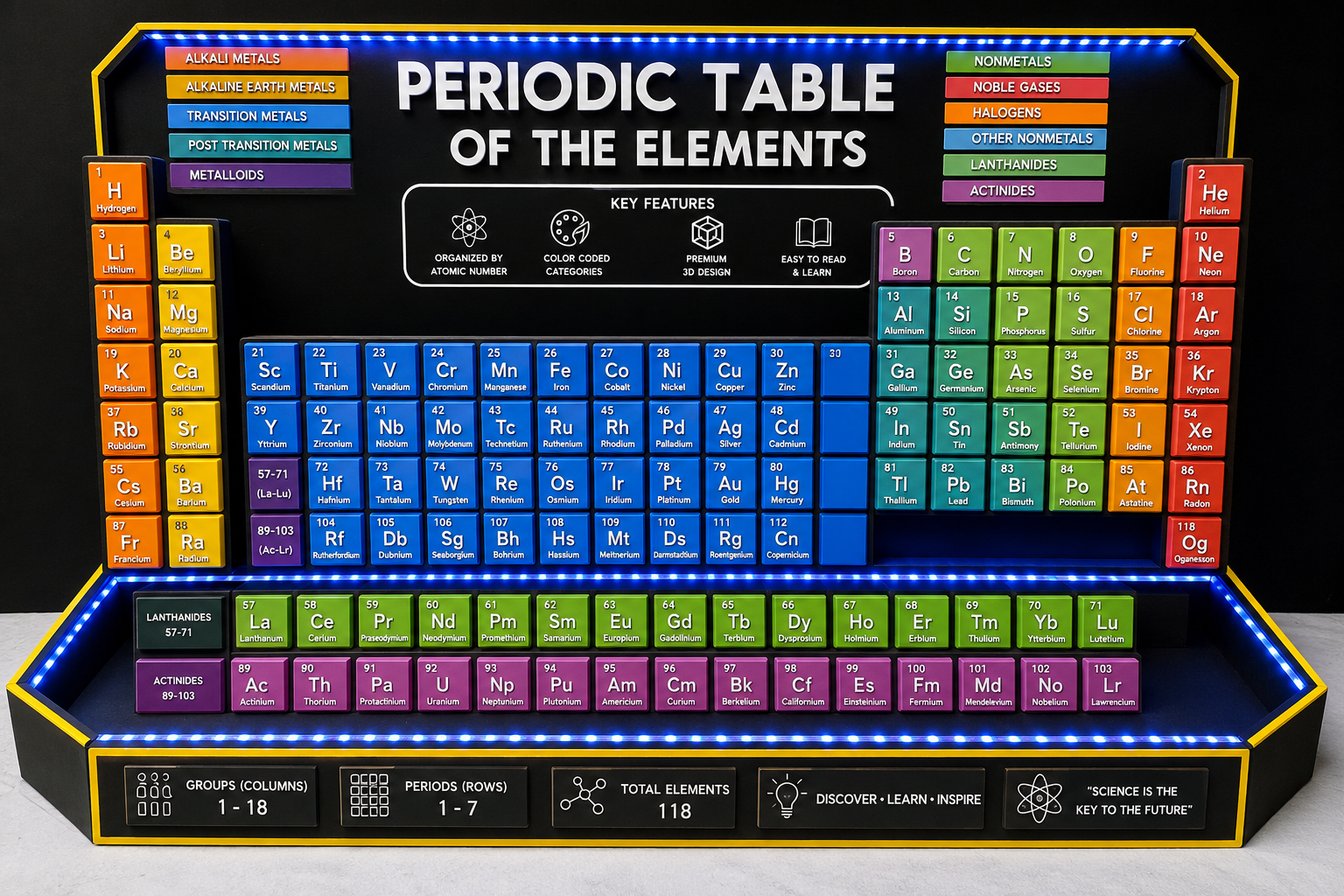
Model Design

The model consists of:

Upper Section

  • Large periodic table poster
  • Embedded LEDs beneath elements

Middle Section

  • Trend selection buttons

Lower Section

  • Arduino and control circuit

https://images.openai.com/static-rsc-4/1bQiPHHQxCW4GaxEjXF55yZS6D527u9FX2RD8FMCbIJjFt10S98CQruCS8TUiceE7lzzhImCH8zO0oOmlvvLARDrowoYEDjqblOzQU0RBnOazEo9qmZIxSOXcIdgMNJ19YHLipCPUqvS659Yybge8hE77TnwhLeavsv4WI5hLFvmF5Bdi7ka0YixqS-u6wIt?purpose=fullsize
https://images.openai.com/static-rsc-4/Qj--U_mjfGwbcvmxaEjRq5Du-Z_PZ-jdDREoxTgVLsQWX4UjTHAuTj5njvRkqWXU9bTV4KIbhEyOpUIjZYeuKiMFfNG_3AvsueKHBgYaa99dwtD458KU15z9I2mxFk5wLdqMEsUAu3YDzZWw3NIIC-qn8ZBPKivVN6iiXLsZAiXjps3iAhehCA-TmZ2lPzeF?purpose=fullsize
https://images.openai.com/static-rsc-4/qt31NFpvvkpx8OusQ86cb-dPSUCIfqiqzVFxvtWUszCTvFwl1PS6l9OS8950DTPOqIssyXOuk2PqeUrlJirwXV1TVoc7Axzsl1YzTDmBrSBwcqK1uRp14DkmI7Bw9ILSRvcLZxhbWgBuwb_B0cL2aec6D8IuGS4mz1eBCJqpkTTE2TEXH0SMuR-OeLQMiqFC?purpose=fullsize

Block Diagram

Push Buttons
       ↓
Arduino Uno
       ↓
OLED Display
       ↓
LED Matrix
       ↓
Buzzer

Circuit Diagram Connections

Push Buttons

  • Atomic Radius → D2
  • Electronegativity → D3
  • Ionization Energy → D4
  • Metallic Character → D5

OLED Display

  • SDA → A4
  • SCL → A5

Buzzer

  • Positive → D6

https://images.openai.com/static-rsc-4/_huk9XJwAFxOBfy3zXm-2v0epG7CMV658bKiXwKEOkOsQgM-pewTJnX1GSB9-vTI8RFJqsieXHB-eAR9nBsGYZMTswcUDhFP21NoHMKQIb1B7PHFC18860rHk8uqd3AJwkGYmicp1_CJWVzmNAQfVkV4NqScdX7h0DMLqnv2Yk_o4Uhl-QWc2nlzM2fDttNN?purpose=fullsize
https://images.openai.com/static-rsc-4/pfkDlK3CSKxZEHVgPrpg0pq4t-Aa6T-jsKhdxl-HauX5RvU6Rh2csE4ZZgV3GWYkPNkPWpLsKOMmyizYIexzqZorjoRq1mftDzjap5NlJc7QrGTQKLarZT1Q0pLIFIDKI_0ndDE_GwoNma2IwB6gwcJSaIffpGdEtEhpXJrthdjTY6sNBgujO-cBnCbIrH0L?purpose=fullsize
https://images.openai.com/static-rsc-4/vfUwdytvNKFNOHBkkjdpjN-w24115K_UFdZw9wWb5mvXn7llGcIRjCiqfPFaTtsNWlV2QcCqOAmSxEZ_43O0pNjvnOIr8LBluYUg8SQj1T4dDV-OSD-EKFT-RFi_ZiUQYhVKXGyJuZ7GJGa1ouiH3ZntIDADjCLbCOOefxHChcAAK7dvA20-j5vfgkpdSw8E?purpose=fullsize

Step-by-Step Guide

Step 1: Construct the Board

Prepare an acrylic or wooden board.

Print and mount the periodic table.


Step 2: Install LEDs

Place LEDs under each element.

Use colours to distinguish categories.


Step 3: Install Buttons

Create buttons for:

  • Atomic Radius
  • Electronegativity
  • Ionization Energy
  • Metallic Character

Step 4: Upload Arduino Program

The Arduino should:

  • Detect selected trend.
  • Activate LED animations.
  • Display explanations.

Working Principle


1. Atomic Radius Trend

When the Atomic Radius button is pressed:

LEDs illuminate showing:

Trend:

Increases ↓
Decreases →

Students observe:

  • Atomic radius increases down groups.
  • Atomic radius decreases across periods.

2. Electronegativity Trend

When selected:

Increases ↑ →

LEDs move towards Fluorine.


3. Ionization Energy Trend

LED animations show:

Increases ↑ →

4. Metallic Character Trend

LEDs indicate:

Increases ↓ ←

Example OLED Display

PERIODIC TREND

Atomic Radius

Increase:
↓ Down Group

Decrease:
→ Across Period

System Flowchart

START
   ↓
Wait for Button Press
   ↓
Which Trend Selected?
   ↓
Activate LEDs
   ↓
Display Explanation
   ↓
Sound Buzzer
   ↓
Repeat

https://images.openai.com/static-rsc-4/Cxo7u5yXyBMA93gmxjDLgIFrx-9Bdp6qMnJlVb0Puts-xfXLsIuVnZ6dg-Kr_ZymQOlvL6T9OojVR9DEOEVpjlf5VJgRgFAiHohk_ZfrXniFewxKdasldeSjCEGActRw6rY5rMBhYj7_NS7fTmmgCkzSWc0HM3gPerT5Tmgws2-4s3v5cs_cpaUsmad54f-r?purpose=fullsize
https://images.openai.com/static-rsc-4/aI0xzthHIBCNy6FwthNQPzR_d7Hu87S-dFzjBsSelTyqAzuCeAWAsgvwyRioPizWKc4UW6QWMniVDRfaRtakiFrDDTjqkZvYxNU002XwVvsbEug1XNohfCYL_M1VyU7vtta_PR8pBPyrwDOHv7gqNJUv2HT9URc-ESJ3tmWINuFHWbFLEU8kNhcQat0k_Z_O?purpose=fullsize
https://images.openai.com/static-rsc-4/_ue68QDdrgE0dZ6dnOa60QEAi_KTxmCBYnRb0gSJ7fDTc_y5q6cadEd8f1nUwDMwLVZjeomUphhtEDnMmXU1R-lnkd55Xz80HGSRreMF_3ESSYJJWah999L_2RtbIirtwW2VuId8uqRdtP3h1CWZKPD9K5Uuzj2cQbGNKOJDL0Fy1U6gcVxuEzyqg9p7bxAE?purpose=fullsize

Chemistry Concepts Demonstrated

Periodic Trends Covered

✅ Atomic Radius

✅ Electronegativity

✅ Ionization Energy

✅ Electron Affinity

✅ Metallic Character

✅ Reactivity Trends


Applications

This project can be used in:

  • Schools
  • Chemistry laboratories
  • Science exhibitions
  • Museums
  • Smart classrooms

Advantages

✔ Makes learning easier.

✔ Attractive visual representation.

✔ Interactive.

✔ Encourages self-learning.

✔ Supports competency-based learning.


Future Improvements

You can improve this project by adding:

Voice Module

Explain trends verbally.

ESP32 Mobile Application

Control using smartphones.

Artificial Intelligence

Ask questions and receive explanations.

Holographic Atoms

Display atomic structures.

Quiz Mode

Students answer chemistry questions.


How to Fix Common Arduino Upload Errors

Error: Board Not Uploading

Solutions

  • Verify COM port.
  • Replace USB cable.
  • Install drivers.

Error: LEDs Not Working

Solutions

  • Check polarity.
  • Verify resistor values.

Error: OLED Not Displaying

Solutions

  • Verify SDA/SCL connections.
  • Check I2C address.

Real Project Prototype

https://images.openai.com/static-rsc-4/hh0AVfR99o9lc1F8un1XctZTdsIXMg3f5MggmPdmkWPrfJNo1-3LZDGqwQLsbqH5sCY2JYeYN_6LTgBDnEWmJFUZrNs1pZPpFrf2_pnAKQkcRUWUfu-k7_5xtMFAWNP9_0dU1XPzDkOti7R1-uHNcyhen8xi-9Cf53WGmYPXcwEaJcD6vzN8r0uswlMj2Dud?purpose=fullsize
https://images.openai.com/static-rsc-4/ZuDW1YOj3TaiZTvSwt2BshuPxGT3ZD_kP8D0B6g3eybb7q8k0YZfAmbV6j9OrrANSblSqRADXpHiniiPy_ff8rEac1m5RWMd1AVS6-6lX82CREBHb_HKMqPRh7xbAa3kCBHfZgOGB9UVDVw3P13bw8EBUKHGxet8c1V2T803q1vtEdV2K7OPd2UZOOK4tmC0?purpose=fullsize

Featured Images Required for Blog

1. Components Image

  • Arduino Uno
  • RGB LEDs
  • OLED Display
  • Push Buttons
  • Resistors

2. Features Illustration

  • Interactive trend selection
  • LED animations
  • OLED explanations

3. Block Diagram

Buttons → Arduino → LEDs → Display

4. Working Principle Diagram

Button Selection → Trend Animation → Explanation

5. Circuit Diagram

Complete Arduino wiring layout.

6. Flowchart

System operation process.

7. Real Prototype Image

Fully assembled Periodic Trends LED Board.


Final Thoughts

Learning how to make a Periodic Trends LED Board is one of the best Grade 10 Chemistry STEM projects.

By combining Chemistry, Arduino, ICT, and Engineering, students can transform abstract periodic trends into an engaging visual learning experience.

mbeva

Dominic Mbeva is a science teacher, experienced researcher, innovator, and creative technologist with expertise in STEM education, digital media, and scientific research. As a Kenya Science and Engineering Fair (KSEF) advisor and projects manager, he mentors young scientists, guiding them in developing award-winning innovations. He is also an IC Technorat, leading advancements in science and technology. Beyond education, Dominic is a skilled photographer and video editor, using visual storytelling to make science more engaging. His philosophy, “If you take care of minutes, hours will take care of themselves,” reflects his belief in consistent effort, strategic thinking, and innovation to drive success in both research and creativity.

Related Posts

How to Make a Smart Periodic Table Model Using Arduino and ESP32

Meta Title: How to Make a Smart Periodic Table Model Using Arduino, ESP32, LEDs and IoT Meta Description: Learn how to make a Smart Periodic Table Model using Arduino and…

Read more

How to Make an Automatic Livestock Watering System

Meta Title: How to Make an Automatic Livestock Watering System Using ESP32 and IoT Meta Description: Learn how to build an Automatic Livestock Watering System using ESP32, water level sensors,…

Read more

Leave a Reply

Your email address will not be published. Required fields are marked *