mbeva
mbeva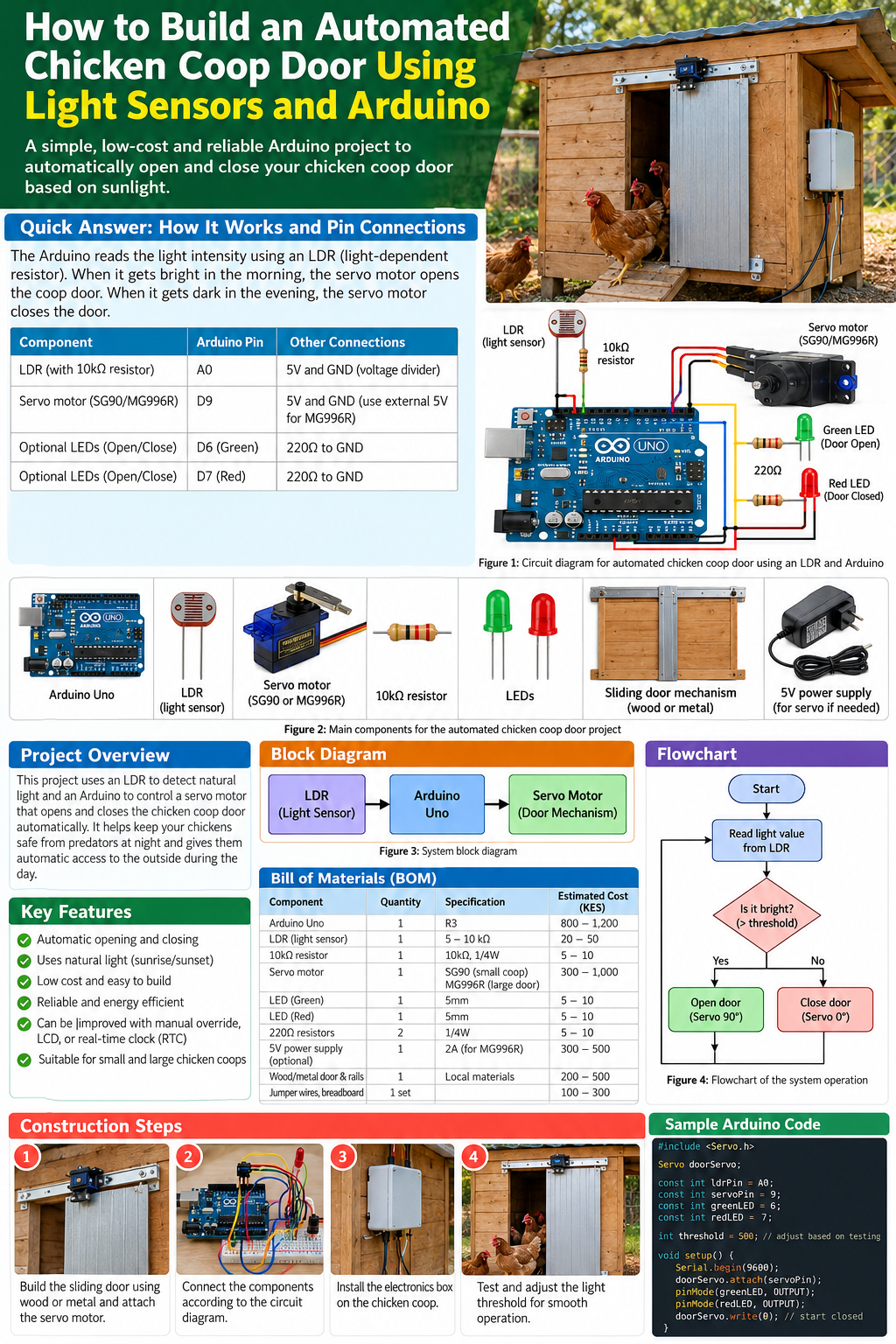
An automatic chicken coop door can save time, simplify poultry management, and help protect chickens by closing the entrance after dark. In this project, an Arduino Uno reads a light-dependent resistor (LDR) and controls a motorized door according to the surrounding light level.
The guide below includes the circuit connections, system diagrams, bill of materials, estimated costs in Kenyan shillings, complete Arduino code, construction instructions, testing procedures, and practical safety improvements..
1. Introduction
Poultry farmers need to protect chickens from predators while ensuring birds can access their coop during the day. Manually opening and closing a door every morning and evening can be inconvenient, particularly on larger farms or when the farmer is away.
An automated chicken coop door solves this problem by using a light sensor to detect changes in daylight and a microcontroller to operate the door.
This project combines:
- Electronics: LDR sensors, resistors, LEDs, and a microcontroller.
- Programming: Arduino code that interprets light readings and controls a motor.
- Mechanical engineering: A sliding door, rails, and a linkage.
- Agricultural technology: Automation to support poultry management.
The prototype is suitable for STEM learners, science fair projects, hobbyists, and small-scale farmers. However, a demonstration circuit must be upgraded with appropriate mechanical safety controls before it is used with live poultry.
2. Project objectives
The main objective is to design and build a light-sensitive automatic chicken coop door.
Specific objectives are to:
- Detect changes in natural light using an LDR.
- Process the sensor readings using an Arduino Uno.
- Open the door when the light level rises above a chosen threshold.
- Close the door when the light level falls below a separate threshold.
- Use LEDs to indicate the commanded door state.
- Evaluate the system’s response to changing light conditions.
- Identify improvements needed for reliable, safe poultry-farm operation.
3. How the system works
The system operates through four stages.
1. Natural light
Daylight changes throughout the day
2. LDR sensor
Converts light changes into a voltage change
3. Arduino Uno
Reads the sensor and applies threshold logic
4. Motor and door
Moves the door to the commanded position
Figure 2: System block diagram showing the relationship between daylight, sensing, control, and movement.
In the morning, the LDR reading should rise as the environment becomes brighter. When the reading reaches the opening threshold, the Arduino commands the motor to open the door. In the evening, the reading falls. Once it reaches the lower closing threshold, the controller commands the door to close.
The use of two thresholds is called hysteresis. It reduces unnecessary switching when the light level fluctuates near the decision point.
4. Bill of materials (BOM)
The following estimates are for a small demonstration prototype in Kenya. Actual prices depend on supplier, component quality, and availability.
| Component | Quantity | Specification or purpose | Estimated cost (KES) |
|---|---|---|---|
| Arduino Uno R3 or compatible board | 1 | Main controller | 800–1,500 |
| LDR light sensor | 1 | Detects ambient light | 20–50 |
| 10 kΩ resistor | 1 | LDR voltage divider | 5–20 |
| SG90 servo motor | 1 | Moves a lightweight model door | 300–600 |
| Breadboard | 1 | Prototyping circuit | 100–200 |
| Jumper wires | 1 set | Electrical connections | 50–200 |
| Green LED | 1 | Indicates open command | 5–10 |
| Red LED | 1 | Indicates closed command | 5–10 |
| 220 Ω resistors | 2 | Limit LED current | 5–20 |
| Small door and rails | 1 set | Mechanical assembly | 200–600 |
| Regulated 5V supply | 1 | External servo supply if required | 300–700 |
| Weather-resistant enclosure | 1 | Protects electronics | 200–500 |
Estimated prototype budget: approximately KES 1,985–4,410. The total is indicative and excludes labour, delivery, and any larger motor or safety-control hardware.
Selecting the correct motor
The SG90 servo is intended for a small, lightweight model. A larger servo, such as an MG996R, may suit a heavier demonstration mechanism if its torque and power requirements are satisfied. A full-size coop door will often need a geared DC motor or linear actuator with a suitable driver and end-position controls.
Choose the actuator based on the actual door weight, friction, travel, and required force rather than choosing by size alone.
5. Circuit diagram and electrical connections
The LDR does not connect to the Arduino as a simple digital switch. It must be part of a voltage-divider circuit so the Arduino can measure a changing voltage on analog input A0.
LDR voltage-divider wiring
Arduino 5V
LDR
Junction → Arduino A0
10 kΩ resistor
Arduino GND
Figure 3: LDR voltage-divider diagram. With this arrangement, the A0 reading generally increases as light increases.
Full pin-connection table
| Component | Arduino pin | Connection details |
|---|---|---|
| LDR voltage-divider junction | A0 | Junction between LDR and 10 kΩ resistor |
| LDR | 5V and A0 | One leg to 5V, the other to A0 |
| 10 kΩ resistor | A0 and GND | One end at A0, other end at GND |
| Servo signal | D9 | Usually yellow, orange, or white wire |
| Servo positive supply | Regulated supply | Follow the servo’s voltage and current requirements |
| Servo ground | GND | Join supply ground to Arduino GND |
| Green LED anode | D6 through 220 Ω | LED cathode to GND |
| Red LED anode | D7 through 220 Ω | LED cathode to GND |
Servo power and safety
Do not assume the Arduino’s 5V pin can provide enough current for a servo under load. Use a suitably rated regulated supply if necessary, and connect the external supply ground to Arduino GND.
Never connect separate positive power supplies together unless the circuit design explicitly allows it. Check polarity before applying power.
The LEDs indicate the commanded state, not proof that the physical door has reached its final position. Use limit switches or other suitable position feedback for a practical installation.
6. Complete Arduino program
This program uses the standard Arduino Servo library. It reads the LDR, opens the door when the reading is high enough, and closes it when the reading falls below a lower threshold.
#include <Servo.h>

Servo doorServo;

// Hardware pins
const int ldrPin = A0;
const int servoPin = 9;
const int greenLED = 6;
const int redLED = 7;

// Example thresholds: calibrate for your own circuit
const int openThreshold = 600;
const int closeThreshold = 450;

// Adjust these angles for your linkage
const int closedPosition = 0;
const int openPosition = 90;

bool doorOpen = false;

void setDoor(bool open) {
  doorOpen = open;

  if (doorOpen) {
    doorServo.write(openPosition);
    digitalWrite(greenLED, HIGH);
    digitalWrite(redLED, LOW);
    Serial.println("Door commanded OPEN");
  } else {
    doorServo.write(closedPosition);
    digitalWrite(greenLED, LOW);
    digitalWrite(redLED, HIGH);
    Serial.println("Door commanded CLOSED");
  }
}

void setup() {
  Serial.begin(9600);

  pinMode(greenLED, OUTPUT);
  pinMode(redLED, OUTPUT);

  doorServo.attach(servoPin);
  setDoor(false);
  delay(1000);
}

void loop() {
  int lightValue = analogRead(ldrPin);

  Serial.print("Light reading: ");
  Serial.println(lightValue);

  if (!doorOpen && lightValue >= openThreshold) {
    setDoor(true);
  }
  else if (doorOpen && lightValue <= closeThreshold) {
    setDoor(false);
  }

  delay(1000);
}
How the code works
analogRead(A0)measures the voltage from the LDR circuit.openThresholddefines the reading at which the door should open.closeThresholddefines the lower reading at which it should close.doorServo.write(90)commands the servo to its configured open position.doorServo.write(0)commands it to its configured closed position.- The
doorOpenvariable prevents repeated commands while the reading stays within the hysteresis range. - The LEDs display the controller’s commanded state.
The example thresholds of 600 and 450 are not universal values. Sensor type, resistor value, light conditions, and wiring all affect the readings.
Safety limitation: This program does not detect a trapped chicken, confirm that the door physically moved, or guarantee a safe position after a power failure. It is a starting point for a prototype, not a complete safety controller.
7. Construction and assembly


12
Figure 4: Examples of the mechanical door, electronic prototype, protective enclosure, and finished installation.
Step 1: Build the door
Make a lightweight sliding door using wood or plastic. Fit rails or guides that keep the door aligned and allow it to move without sticking. Smooth rough edges and eliminate sharp protrusions.
Step 2: Assemble the sensor circuit
Connect the LDR and 10 kΩ resistor as shown in the voltage-divider diagram. Connect the junction to A0 and check the circuit before powering the board.
Step 3: Connect the servo
Connect the signal wire to D9. Supply the servo with the correct voltage and adequate current. Test its direction and movement before attaching it to the door.
Step 4: Attach the mechanical linkage
Connect the servo arm to the door using a linkage suitable for the required travel. Ensure the mechanism does not force the servo against its mechanical limits.
Step 5: Protect the electronics
Mount the Arduino, breadboard or permanent circuit, and connections inside a suitable enclosure. Keep them protected from rain, dust, pecking, and accidental contact with the moving door.
Step 6: Calibrate and test
Upload the program, open the Serial Monitor at 9600 baud, and record readings under different lighting conditions. Adjust the thresholds and servo angles as necessary.
Do not install the unprotected prototype in a working coop until the mechanical movement and safety features have been tested.
8. Flowchart of the control system
Start
Read LDR value from A0
Is the door closed and light at or above the opening threshold?
Yes
Command door open
No
If door is open and light is low, command close
Wait and repeat
Figure 5: Simplified control flow. A production-ready system also needs position monitoring, obstruction detection, and fault handling.
9. Testing, calibration, and expected results
Testing should establish whether the sensor readings and motor commands behave as expected under different lighting conditions.
Testing procedure
- Power the Arduino and open the Serial Monitor at 9600 baud.
- Record the LDR reading in bright daylight.
- Shade the sensor gradually and observe how the readings change.
- Adjust the opening threshold to suit the measured bright-light readings.
- Adjust the closing threshold to suit the measured low-light readings.
- Test the door repeatedly without chickens near the mechanism.
- Verify the direction of travel, linkage, and end positions before proceeding to a protected installation.
Illustrative results table
| Test condition | Example LDR reading | Expected action |
|---|---|---|
| Bright morning light | 700–950 | Open door if currently closed |
| Moderate or cloudy light | 500–700 | Depends on current state and threshold |
| Low evening light | 300–450 | Close door if currently open |
| Darkness | 0–300 | Remain closed |
These values are illustrative only, not actual experimental measurements. Your results will depend on the sensor, resistor, environment, and circuit arrangement.
Troubleshooting common operating problems
| Problem | Possible cause | Recommended solution |
|---|---|---|
| Door opens at night | Threshold or sensor wiring is incorrect | Check the voltage divider and calibrate readings |
| Door never opens | Threshold is too high or sensor is disconnected | Check A0 readings and wiring |
| Door repeatedly changes state | Threshold is too sensitive | Increase the gap between opening and closing thresholds |
| Servo jitters or resets Arduino | Power supply is inadequate | Use a suitable regulated external servo supply |
| Door stops before opening fully | Incorrect servo angle or mechanical binding | Adjust the linkage and verify free movement |
| Door closes on an obstruction | No obstruction-detection mechanism | Add appropriate safety sensing and motor control |
| Door state is uncertain after power loss | No position feedback | Add limit switches and a recovery procedure |
10. Safety improvements for real poultry farms
An automatic door must not compromise the welfare of the birds it is intended to protect. Light detection alone cannot tell whether a chicken is standing in the doorway.

Figure 6: A practical installation should protect the electronics and provide a reliable door mechanism with safety controls.
Recommended upgrades include:
- Limit switches: Detect the fully open and fully closed positions.
- Obstruction detection: Stop or reverse movement when an animal or object blocks the door, using a suitable sensor or force/current-monitoring system.
- Manual override: Allow the door to be opened or closed if the electronics fail.
- Power backup: Provide a suitable battery or alternative supply where reliable operation during outages is important.
- Fault handling: Detect implausible sensor readings, disconnected sensors, and motor failures.
- Weather protection: Protect the electronics and moving parts against moisture, dust, corrosion, and pecking.
- Routine inspection: Check that the door moves freely and cannot trap or injure birds.
For a full-size door, use a properly rated geared motor or linear actuator with a suitable driver, mechanical stops, and safety controls. Do not rely on a small hobby servo for a heavy door.
11. Applications and future improvements
The project can be adapted for:
- Small-scale poultry farms and backyard chicken coops.
- School STEM exhibitions and science fairs.
- Agricultural technology demonstrations.
- Remote poultry-house monitoring.
- Smart-farming systems with temperature and humidity sensors.
- Solar-powered poultry automation.
- Timer-controlled systems using a real-time clock (RTC).
An ESP32 could add wireless monitoring and notifications, while a real-time clock could provide scheduled opening and closing as an alternative to light-based control. These upgrades require appropriate power design, software, and additional testing.
12. Frequently asked questions
Can I use an ESP32 instead of an Arduino Uno?
Yes. An ESP32 can implement similar logic and offer wireless connectivity. However, its inputs generally use 3.3V logic, so the sensor circuit must not exceed the board’s permitted input voltage.
Can the system work without sunlight?
The system responds to the light level rather than detecting sunrise or sunset directly. Artificial lighting, shadows, and cloudy conditions may affect operation. A real-time clock is useful if a more predictable schedule is needed.
Can an SG90 servo open a full-size chicken door?
Usually not. It is intended for small, lightweight mechanisms. Select an actuator based on the door’s weight, friction, required force, and travel.
What happens if power fails?
The result depends on the mechanism. The door may remain in its current position or become difficult to move. A suitable manual release, backup supply, and safe failure procedure are important for a working installation.
How much does the project cost?
A basic prototype may cost around KES 2,000–4,500 using the estimates in this guide. A durable installation with a suitable motor, limit switches, obstruction protection, enclosure, and backup power will cost more.
Is the project suitable for a school science exhibition?
Yes. It demonstrates sensor input, conditional programming, actuator control, circuit construction, and agricultural problem-solving. Students can investigate how changing the light threshold affects operation and record their observations.
13. Conclusion
An automated chicken coop door using light sensors and Arduino is a useful introduction to practical electronics and smart poultry farming. The prototype combines an LDR, an Arduino Uno, and a motorized door to automate opening and closing in response to changes in daylight.
For a successful project, build the mechanism carefully, verify the wiring, calibrate the sensor, and test the program before deployment. For use with live poultry, add position feedback, obstruction protection, a manual release, suitable weatherproofing, and a reliable power arrangement.
The project can be expanded into a more advanced agricultural automation system using an ESP32, a real-time clock, solar power, or remote monitoring.
How to Fix Common Arduino/ESP32 Upload Errors
| Error or problem | Likely cause | Solution |
|---|---|---|
| Board not detected | Incorrect board selection or USB issue | Select Arduino Uno or the correct ESP32 board and reconnect USB |
| COM port missing | Driver or cable problem | Try a data-capable USB cable and check the operating system’s port list |
Servo.h not found | Library unavailable | Install the standard Servo library through Library Manager |
avrdude: stk500_recv() | Upload communication failure | Check board, port, cable, and serial applications |
| ESP32 fails to upload | Incorrect board configuration or boot mode | Check the selected board and follow the board’s upload procedure |
| Code compiles but servo does not move | Incorrect wiring or inadequate power | Verify signal, ground, and servo supply |
| Arduino resets during movement | Excessive servo current | Use a suitably rated external regulated supply with common ground |
| Door moves in the wrong direction | Incorrect linkage or servo angle | Adjust the linkage or reverse the programmed positions |
| Sensor reading is constant | Incorrect voltage divider or disconnected sensor | Check the LDR, resistor, power, ground, and A0 connection |