mbeva
mbeva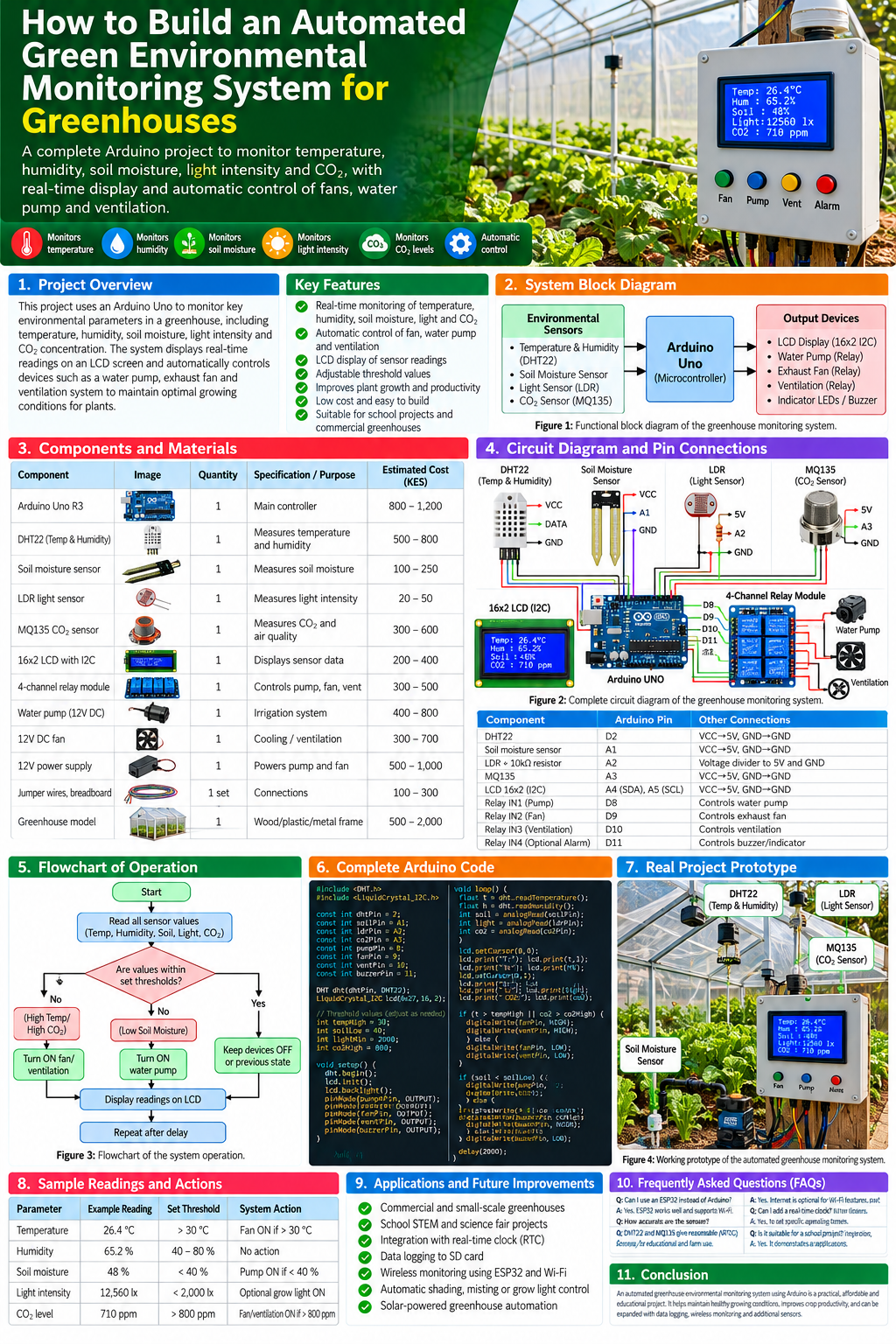
Meta description: Learn how to build an automated greenhouse monitoring system using Arduino or ESP32 to measure temperature, humidity, soil moisture, light, and CO₂, with sensor wiring, code, costs, and automation.
1. Introduction
Greenhouses help farmers control growing conditions, protect crops from harsh weather, and extend production seasons. However, temperature, humidity, soil moisture, light intensity, and carbon dioxide levels can change throughout the day. If these conditions are not monitored, plants may experience heat stress, inadequate irrigation, excessive humidity, or poor growing conditions.
An automated green environmental monitoring system for greenhouses uses electronic sensors and a microcontroller to measure these conditions and help maintain a suitable environment for plant growth.
In this project, an Arduino Uno collects environmental readings, displays them on an LCD, and controls devices such as a water pump and ventilation fan according to adjustable thresholds. An ESP32 can be used instead when wireless monitoring is required.
The system is suitable for school STEM projects, agricultural research, greenhouse demonstrations, and small-scale farming.
2. Project objectives
The main objective is to design and develop an automated environmental monitoring system for greenhouse applications.
The specific objectives are to:
- Measure temperature and relative humidity.
- Monitor soil moisture and light intensity.
- Measure carbon dioxide concentration using a suitable CO₂ sensor.
- Display sensor readings on an LCD.
- Automate irrigation and ventilation using preset thresholds.
- Evaluate sensor readings under different greenhouse conditions.
- Identify improvements for reliable, energy-efficient greenhouse management.
3. How the system works
The system has three main stages: sensing, processing, and control.
Greenhouse environment
Temperature, humidity, soil moisture, light and CO₂
Environmental sensors
Convert environmental conditions into electrical readings
Arduino Uno or ESP32
Reads data and compares values with thresholds
Display and control outputs
LCD, irrigation pump, ventilation fan and alarm
Figure 2: Functional block diagram of the greenhouse environmental monitoring system.
For example, when the soil moisture reading indicates that the soil is too dry, the controller can activate an irrigation pump. When the temperature rises above a configured limit, it can activate an exhaust fan. Sensor readings are displayed so the farmer can inspect conditions and adjust the thresholds.
The system should not treat all sensor values as interchangeable. Each sensor measures a different parameter and requires its own calibration and suitable operating limits.
4. Components and bill of materials (BOM)
The following list describes a practical prototype using an Arduino Uno. Costs are indicative estimates in Kenyan shillings (KES), not verified current supplier prices.
| Component | Quantity | Function | Estimated cost (KES) |
|---|---|---|---|
| Arduino Uno R3 or compatible | 1 | Main controller | 800–1,500 |
| DHT22 temperature and humidity sensor | 1 | Measures temperature and relative humidity | 500–800 |
| Capacitive soil moisture sensor | 1 | Estimates soil moisture | 150–400 |
| LDR light sensor | 1 | Measures relative light level | 20–50 |
| 10 kΩ resistor | 1 | LDR voltage divider | 5–20 |
| MQ-135 gas sensor module | 1 | General air-quality response; requires calibration | 300–600 |
| 16×2 LCD with I²C adapter | 1 | Displays readings | 200–400 |
| 4-channel relay module | 1 | Switches compatible output devices | 300–500 |
| DC water pump | 1 | Automated irrigation | 400–800 |
| DC exhaust fan | 1 | Greenhouse ventilation | 300–700 |
| Regulated power supplies | As needed | Power controller and loads | 500–1,500 |
| Breadboard and jumper wires | 1 set | Circuit connections | 100–300 |
| Tubing, enclosure and mounting materials | 1 set | Water delivery and protection | 300–1,000 |
Estimated total: approximately KES 3,875–8,570, depending on components and power arrangements. A complete installation may cost more after adding wiring, protective enclosures, plumbing, and safety controls.
Why these components are used


Figure 3: Representative sensors and electronic modules for a greenhouse monitoring prototype.
- DHT22: Measures air temperature and relative humidity.
- Capacitive soil moisture sensor: Estimates soil moisture without the exposed conductive tracks found on many resistive probes.
- LDR: Measures relative brightness; it is not a calibrated light meter.
- MQ-135: Responds to several gases and air-quality influences. It is not a selective, calibrated CO₂ instrument.
- LCD: Displays readings locally.
- Relay module: Switches compatible pumps, fans, or other loads through appropriately designed electrical circuits.
Important CO₂ note: If accurate carbon dioxide concentration is required, use a calibrated NDIR CO₂ sensor. The MQ-135 is better treated as a general gas-response sensor unless you have a validated calibration method for the target gas and operating conditions.
5. Circuit diagram and Arduino pin connections
The connections below use an Arduino Uno, a DHT22, analog sensors, an I²C LCD, and a relay module. Check each module’s voltage requirements before wiring.
Pin-connection table
| Component | Arduino pin | Connection |
|---|---|---|
| DHT22 data | D2 | Sensor data signal |
| Soil moisture sensor output | A1 | Analog output |
| LDR voltage-divider output | A2 | Analog output |
| MQ-135 analog output | A3 | Confirm output voltage compatibility |
| I²C LCD SDA | A4 | I²C data |
| I²C LCD SCL | A5 | I²C clock |
| Relay 1 input | D8 | Irrigation pump control |
| Relay 2 input | D9 | Ventilation fan control |
| Relay 3 input | D10 | Optional light or additional device |
| Sensor power | 5V or compatible supply | Follow each module’s specifications |
| Sensor ground | GND | Common ground where required |
The fourth relay channel can be reserved for an alarm or another output, but assign it a separate pin if you use it in the program.
Sensor wiring details
DHT22: Connect VCC to the correct supply, GND to ground, and DATA to D2. A bare DHT22 generally needs a pull-up resistor between DATA and VCC; many breakout modules already include one.
Soil moisture sensor: Connect VCC and GND according to the module specification, and its analog output to A1. Calibrate the reading in the soil or growing medium you actually use.
LDR: Use a voltage divider with a fixed resistor. For example, connect 5V to the LDR, the LDR junction to A2, and a 10 kΩ resistor from A2 to GND. This arrangement generally produces higher readings in brighter light.
MQ-135: Connect the module’s analog output to A3 only if its output voltage stays within the Arduino’s permitted input range. Some modules operate at 5V and can produce analog voltages unsuitable for a 3.3V controller without level adaptation.
I²C LCD: Connect SDA to A4 and SCL to A5 on the classic Uno. The LCD address is commonly 0x27 or 0x3F, but confirm the address of your particular module.
Wiring diagram
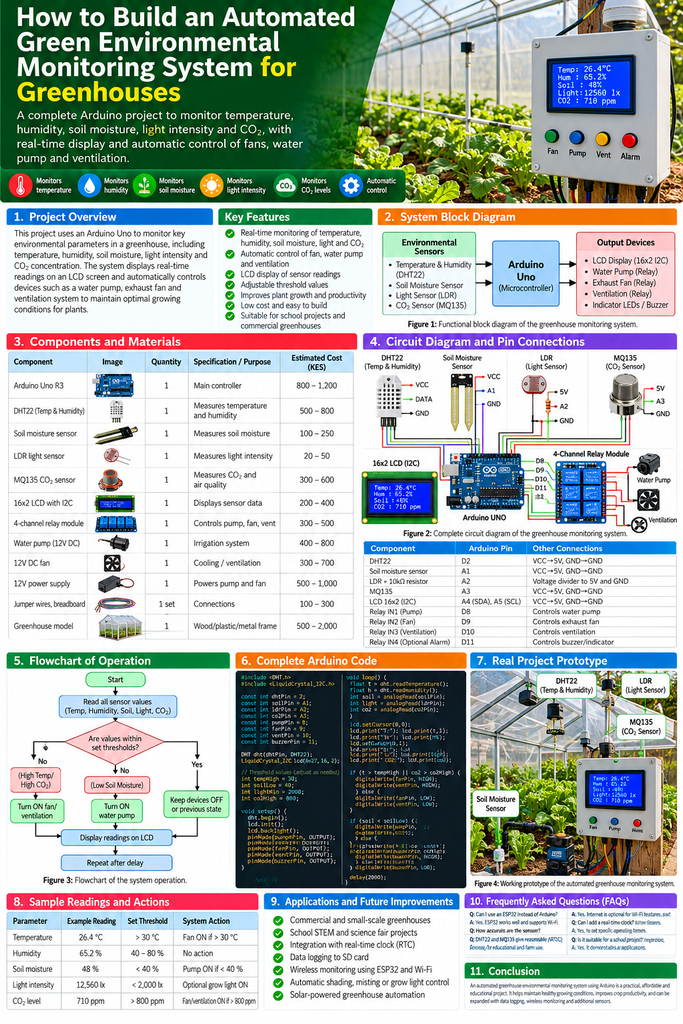
Figure 4: Use the pin-connection table above as the wiring reference. The infographic is a conceptual overview; verify all connections against the actual module pinouts.
Electrical safety
- Do not power a pump or fan directly from an Arduino GPIO pin.
- Use a relay or suitable driver rated for the load’s voltage and current.
- Use a correctly rated, regulated supply for motors and pumps.
- Keep mains-voltage wiring isolated and enclosed; have it installed by a qualified person.
- Protect the electronics from water, condensation, fertilizer, and corrosion.
- Avoid powering a motor and sensitive sensors from an overloaded supply.
- Ensure all low-voltage control grounds are connected appropriately for the chosen driver design.
6. Working principle of the greenhouse system
The system repeatedly reads environmental values, compares them with preset thresholds, updates the LCD, and switches outputs when required.
For example:
- The DHT22 measures air temperature and relative humidity.
- The soil moisture sensor produces a reading representing the growing medium’s moisture.
- The LDR measures relative brightness.
- The gas sensor provides an analog response associated with the surrounding air.
- The Arduino processes the readings and checks which thresholds have been crossed.
- The LCD displays the measurements.
- The controller activates the irrigation pump or fan as programmed.
Start and initialize sensors
Read temperature, humidity, soil moisture, light and gas response
Compare readings with calibrated thresholds
Too hot
Run fan
Soil too dry
Run pump
Display readings and repeat
Figure 5: Simplified control flow. A robust system should also handle sensor errors, relay faults, and pump run-time limits.
7. Complete Arduino code
This example uses the DHT22, soil moisture sensor, LDR, MQ-135 analog response, I²C LCD, and two relay outputs. It provides a starting point for a prototype, not a validated commercial greenhouse controller.
Install the DHT sensor library and LiquidCrystal I2C library through the Arduino IDE Library Manager. Depending on the LCD library version, the initialization syntax may differ.
#include <DHT.h>
#include <Wire.h>
#include <LiquidCrystal_I2C.h>

// Sensor pins
#define DHTPIN 2
#define DHTTYPE DHT22

const int soilPin = A1;
const int lightPin = A2;
const int gasPin = A3;

// Relay input pins
const int pumpRelay = 8;
const int fanRelay = 9;

// Set to match your relay module.
// Many relay modules are active LOW.
const int RELAY_ON = LOW;
const int RELAY_OFF = HIGH;

DHT dht(DHTPIN, DHTTYPE);
LiquidCrystal_I2C lcd(0x27, 16, 2);

// Example thresholds; calibrate before use
const int soilDryThreshold = 400;
const int lowLightThreshold = 300;
const float highTempThreshold = 30.0;

// Limit each pump activation to reduce flooding risk
const unsigned long pumpRunMs = 5000;
unsigned long pumpStartedAt = 0;
bool pumpRunning = false;

void setRelay(int pin, bool on) {
  digitalWrite(pin, on ? RELAY_ON : RELAY_OFF);
}

void setup() {
  Serial.begin(9600);

  pinMode(pumpRelay, OUTPUT);
  pinMode(fanRelay, OUTPUT);

  // Default to OFF during startup
  setRelay(pumpRelay, false);
  setRelay(fanRelay, false);

  dht.begin();
  lcd.init();
  lcd.backlight();

  lcd.setCursor(0, 0);
  lcd.print("Greenhouse");
  lcd.setCursor(0, 1);
  lcd.print("Monitoring...");
  delay(1500);
}

void loop() {
  float temperature = dht.readTemperature();
  float humidity = dht.readHumidity();

  int soilValue = analogRead(soilPin);
  int lightValue = analogRead(lightPin);
  int gasValue = analogRead(gasPin);

  // Stop control decisions if the DHT reading fails
  if (isnan(temperature) || isnan(humidity)) {
    setRelay(fanRelay, false);
    lcd.clear();
    lcd.print("DHT sensor error");
    Serial.println("DHT sensor error");
    delay(2000);
    return;
  }

  // Fan control using temperature threshold
  setRelay(fanRelay, temperature >= highTempThreshold);

  // Pump control with a maximum run duration
  unsigned long now = millis();

  if (!pumpRunning && soilValue < soilDryThreshold) {
    pumpRunning = true;
    pumpStartedAt = now;
    setRelay(pumpRelay, true);
  }

  if (pumpRunning && now - pumpStartedAt >= pumpRunMs) {
    pumpRunning = false;
    setRelay(pumpRelay, false);
  }

  // Display environmental readings
  lcd.clear();
  lcd.setCursor(0, 0);
  lcd.print("T:");
  lcd.print(temperature, 1);
  lcd.print("C H:");
  lcd.print(humidity, 0);
  lcd.print("%");

  lcd.setCursor(0, 1);
  lcd.print("Soil:");
  lcd.print(soilValue);
  lcd.print(" L:");
  lcd.print(lightValue);

  // Send all readings to Serial Monitor
  Serial.print("Temp C: ");
  Serial.print(temperature);
  Serial.print(", RH %: ");
  Serial.print(humidity);
  Serial.print(", Soil ADC: ");
  Serial.print(soilValue);
  Serial.print(", Light ADC: ");
  Serial.print(lightValue);
  Serial.print(", Gas ADC: ");
  Serial.println(gasValue);

  delay(2000);
}
Understanding the program
- The DHT22 provides temperature and humidity.
- The soil sensor reading is compared with a configured dry-soil threshold.
- The fan runs when temperature reaches the example high-temperature threshold.
- The pump runs for a limited period when the soil reading indicates dryness.
- The LCD shows temperature, humidity, soil reading, and light reading.
- The Serial Monitor reports the gas sensor’s raw analog response.
Calibration warning: The example soil threshold of 400 is an analog-to-digital converter reading, not a universal moisture percentage. Depending on the sensor, dry soil may produce either a higher or lower reading. Test your specific sensor before using the pump logic. The light and gas readings are also raw values, not lux or CO₂ ppm.
The example does not use the light or gas reading to switch any device, and it does not implement a calibrated CO₂ control strategy. These features should be added only after the sensors have been calibrated and the appropriate thresholds established.
8. Installing and calibrating the sensors
Correct sensor placement is essential for useful greenhouse data. Sensors should measure conditions representative of the plants rather than conditions immediately beside a heater, fan, wet surface, or direct water spray.


11
Figure 6: Examples of environmental sensors and suitable measurement locations in a greenhouse.
Temperature and humidity sensor
Place the DHT22 near crop-canopy height, shielded from direct sunlight and water droplets. Avoid placing it directly in front of an exhaust fan, because the resulting reading may not represent the general growing environment.
Soil moisture sensor
Insert the probe into the root zone of a representative plant. Compare its readings in dry growing medium, adequately watered medium, and wet medium. Avoid leaving the electronics exposed to irrigation water.
Light sensor
Place the LDR where it receives representative light from above the plants. Its readings are relative brightness values unless the system uses a calibrated light sensor that reports physical units such as lux.
CO₂ sensor
If monitoring carbon dioxide is important, use an NDIR sensor with a documented measurement range and calibration procedure. Install it according to the manufacturer’s guidance and avoid interpreting an MQ-135 raw reading as a reliable CO₂ concentration.
9. Testing and expected results
Testing should verify that each sensor responds correctly and that outputs operate safely when the selected thresholds are crossed.
| Test | Expected observation | Verification method |
|---|---|---|
| Increase air temperature | Temperature reading rises | Compare with a reference thermometer |
| Increase humidity | Relative humidity reading changes | Compare with a suitable hygrometer |
| Water dry soil | Moisture reading changes | Record readings before and after watering |
| Shade the LDR | Light reading changes | Observe Serial Monitor |
| Introduce a gas sensor test condition | MQ-135 response may change | Follow the module’s datasheet and calibration procedure |
| Soil becomes dry | Pump command activates if threshold is crossed | Observe relay indicator and pump |
| Temperature exceeds the configured threshold | Fan command activates | Observe relay indicator and fan |
| Disconnect a sensor | Error or abnormal reading should be recognized | Test fault handling before deployment |
These are expected behaviours, not experimentally measured results. Record your own observations during testing.
Sample greenhouse monitoring record
The following is an illustrative data table for a school STEM project. These values are examples only and are not measurements from an actual greenhouse.
| Parameter | Example reading | Example action threshold | Possible response |
|---|---|---|---|
| Temperature | 32°C | Above 30°C | Activate ventilation |
| Relative humidity | 65% | Project-specific | Display reading; apply control if configured |
| Soil moisture ADC | 350 | Below 400 in the example circuit | Run a timed irrigation cycle |
| Light ADC | 650 | Project-specific | Record light conditions |
| CO₂ concentration | Not established | Requires calibrated sensor | Do not make ppm-based decisions from raw MQ-135 readings |
Thresholds must be selected for the crop, growth stage, greenhouse design, sensor characteristics, and local conditions. There is no single set of values suitable for every greenhouse.
10. Advantages and limitations
| Advantages | Limitations |
|---|---|
| Provides continuous environmental readings | Sensors require calibration and maintenance |
| Can automate irrigation and ventilation | Poorly chosen thresholds can waste water or energy |
| Displays data locally without requiring internet | Basic Arduino Uno systems do not provide remote monitoring by themselves |
| Supports STEM education and agricultural research | Low-cost gas sensors may not provide selective, accurate CO₂ readings |
| Can be expanded with additional sensors | Electrical equipment must be protected from water and condensation |
11. Applications and future improvements

Figure 7: Greenhouse technology combines environmental monitoring, irrigation, and ventilation to support crop management.
Possible applications and upgrades include:
- Smart irrigation: Add a soil-moisture sensor, water-level sensor, and pump protection.
- Wireless monitoring: Use an ESP32 to send readings to a local dashboard or compatible cloud service.
- Data logging: Store measurements on an SD card or send them to a database for trend analysis.
- Real-time clock: Timestamp readings and schedule irrigation.
- Solar power: Add a properly sized solar panel, charge controller, and battery.
- Automated shading: Use a motorized shade when calibrated light readings exceed a crop-specific threshold.
- CO₂ monitoring: Use a calibrated NDIR sensor where carbon dioxide management is required.
- Advanced control: Add separate thresholds for turning devices on and off, sensor-fault handling, and alerts for abnormal conditions.
A more advanced design can log readings at regular intervals and compare temperature, humidity, soil moisture, and light against plant growth observations. This makes the project more useful for agricultural research and school science exhibitions.
12. Frequently asked questions
Can I use an ESP32 instead of an Arduino Uno?
Yes. An ESP32 can perform the same monitoring tasks and add Wi-Fi or Bluetooth connectivity. However, most ESP32 boards use 3.3V logic, so check sensor outputs and voltage compatibility before connecting them.
Can this system automatically water plants?
Yes. A soil-moisture sensor can trigger a pump or irrigation valve. Add a maximum pump-run time, appropriate electrical protection, and a method to detect an empty water reservoir or pump failure.
Does the MQ-135 accurately measure CO₂?
Not by itself. The MQ-135 responds to several gases and environmental factors. For reliable CO₂ concentration measurements, use a calibrated NDIR CO₂ sensor.
Can the system work without internet access?
Yes. The Arduino Uno can read sensors, display measurements, and control local devices without internet access. Internet connectivity is needed only for remote features that depend on it.
How much does the project cost?
The prototype components listed in this guide have an illustrative estimated total of KES 3,875–8,570. Costs vary with the selected sensors, power supplies, pump, enclosure, and installation requirements.
Is this suitable for a school STEM exhibition?
Yes. It combines electronics, programming, environmental science, agriculture, and automated control. Students can test sensor response, compare conditions, record observations, and investigate how different control thresholds affect system operation.
13. Conclusion
An automated green environmental monitoring system for greenhouses can help farmers and learners understand how environmental conditions change and how electronic controllers can respond to them. By combining temperature and humidity sensing, soil-moisture monitoring, light measurement, an appropriate gas sensor, an LCD, and controlled outputs, the project provides a practical introduction to smart agriculture.
Start with the basic sensors and display, verify every connection, calibrate the readings, and test the control outputs before connecting pumps or fans. For reliable greenhouse use, add fault detection, suitable electrical protection, device run-time limits, and appropriate sensor calibration.
The project can be expanded into a wireless greenhouse monitoring platform with data logging, solar power, and crop-specific automation.
How to Fix Common Arduino/ESP32 Upload Errors
| Problem | Possible cause | Solution |
|---|---|---|
| Board not detected | Incorrect board or USB connection | Select the correct board and check the USB cable |
| COM port missing | Driver or cable problem | Try a data-capable USB cable and check the operating system’s port list |
DHT.h not found | Missing DHT library | Install the appropriate DHT sensor library |
LiquidCrystal_I2C.h not found | Missing LCD library | Install a compatible I²C LCD library |
| LCD lights up but shows no text | Incorrect I²C address or contrast | Check the address and adjust the contrast control |
DHT readings show nan | Wiring, power, timing, or sensor problem | Verify pin assignments and sensor connections |
| Relay works in reverse | Active-low versus active-high input | Configure the relay’s ON and OFF logic correctly |
| Pump causes Arduino resets | Inadequate power supply or electrical interference | Use a suitable separate supply and appropriate driver protection |
| ESP32 upload fails | Incorrect board settings or boot mode | Select the correct ESP32 board and follow its upload procedure |