mbeva
mbeva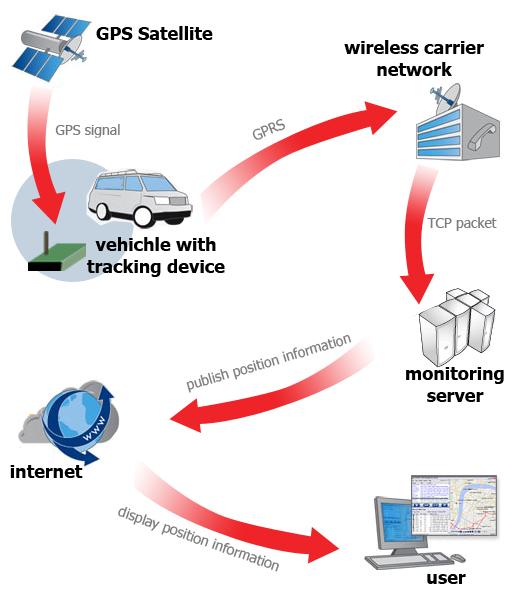
Description: Learn how to make a GPS tracker for vehicles at home using Arduino, a GPS module, and a GSM module. Includes wiring diagrams, bill of materials, installation steps, code overview, and troubleshooting tips.
Building your own vehicle GPS tracker is one of the most practical and rewarding Arduino projects. Instead of paying monthly subscription fees for commercial trackers, you can create a customizable system that sends your vehicle’s real-time location directly to your phone.
This guide shows you exactly how to make a GPS tracker for vehicles at home using Arduino, from selecting components to installing the tracker inside your vehicle.
Quick Answer: Arduino GPS Tracker Wiring Diagram
If you need the connection map immediately, use the following pin configuration.
| Component | Pin | Arduino Uno Pin |
|---|---|---|
| NEO-6M GPS Module | VCC | 5V |
| NEO-6M GPS Module | GND | GND |
| NEO-6M GPS Module | TX | D4 |
| NEO-6M GPS Module | RX | D3 |
| SIM800L GSM Module | TX | D8 |
| SIM800L GSM Module | RX | D7 |
| SIM800L GSM Module | GND | Common GND |
| LM2596 Buck Converter | OUT+ | VIN |
| LM2596 Buck Converter | OUT- | GND |
Important: The SIM800L requires a stable 3.7–4.2V power supply. Never power it directly from the Arduino’s 5V pin.
System Workflow:
GPS Satellites → GPS Module → Arduino → GSM Module → SMS with Google Maps Link → Mobile Phone


4
Why Build an Arduino Vehicle GPS Tracker?
Commercial GPS trackers can be expensive and often require recurring subscription fees. A DIY Arduino tracker gives you complete control over your hardware and software.
Key benefits include:
- Low-cost vehicle monitoring
- No vendor lock-in
- Customizable tracking intervals
- Expandable features
- Educational hands-on experience
- Offline SMS-based tracking
Whether you’re protecting a personal car, motorcycle, or school project vehicle, building your own tracker teaches valuable skills in electronics, programming, and IoT.
How Does an Arduino GPS Tracker Work?
A DIY GPS tracker combines three main technologies:
1. GPS Module
The GPS module receives signals from multiple satellites and calculates the vehicle’s exact location.
2. GSM Module
The GSM module sends the location information to your mobile phone via SMS.
3. Arduino Microcontroller
The Arduino reads GPS coordinates, formats the data, and commands the GSM module to send the information.
The SMS typically includes:
- Latitude
- Longitude
- Date and time
- Speed (optional)
- Google Maps link


6
Bill of Materials (BOM)
| Component | Quantity | Purpose |
|---|---|---|
| Arduino Uno or Nano | 1 | Controls the entire system |
| NEO-6M GPS Module | 1 | Receives location coordinates |
| SIM800L GSM Module | 1 | Sends SMS alerts |
| SIM Card | 1 | Connects to the cellular network |
| LM2596 Buck Converter | 1 | Reduces vehicle voltage |
| 1000 µF Capacitor | 1 | Stabilizes GSM power supply |
| Breadboard or PCB | 1 | Circuit assembly |
| Jumper Wires | 20+ | Electrical connections |
| Plastic Enclosure | 1 | Protects electronics |
| Toggle Switch | 1 | Powers the device on/off |
| USB Cable | 1 | Programming the Arduino |
Estimated Cost
| Item | Approximate Cost (USD) |
|---|---|
| Arduino Uno | $8–15 |
| GPS Module | $10–20 |
| GSM Module | $5–10 |
| Power Components | $5–10 |
| Miscellaneous Parts | $5–10 |
Total Estimated Cost: $35–65
Circuit Connections Explained
Correct wiring is critical for reliable performance.
NEO-6M GPS Module Connections
- VCC → 5V
- GND → GND
- TX → D4
- RX → D3
SIM800L GSM Module Connections
- TX → D8
- RX → D7
- GND → Common GND
- VCC → External 4V power supply
Power Supply Connections
Connect the vehicle’s 12V battery to the LM2596 buck converter and adjust the output voltage appropriately.


4
Step-by-Step Guide: How to Make a GPS Tracker for Vehicles at Home Using Arduino
Step 1: Install the Arduino IDE
Download and install the latest version of the Arduino IDE on your computer.
Install the following libraries:
- TinyGPS++
- SoftwareSerial
Step 2: Assemble the Circuit
Connect the GPS and GSM modules according to the wiring table above.
Double-check all power connections before switching on the system.
Step 3: Insert and Activate the SIM Card
Ensure your SIM card:
- Has sufficient airtime
- Can send SMS messages
- Does not require a PIN code
- Has network coverage in your area
Step 4: Upload the Arduino Code
Your code should perform these functions:
- Read coordinates from the GPS module.
- Generate a Google Maps link.
- Send the location through SMS.
Example SMS output:
Vehicle Location:

Latitude: -1.2921
Longitude: 36.8219

https://maps.google.com/?q=-1.2921,36.8219
Step 5: Test the GPS Module Outdoors
GPS modules need a clear view of the sky.
Take the prototype outside and wait several minutes for the initial satellite lock.
Step 6: Install the Tracker in the Vehicle
Place the completed system inside a protective enclosure.
Recommended installation locations:
- Under the dashboard
- Inside the glove compartment
- Beneath a seat
Avoid placing the GPS antenna under thick metal surfaces.


6
Arduino GPS Tracker Code Logic
The Arduino program continuously reads NMEA data from the GPS module.
Once valid coordinates are detected, the system:
- Extracts latitude and longitude values.
- Creates a Google Maps URL.
- Sends the information via the GSM module.
You can enhance the code to include:
- Geofencing alerts
- Engine shutdown relay
- Speed monitoring
- Scheduled location updates
- Cloud storage integration
Advantages of a DIY GPS Tracker
Building your own system offers several advantages:
- Lower cost than commercial devices
- Full hardware control
- Expandable features
- Educational value
- No monthly tracking fees
Limitations to Consider
Before deploying your tracker, understand these limitations:
- GPS signal weakens indoors
- GSM coverage affects communication
- SIM cards require ongoing credit
- Battery backup may be necessary
Safety and Legal Considerations
Only install tracking devices on:
- Vehicles you own
- Fleet vehicles with authorization
- Vehicles where users have provided consent
Always comply with local privacy laws and data protection regulations.
Ensure your installation does not interfere with critical vehicle systems such as airbags or wiring harnesses.
Frequently Asked Questions
Can I Track My Vehicle in Real Time?
Yes. You can configure the Arduino to send location updates at regular intervals.
Can I Use an ESP32 Instead of an Arduino Uno?
Yes. An ESP32 provides built-in Wi-Fi and Bluetooth capabilities, enabling cloud-based tracking applications.
How Accurate Is a DIY GPS Tracker?
Most NEO-6M modules provide accuracy within 2–5 meters under clear sky conditions.
Does the Tracker Work Without Internet?
Yes. The SIM800L sends coordinates via SMS, so mobile data is not required.
How to Fix Common Arduino Upload Errors
This section addresses common issues encountered during development.
Error: “avrdude: stk500_recv(): programmer is not responding”
Solutions:
- Verify the correct COM port.
- Select the correct board type.
- Disconnect modules from TX and RX pins during upload.
- Replace the USB cable.
Error: “Board Not Detected”
Solutions:
- Install USB drivers.
- Try another USB port.
- Restart the Arduino IDE.
Error: “Compilation Error: No Such File or Directory”
Solutions:
Install the required libraries:
- TinyGPS++
- SoftwareSerial
Restart the Arduino IDE after installation.
Error: SIM800L Does Not Send SMS
Solutions:
- Check SIM card activation.
- Verify network signal strength.
- Ensure the power supply provides sufficient current.
- Confirm the SIM card has available credit.
Error: GPS Module Cannot Get a Fix
Solutions:
- Move outdoors.
- Keep the antenna away from metal surfaces.
- Wait 2–10 minutes for the initial satellite lock.


5
Final Thoughts
Learning how to make a GPS tracker for vehicles at home using Arduino is an excellent introduction to embedded systems, GPS technology, and IoT development.
With an Arduino board, a GPS module, and a GSM module, you can create a reliable vehicle tracking solution that sends real-time location information directly to your phone.
Start with the basic SMS tracker, test it thoroughly, and gradually expand your project with advanced features such as geofencing, cloud dashboards, and engine immobilization.