mbeva
mbeva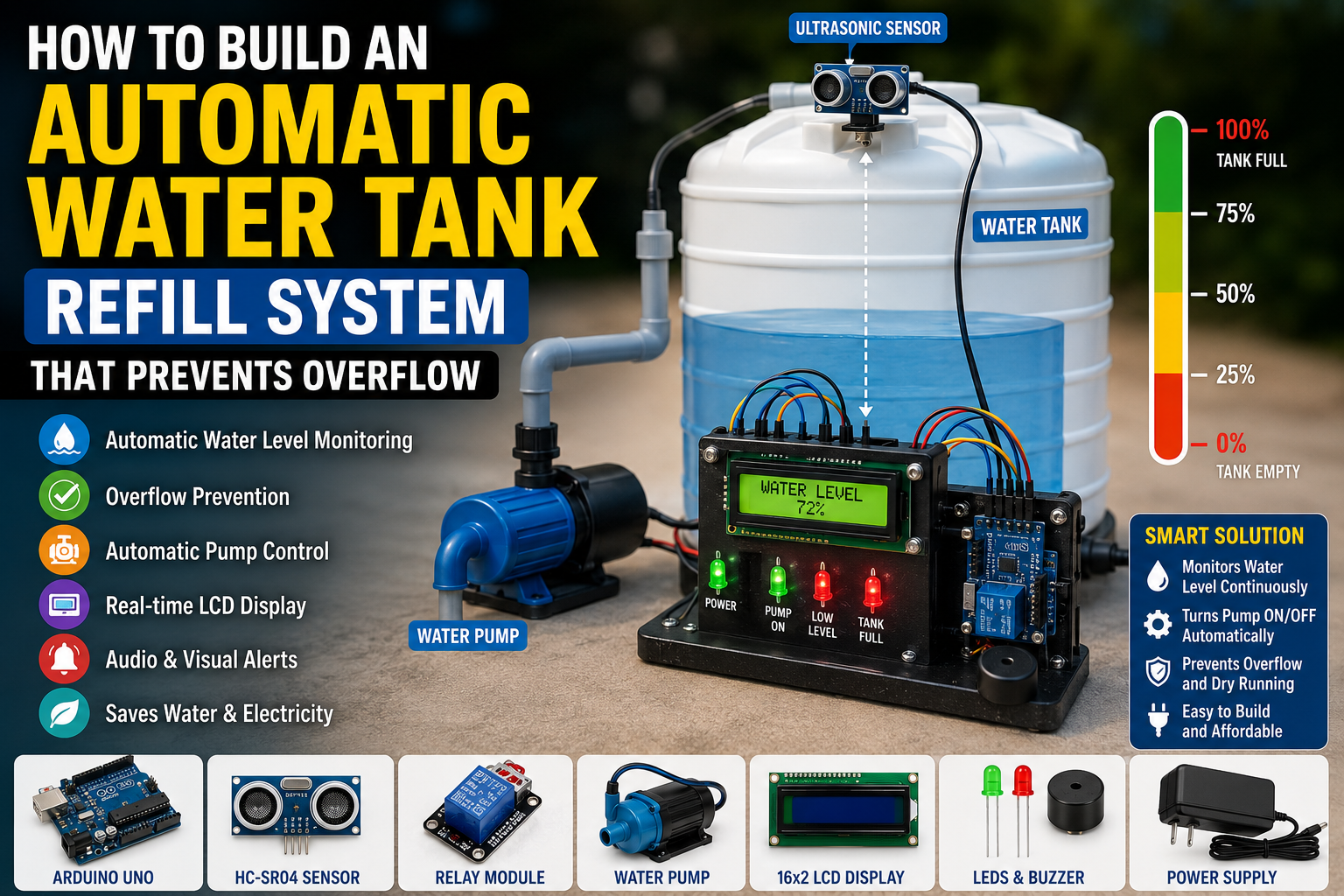
Meta Title: How to Build an Automatic Water Tank Refill System That Prevents Overflow Using Arduino
Meta Description: Learn how to build an automatic water tank refill system using Arduino, an ultrasonic sensor, relay module, and water pump. Includes wiring diagrams, bill of materials, installation guide, troubleshooting tips, and code overview.
An automatic water tank refill system is one of the most practical Arduino projects for homes, schools, farms, and industries. Instead of manually monitoring water levels, this smart system automatically starts the water pump when the tank level becomes low and stops it when the tank is full, preventing overflow and saving water.
Whether you’re a beginner learning Arduino or an engineer looking for a reliable automation project, this guide explains how to build an automatic water tank refill system that prevents overflow using affordable electronic components.
Quick Answer: Automatic Water Tank Refill Wiring Diagram
If you want to build the project immediately, use the following wiring configuration.
| Component | Pin | Arduino Uno Pin |
|---|---|---|
| HC-SR04 Ultrasonic Sensor | VCC | 5V |
| HC-SR04 Ultrasonic Sensor | GND | GND |
| HC-SR04 Ultrasonic Sensor | TRIG | D9 |
| HC-SR04 Ultrasonic Sensor | ECHO | D10 |
| Relay Module | IN | D8 |
| Relay Module | VCC | 5V |
| Relay Module | GND | GND |
| 16×2 LCD I2C | SDA | A4 |
| 16×2 LCD I2C | SCL | A5 |
| Buzzer | Positive | D7 |
| LED (Green) | Positive | D5 |
| LED (Red) | Positive | D6 |
Important: The relay controls the water pump. Never connect the pump directly to the Arduino output pins. Always use a properly rated relay module or motor driver for safe operation.
System Workflow
Water Tank → Ultrasonic Sensor → Arduino → Relay Module → Water Pump → Tank Refill → Pump OFF When Full


Why Build an Automatic Water Tank Refill System?
Water overflow wastes thousands of litres of water every year. Manual pump operation can also damage pumps when they run dry or are left running after the tank is full.
An Arduino-based automatic refill system solves these problems by continuously monitoring water levels and controlling the pump automatically.
Benefits
- Prevents tank overflow
- Saves water
- Protects water pumps
- Reduces electricity consumption
- Eliminates manual monitoring
- Suitable for homes, schools, farms, and industries
This project is ideal for smart home automation and IoT learning.
How Does the Automatic Water Tank Refill System Work?
The system consists of four major sections.
1. Water Level Detection
An HC-SR04 ultrasonic sensor measures the distance between the sensor and the water surface.
2. Arduino Processing
The Arduino converts the measured distance into a water level percentage.
3. Pump Control
If the water level falls below a preset value, the Arduino energizes the relay, turning the pump ON.
When the tank reaches the maximum level, the relay switches OFF automatically.
4. User Notification
An LCD displays the water level, while LEDs and a buzzer provide visual and audible alerts.


Bill of Materials (BOM)
| Component | Quantity | Purpose |
|---|---|---|
| Arduino Uno | 1 | Main controller |
| HC-SR04 Ultrasonic Sensor | 1 | Measures water level |
| Single Channel Relay Module | 1 | Controls the pump |
| Submersible Water Pump | 1 | Pumps water into the tank |
| 16×2 LCD with I2C | 1 | Displays water level |
| Green LED | 1 | Indicates tank full |
| Red LED | 1 | Indicates low water level |
| Piezo Buzzer | 1 | Alarm indication |
| Breadboard | 1 | Circuit assembly |
| Jumper Wires | Several | Connections |
| 12V Adapter | 1 | Pump power |
| 5V Adapter | 1 | Arduino power |
Estimated Cost
| Item | Approximate Cost |
|---|---|
| Arduino Uno | $10 |
| HC-SR04 | $3 |
| Relay Module | $3 |
| LCD Display | $6 |
| Water Pump | $12 |
| Miscellaneous | $10 |
Estimated Total Cost: $40–55
Circuit Connections Explained
Ultrasonic Sensor
- VCC → 5V
- GND → GND
- TRIG → D9
- ECHO → D10
Relay Module
- IN → D8
- VCC → 5V
- GND → GND
LCD Display
- SDA → A4
- SCL → A5
Indicators
Green LED → D5
Red LED → D6
Buzzer → D7


Step-by-Step Guide: How to Build an Automatic Water Tank Refill System That Prevents Overflow
Step 1: Install the Ultrasonic Sensor
Mount the HC-SR04 at the top of the tank facing downward.
Ensure there are no obstructions between the sensor and the water surface.
Step 2: Assemble the Arduino Circuit
Connect all components according to the wiring diagram.
Double-check all connections before applying power.
Step 3: Connect the Relay Module
Wire the relay between the power source and the water pump.
The relay acts as an electrically controlled switch that isolates the Arduino from the high-current pump.
Step 4: Upload the Arduino Program
The Arduino program should:
- Measure water level
- Display the percentage on the LCD
- Turn the relay ON when the tank is low
- Turn the relay OFF when the tank is full
- Activate alarms when necessary
Example logic:
If Water Level < 30%

Pump ON

Else If Water Level > 95%

Pump OFF
Step 5: Test the System
Fill and empty the tank gradually while monitoring the LCD.
Verify that:
- Water level readings are accurate.
- LEDs indicate the correct status.
- The buzzer sounds when required.
- The pump switches automatically.


Arduino Program Logic
The Arduino continuously repeats the following process:
- Trigger the ultrasonic sensor.
- Measure water distance.
- Calculate water level percentage.
- Compare with preset thresholds.
- Turn the relay ON or OFF.
- Update the LCD display.
- Repeat every few seconds.
This closed-loop control system ensures the tank remains within safe operating levels.
Applications
This automatic water refill system is suitable for:
- Homes
- Schools
- Apartment buildings
- Irrigation systems
- Livestock farms
- Industrial storage tanks
- Rainwater harvesting systems
Advantages and Limitations
Advantages
- Prevents water wastage
- Fully automatic operation
- Affordable components
- Low maintenance
- Easy to upgrade for IoT monitoring
Limitations
- Ultrasonic sensors may be affected by condensation.
- Requires stable power.
- Pump selection depends on tank size.
- Periodic sensor cleaning may be necessary.
Safety Tips
- Disconnect power before servicing the circuit.
- Use waterproof enclosures for outdoor installations.
- Install a fuse for pump protection.
- Keep high-voltage wiring isolated from Arduino circuits.
- Test the relay before connecting the pump.
Frequently Asked Questions
Can I Use Float Sensors Instead?
Yes. Float switches are simpler but provide fewer water level measurements compared to ultrasonic sensors.
Can I Monitor the Tank Remotely?
Yes. Replace the Arduino Uno with an ESP32 to add Wi-Fi monitoring using platforms like Blynk or MQTT.
What Is the Maximum Tank Height?
The HC-SR04 typically measures up to 4 meters, making it suitable for most domestic tanks.
How to Fix Common Arduino Upload Errors
Error: “avrdude: stk500_recv(): programmer is not responding”
Solutions
- Select the correct COM port.
- Disconnect modules using TX/RX pins.
- Replace the USB cable.
- Restart the Arduino IDE.
Error: Relay Does Not Switch
Solutions
- Verify the relay input pin.
- Check the power supply.
- Confirm the relay is rated for the pump voltage.
Error: Incorrect Water Level Readings
Solutions
- Mount the sensor vertically.
- Remove obstructions inside the tank.
- Recalibrate the tank height in the code.
Error: LCD Shows Blank Screen
Solutions
- Adjust the I2C module contrast.
- Verify SDA and SCL wiring.
- Check the LCD address using an I2C scanner.


Final Thoughts
Learning how to build an automatic water tank refill system that prevents overflow is one of the most practical Arduino automation projects for everyday use.
With an Arduino Uno, an HC-SR04 ultrasonic sensor, a relay module, and a water pump, you can create a reliable system that automatically maintains water levels while conserving water and protecting your pump.
As your skills improve, you can enhance the project by adding ESP32-based Wi-Fi monitoring, cloud data logging, mobile app notifications, solar-powered operation, or multiple tank management, turning a simple refill controller into a complete smart water management system.