mbeva
mbeva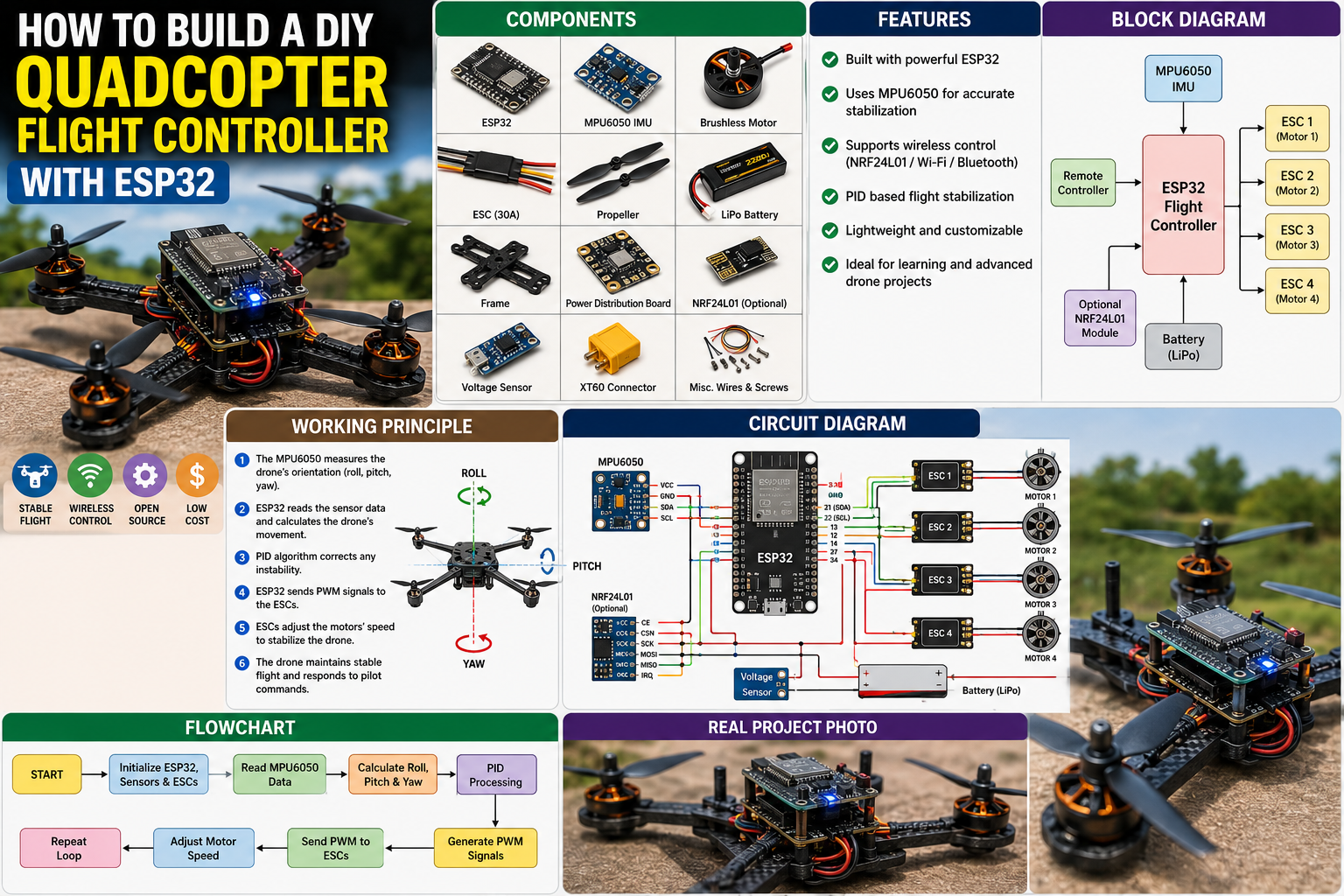
How to Build a DIY Quadcopter Flight Controller with ESP32: Complete Step-by-Step Guide
Meta Description: Learn how to build a DIY quadcopter flight controller using ESP32, an MPU6050 IMU, ESCs, and brushless motors. Includes wiring diagrams, bill of materials, installation guide, troubleshooting tips, and flight controller programming
Building your own quadcopter flight controller is one of the most advanced and rewarding ESP32 projects. Instead of purchasing an expensive commercial flight controller, you can design your own intelligent stabilization system using an ESP32, an inertial measurement unit (IMU), and electronic speed controllers (ESCs).
This project introduces you to embedded systems, robotics, wireless communication, and flight control algorithms while providing practical experience in drone technology.
Quick Answer: ESP32 Flight Controller Wiring Diagram
If you want to start building immediately, use the following pin configuration.
| Component | Pin | ESP32 Pin |
|---|---|---|
| MPU6050 IMU | VCC | 3.3V |
| MPU6050 IMU | GND | GND |
| MPU6050 IMU | SDA | GPIO21 |
| MPU6050 IMU | SCL | GPIO22 |
| ESC Motor 1 | Signal | GPIO13 |
| ESC Motor 2 | Signal | GPIO12 |
| ESC Motor 3 | Signal | GPIO14 |
| ESC Motor 4 | Signal | GPIO27 |
| NRF24L01 (Optional) | CE | GPIO4 |
| NRF24L01 (Optional) | CSN | GPIO5 |
| Battery Voltage Sensor | Analog | GPIO34 |
Important: Calibrate the ESCs and IMU before the first flight. Incorrect calibration may cause unstable flight or motor imbalance.
System Workflow
Remote Controller → ESP32 → MPU6050 Sensor → PID Algorithm → ESCs → Brushless Motors → Stable Flight


Why Build Your Own ESP32 Flight Controller?
Modern drones rely on sophisticated flight controllers to maintain balance and respond to pilot commands.
By building your own controller, you gain a deep understanding of:
- Flight stabilization
- Sensor fusion
- Wireless communication
- PID control algorithms
- Embedded programming
- Robotics engineering
This project is ideal for engineering students, drone enthusiasts, robotics clubs, and advanced STEM competitions.
How an ESP32 Flight Controller Works
A quadcopter remains stable by constantly measuring its orientation and adjusting the speed of its four motors.
The ESP32 performs this task hundreds of times every second.
The system consists of four major subsystems.
1. Inertial Measurement Unit (IMU)
The MPU6050 measures:
- Roll
- Pitch
- Yaw
- Angular velocity
- Acceleration
2. ESP32 Controller
The ESP32 reads sensor data and executes PID calculations.
3. Electronic Speed Controllers (ESCs)
ESCs regulate the speed of each brushless motor.
4. Brushless Motors
The four motors provide lift and directional movement.


Bill of Materials (BOM)
| Component | Quantity | Purpose |
|---|---|---|
| ESP32 Development Board | 1 | Main controller |
| MPU6050 IMU Sensor | 1 | Measures orientation |
| Brushless Motors (2205/2207) | 4 | Drone propulsion |
| Electronic Speed Controllers (30A ESC) | 4 | Motor speed control |
| Propellers | 4 | Generate lift |
| Quadcopter Frame | 1 | Supports components |
| LiPo Battery (3S or 4S) | 1 | Main power source |
| Power Distribution Board | 1 | Distributes battery power |
| Battery Voltage Sensor | 1 | Battery monitoring |
| NRF24L01 Module (Optional) | 1 | Wireless communication |
| Jumper Wires | Several | Electrical connections |
| XT60 Connector | 1 | Battery connection |
Estimated Project Cost
| Item | Approximate Cost |
|---|---|
| ESP32 | $8–12 |
| MPU6050 | $3–5 |
| Motors (4) | $40–60 |
| ESCs (4) | $30–45 |
| Frame | $20–35 |
| Battery | $25–40 |
| Miscellaneous | $15–20 |
Estimated Total Cost: $140–220
Circuit Connections Explained
MPU6050
- SDA → GPIO21
- SCL → GPIO22
- VCC → 3.3V
- GND → GND
ESC Connections
Motor 1 → GPIO13
Motor 2 → GPIO12
Motor 3 → GPIO14
Motor 4 → GPIO27
Battery Sensor
Signal → GPIO34
Ground → GND


Step-by-Step Guide: How to Build a DIY Quadcopter Flight Controller with ESP32
Step 1: Assemble the Drone Frame
Secure the four brushless motors onto the quadcopter frame.
Ensure that opposite motors rotate in opposite directions.
Step 2: Install the ESCs
Mount each ESC close to its corresponding motor.
Connect all ESC power wires to the power distribution board.
Step 3: Mount the ESP32
Install vibration-damping foam beneath the ESP32.
This minimizes vibration reaching the IMU.
Step 4: Connect the MPU6050
Position the sensor exactly in the center of the frame.
Align its orientation with the drone body.
Step 5: Upload the ESP32 Firmware
Your program should:
- Read IMU values
- Calculate roll, pitch and yaw
- Apply PID corrections
- Output PWM signals to the ESCs
Example workflow:
Read IMU
↓

Calculate Orientation

↓

Run PID Controller

↓

Adjust Motor Speeds

↓

Repeat 500 Times/Second
Step 6: Calibrate the Drone
Before installing propellers:
- Calibrate ESCs
- Calibrate MPU6050
- Verify motor direction
- Check battery voltage
Only install propellers after successful calibration.


ESP32 Flight Controller Software Logic
The software continuously performs:
- Read gyroscope data.
- Read accelerometer data.
- Fuse sensor information.
- Calculate orientation.
- Execute PID algorithm.
- Generate PWM outputs.
- Update motors.
This control loop executes hundreds of times every second to maintain stable flight.
Applications of an ESP32 Flight Controller
This project provides the foundation for:
- Autonomous drones
- Agricultural drones
- Delivery drones
- Mapping drones
- Obstacle avoidance systems
- Search and rescue robots
- Indoor autonomous flying robots
Advantages and Limitations
Advantages
- Fully customizable
- Affordable compared to commercial controllers
- Supports Wi-Fi and Bluetooth
- Powerful dual-core processor
- Excellent educational project
Limitations
- Requires careful PID tuning
- Higher programming complexity
- Sensitive to vibration
- Requires proper battery management
Safety Tips
Always follow these safety precautions:
- Remove propellers during testing.
- Wear safety glasses.
- Never fly near people.
- Test in an open outdoor area.
- Inspect batteries before every flight.
- Use a LiPo-safe charging bag.
Frequently Asked Questions
Can ESP32 Replace Commercial Flight Controllers?
Yes.
ESP32 is powerful enough for many educational and hobby quadcopters, although commercial flight controllers typically include additional safety features and highly optimized firmware.
Which IMU Is Better?
MPU6050 is excellent for beginners.
For higher precision consider:
- MPU9250
- ICM20948
- BMI270
Can I Add GPS?
Yes.
Popular GPS modules include:
- NEO-6M
- NEO-M8N
GPS enables:
- Return-to-home
- Position hold
- Waypoint navigation
How to Fix Common ESP32 Upload Errors
Error: Failed Connecting to ESP32
Solutions
- Hold the BOOT button while uploading.
- Check the USB cable.
- Install USB drivers.
- Select the correct COM port.
Error: “No Serial Data Received”
Solutions
- Verify board selection.
- Close Serial Monitor.
- Restart the IDE.
Error: PWM Outputs Not Working
Solutions
- Verify GPIO assignments.
- Check ESC calibration.
- Ensure correct PWM frequency.
Error: IMU Gives Incorrect Values
Solutions
- Recalibrate the MPU6050.
- Check I²C wiring.
- Reduce vibration.
- Secure the sensor firmly.
Error: Drone Flips During Takeoff
Solutions
- Verify motor numbering.
- Check propeller orientation.
- Confirm motor rotation direction.
- Re-tune PID constants.


Final Thoughts
Learning how to build a DIY quadcopter flight controller with ESP32 is one of the best ways to understand modern drone technology and embedded control systems.
By combining the ESP32’s processing power with an MPU6050 IMU, ESCs, and brushless motors, you can build a capable flight controller that serves as the foundation for more advanced UAV projects.
As your skills grow, you can enhance the system with GPS navigation, barometric altitude control, optical flow sensors, telemetry, Wi-Fi mission planning, and autonomous flight modes, transforming a basic quadcopter into a sophisticated research and development platform.