mbeva
mbeva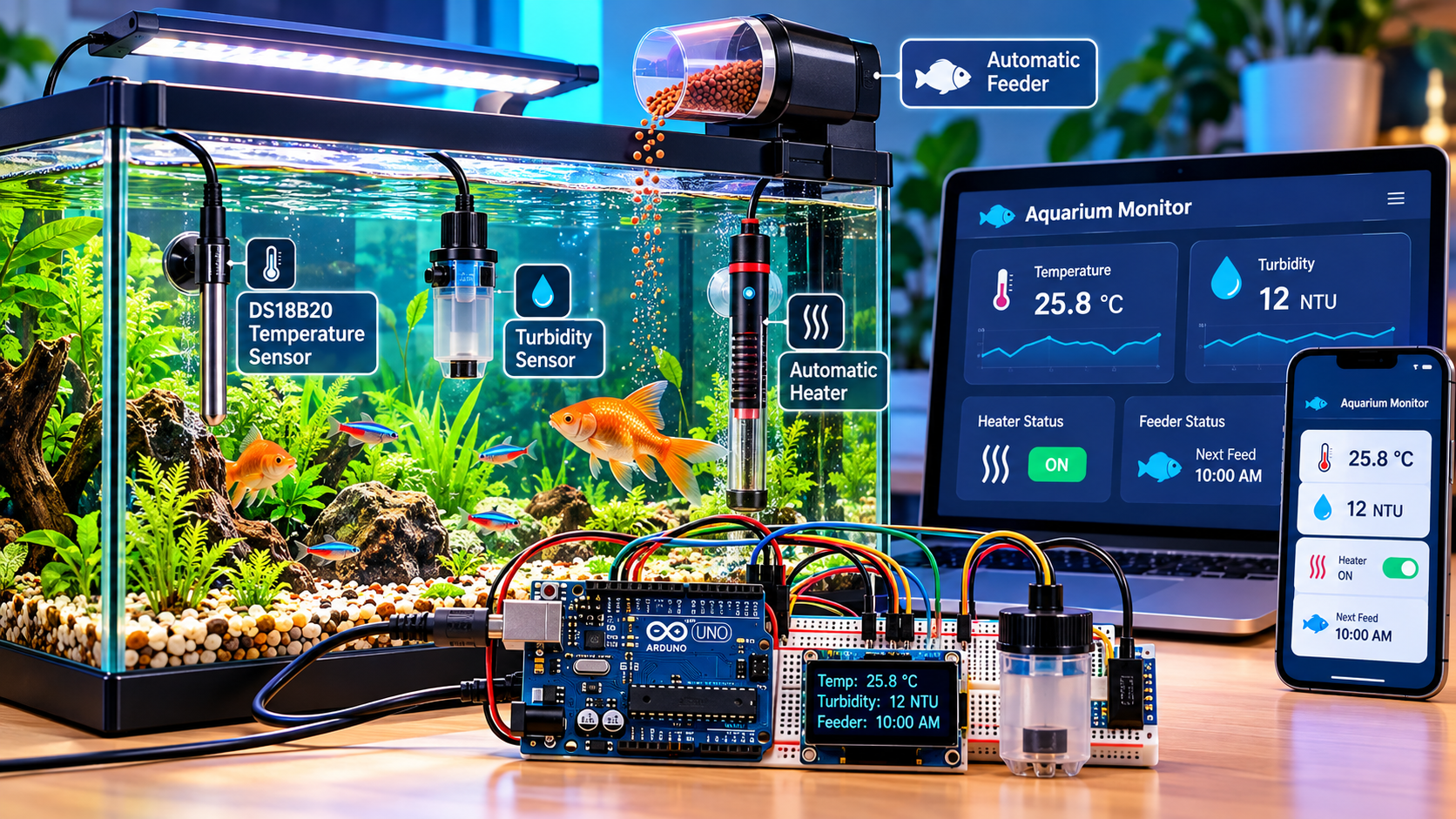


9
SEO title: Arduino Aquarium Water Quality Monitoring System: Temperature, Turbidity and Automatic Feeding
URL slug: arduino-aquarium-water-quality-monitoring-system
Meta description: Learn how to build an Arduino aquarium water quality monitoring system using waterproof DS18B20 sensors, turbidity monitoring, automatic heater control and fish feeding.
Focus keyphrase: Arduino aquarium water quality monitoring system
SEO keywords: Arduino aquarium monitor, DS18B20 aquarium temperature sensor, aquarium turbidity sensor, automatic aquarium heater controller, Arduino automatic fish feeder, aquarium water quality monitoring system, DIY smart aquarium, Arduino fish tank automation, aquarium IoT project, STEM science project.
1. Introduction
Maintaining good aquarium water quality is essential for healthy fish, aquatic plants and other organisms. Sudden temperature changes, suspended particles, excessive feeding and poor maintenance can affect fish health and aquarium stability.
An Arduino aquarium water quality monitoring system combines temperature sensors, a turbidity sensor and automated control mechanisms to monitor selected water conditions and assist with routine aquarium maintenance.
In this project, a waterproof DS18B20 temperature sensor measures the aquarium’s water temperature, while a turbidity sensor estimates the amount of light scattering caused by suspended particles. An Arduino processes the readings and can control a heater through a suitable relay or temperature controller. A servo motor can operate an automatic feeder at scheduled intervals.
The system can also use an LCD to display measurements and warning messages.
What this project does
Temperature monitoring
Measures water temperature and identifies readings outside the selected range.
Turbidity monitoring
Estimates water cloudiness and signals when inspection or maintenance may be necessary.
Automatic heater control
Regulates a suitable heater according to the aquarium’s temperature requirements.
Scheduled fish feeding
Operates a small servo-driven feeder at programmed times, dispensing a measured portion.
Important: Temperature and turbidity alone do not establish complete aquarium water quality. Ammonia, nitrite, nitrate, pH and dissolved oxygen may also need to be monitored, depending on the aquarium and species.
2. How the system works
Sensors in the aquarium
Waterproof DS18B20 + turbidity sensor
Arduino Uno
Reads sensor values and applies programmed rules.
Temperature control
Controls the heater with a suitable deadband and safety checks.
Feeder control
Operates a servo mechanism at scheduled feeding times.
LCD and alarms
Display temperature, turbidity readings and system warnings.
The Arduino acts as the controller. The sensors supply measurements, the program evaluates the readings, and the outputs activate the relevant control mechanisms.
3. Materials and components required


5
| Component | Quantity | Purpose |
|---|---|---|
| Arduino Uno | 1 | Main controller |
| Waterproof DS18B20 sensor | 1–2 | Measures aquarium water temperature |
| 4.7 kΩ resistor | 1 per data bus | Pull-up resistor for DS18B20 data |
| Turbidity sensor and module | 1 | Measures an optical signal related to water cloudiness |
| 16×2 LCD with I2C | 1 | Displays measurements and warnings |
| Small servo motor | 1 | Operates the feeder mechanism |
| Food container and dispensing wheel | 1 set | Stores and releases fish food |
| Suitable relay module or certified temperature controller | 1 | Controls the heater in an appropriately designed system |
| Low-voltage demonstration lamp | 1 | Safely simulates heater operation during initial tests |
| Buzzer and LEDs | Optional | Provide visual and audible alerts |
| Breadboard and jumper wires | 1 set | Prototyping |
| Regulated 5 V power supply | 1 | Powers the Arduino and suitable peripherals |
| Separate servo power supply | As required | Prevents motor current spikes from resetting the controller |
Estimated budget in Kenya
These are indicative planning estimates, not live supplier quotations.
| Item | Estimated cost (KES) |
|---|---|
| Arduino Uno-compatible board | 800–1,500 |
| Waterproof DS18B20 probe | 150–400 |
| Turbidity sensor module | 500–1,200 |
| Servo motor | 150–350 |
| LCD I2C display | 350–700 |
| Resistors, wires and breadboard | 250–600 |
| Relay module and low-voltage test load | 200–500 |
| Feeder container and mounting materials | 100–300 |
| Power supply | 300–700 |
| Estimated total | 2,800–6,250 |
A suitable aquarium heater, certified temperature controller, waterproof enclosure or additional water-quality sensors may increase the final cost.
4. Circuit diagram and Arduino pin connections

Use the following connections as the basis for the prototype.
| Component | Pin | Arduino connection |
|---|---|---|
| DS18B20 | VCC | 5 V |
| DS18B20 | GND | GND |
| DS18B20 | DATA | D2 |
| 4.7 kΩ resistor | One end | DATA/D2 |
| 4.7 kΩ resistor | Other end | 5 V |
| Turbidity module | AO | A0 |
| Turbidity module | VCC/GND | According to module specifications |
| Servo motor | Signal | D9 |
| Servo motor | Power/GND | Suitable supply and common ground |
| I2C LCD | SDA | A4 |
| I2C LCD | SCL | A5 |
| Relay module | IN | D8 |
| Relay module | VCC/GND | As specified by its manufacturer |
Important wiring considerations
- The DS18B20 uses a digital one-wire communication bus. The 4.7 kΩ pull-up resistor is normally connected between the data line and its supply.
- Check the turbidity module’s output voltage before connecting its analogue output to A0. Never allow an input to exceed the Arduino board’s permitted voltage.
- Power the servo from an adequately rated external supply when necessary. Connect the supply ground to Arduino ground for a shared signal reference.
- Verify the relay’s active-high or active-low behaviour before using it.
- Keep the Arduino, breadboard, connectors and mains electricity completely separated from aquarium water.
Heater safety: For the school prototype, use a low-voltage lamp to simulate heater operation. In a real aquarium, use a properly rated aquarium heater and a suitable independent temperature controller or certified control arrangement. Do not rely on a hobby Arduino and relay as the sole protection against overheating. Any mains-powered installation must use suitable enclosures, electrical protection and qualified installation.
5. Step-by-step construction procedure

Step 1: Install the temperature sensor
Position the waterproof probe in an area with representative water circulation, away from direct contact with the heater. Connect its data line to D2 and install the pull-up resistor.

Step 2: Install the turbidity sensor
Mount the probe according to its manufacturer’s instructions. Some common modules are not designed for continuous immersion, so keep the electronics and non-waterproof connections dry. Provide a consistent measurement position.

Step 3: Connect the display
Wire the LCD’s I2C interface to A4 and A5. The display can show the measured temperature, raw turbidity reading and any sensor-fault warnings.

Step 4: Build the automatic feeder
Attach a servo to a small dispensing gate or rotating wheel. Test it with dry fish-food pellets before installing it above the aquarium. Adjust the opening to deliver a measured portion without jamming.

Step 5: Test the heater-control output
Initially connect the relay to a low-voltage test lamp. Verify that the output switches at the programmed temperature thresholds and returns to the safe state when a sensor fault occurs.
6. Arduino code for aquarium monitoring and automation
This example integrates the DS18B20, turbidity module, relay output and servo feeder. It uses a demonstration temperature range of 24–26 °C, which must be adjusted to suit the actual aquarium species and setup.
The example feeds at fixed intervals measured from startup. For a dependable aquarium installation, replace this with a real-time clock (RTC) and defined feeding times, so a power interruption does not reset the daily schedule.
Required Arduino libraries
Install these libraries using the Arduino IDE Library Manager:
OneWireDallasTemperatureServoLiquidCrystal_I2C
The code assumes a common I2C LCD address of 0x27, an active-low relay and a servo feeder that dispenses food when moved to its open position. Check the hardware before use.
#include <OneWire.h>
#include <DallasTemperature.h>
#include <Servo.h>
#include <Wire.h>
#include <LiquidCrystal_I2C.h>

// Pin assignments
const byte TEMP_PIN = 2;
const byte TURBIDITY_PIN = A0;
const byte RELAY_PIN = 8;
const byte SERVO_PIN = 9;

// Adjust for the relay module
const byte RELAY_ON = LOW;
const byte RELAY_OFF = HIGH;

// Example setpoints: adjust for fish species
const float HEAT_ON_TEMP = 24.0;
const float HEAT_OFF_TEMP = 26.0;

// Demonstration turbidity threshold.
// Calibrate with the actual sensor and water samples.
const int TURBIDITY_THRESHOLD = 500;

// Feeder positions: calibrate the mechanism
const int FEED_CLOSED = 10;
const int FEED_OPEN = 90;

// Example interval: 8 hours after startup
const unsigned long FEED_INTERVAL = 8UL * 60UL * 60UL * 1000UL;
const unsigned long FEED_OPEN_TIME = 800;

OneWire oneWire(TEMP_PIN);
DallasTemperature tempSensor(&oneWire);
LiquidCrystal_I2C lcd(0x27, 16, 2);
Servo feeder;

bool heaterOn = false;
unsigned long lastFeedTime = 0;
unsigned long lastDisplayTime = 0;

void setup() {
  Serial.begin(9600);

  pinMode(RELAY_PIN, OUTPUT);
  digitalWrite(RELAY_PIN, RELAY_OFF);

  tempSensor.begin();

  lcd.init();
  lcd.backlight();

  feeder.attach(SERVO_PIN);
  feeder.write(FEED_CLOSED);

  // Begin feeding interval after startup.
  lastFeedTime = millis();

  lcd.setCursor(0, 0);
  lcd.print("Aquarium Monitor");
  lcd.setCursor(0, 1);
  lcd.print("Initialising...");
  delay(1500);
}

void loop() {
  tempSensor.requestTemperatures();
  float tempC = tempSensor.getTempCByIndex(0);

  int turbidity = analogRead(TURBIDITY_PIN);

  // DS18B20 disconnect/error check
  bool tempValid =
      tempC != DEVICE_DISCONNECTED_C &&
      tempC >= -10.0 &&
      tempC <= 60.0;

  // Fail safe: turn off heater if temperature is invalid.
  if (!tempValid) {
    heaterOn = false;
    digitalWrite(RELAY_PIN, RELAY_OFF);
  } else {
    // Hysteresis avoids rapid relay switching.
    if (tempC <= HEAT_ON_TEMP) {
      heaterOn = true;
    } else if (tempC >= HEAT_OFF_TEMP) {
      heaterOn = false;
    }

    digitalWrite(
      RELAY_PIN,
      heaterOn ? RELAY_ON : RELAY_OFF
    );
  }

  // Print data for calibration and testing.
  Serial.print("Temperature: ");
  if (tempValid) {
    Serial.print(tempC);
    Serial.print(" C");
  } else {
    Serial.print("SENSOR ERROR");
  }

  Serial.print(" | Turbidity raw: ");
  Serial.println(turbidity);

  // Display sensor readings and faults.
  if (millis() - lastDisplayTime >= 1000) {
    lastDisplayTime = millis();

    lcd.setCursor(0, 0);
    if (tempValid) {
      lcd.print("Temp: ");
      lcd.print(tempC, 1);
      lcd.print((char)223);
      lcd.print("C   ");
    } else {
      lcd.print("TEMP SENSOR ERR ");
    }

    lcd.setCursor(0, 1);
    if (turbidity >= TURBIDITY_THRESHOLD) {
      lcd.print("Check water     ");
    } else {
      lcd.print("Turb:");
      lcd.print(turbidity);
      lcd.print("       ");
    }
  }

  // Scheduled feeder: interval from startup.
  if (millis() - lastFeedTime >= FEED_INTERVAL) {
    feeder.write(FEED_OPEN);
    delay(FEED_OPEN_TIME);
    feeder.write(FEED_CLOSED);

    lastFeedTime = millis();
  }

  delay(500);
}
Code limitations to address before deployment
This is a teaching prototype, not a complete unattended aquarium controller.
- The temperature sensor fault check switches the heater off, but a real system also needs independent over-temperature protection and a suitable heater safety arrangement.
- The turbidity threshold is an arbitrary raw analogue value. It must be calibrated for the particular sensor and is not a universal measure of water cleanliness.
- The feeder interval starts when the Arduino starts. Use an RTC and persistent scheduling for reliable daily feeding.
- The servo movement time and angles depend on the feeder design. Verify that it dispenses the correct portion without jamming.
- The program does not yet provide a complete sensor-fault response for the turbidity module or a low-food alarm.
7. How to calibrate the sensors
A. Calibrating the DS18B20 temperature sensor
The DS18B20 reports temperature digitally, typically with a resolution configurable up to 12 bits. To verify its accuracy:
- Place the probe in a stable water bath alongside a reliable reference thermometer.
- Allow both readings to stabilise.
- Record the Arduino reading and reference temperature.
- Repeat at several temperatures within the intended operating range.
- Investigate any consistent difference and replace a faulty probe if necessary.
Do not assume that the programmed temperature limits suit every fish species. Tropical freshwater fish, cold-water species and marine aquariums can have different temperature requirements.
B. Calibrating the turbidity sensor

A turbidity sensor measures changes in light transmission or scattering. Its output depends on the sensor design, water composition, ambient light and the characteristics of suspended particles.
For a basic calibration experiment:
- Collect a sample of clear aquarium water.
- Record the raw analogue reading several times.
- Prepare controlled samples with increasing concentrations of a safe, non-toxic suspended material in separate test containers.
- Record the readings using the same probe position, lighting and sample volume.
- Compare the readings and establish an appropriate threshold for your particular module.
Do not introduce test particles into the aquarium itself. For accurate turbidity measurements, use a suitable calibrated reference instrument and a method appropriate to the sensor’s design.
Important: The direction of the analogue reading varies between sensor modules. A higher raw value does not universally mean cleaner or dirtier water. Establish the relationship experimentally before using the threshold in an automated alarm.
8. How to test the automatic fish feeder
The feeder should deliver a consistent, suitable quantity of food without releasing too much at once.

Follow this testing procedure:
- Fill the feeder with dry pellets of the intended size.
- Run the servo through its closed and open positions.
- Collect and weigh the food released during each dispensing cycle.
- Repeat at least ten times and calculate the average portion.
- Adjust the dispensing gate or wheel until the portions are consistent.
- Test for jams and verify that food cannot continuously fall through the opening.
Use the fish species’ feeding requirements to determine portion size and frequency. Automation should not replace observation of the fish, and the feeder should not continue dispensing if its mechanism becomes stuck.
For improved reliability, add a real-time clock module, a manual feeding button, a low-food sensor and a way to verify that a feeding cycle has completed.
9. Data collection and experimental investigation
For a school science project, collect evidence showing how well the system monitors temperature and responds to changing water conditions.
Sample data-recording table
Record real measurements during testing; the table below is a blank template.
| Time | Reference temperature (°C) | DS18B20 reading (°C) | Turbidity raw reading | Heater state | Feeder event |
|---|---|---|---|---|---|
| 08:00 | — | — | — | — | — |
| 10:00 | — | — | — | — | — |
| 12:00 | — | — | — | — | — |
| 14:00 | — | — | — | — | — |
| 16:00 | — | — | — | — | — |
Suggested research questions
- How accurately does the DS18B20 measure aquarium temperature compared with a reference thermometer?
- How does turbidity sensor output change as the concentration of suspended particles increases?
- How consistently does the automatic feeder dispense a fixed portion of fish food?
- How effectively does temperature hysteresis reduce unnecessary heater switching?
Performance indicators
You can calculate the absolute temperature error:
\[ E=|T_{\text{Arduino}}-T_{\text{reference}}| \]
You can also calculate the mean absolute error across several readings:
\[ MAE=\frac{\sum_{i=1}^{n}|T_i-R_i|}{n} \]
Here, \(T_i\) represents the Arduino temperature reading, \(R_i\) the reference thermometer reading, and \(n\) the number of paired measurements.
For the feeder, measure the mass of food dispensed per cycle and calculate the mean and variation across repeated trials.
These measurements help establish whether the project works reliably rather than simply showing that its components can be connected.
10. How to Fix Common Arduino Upload Errors
| Problem | Likely cause | Solution |
|---|---|---|
OneWire.h: No such file | OneWire library is missing | Install the OneWire library |
DallasTemperature.h: No such file | Temperature library is missing | Install DallasTemperature |
Servo.h: No such file | Servo library is unavailable for the selected environment | Install a compatible Servo library and select the correct board |
DS18B20 reads -127°C | Probe disconnected, wiring error or communication failure | Check VCC, GND, data pin and pull-up resistor |
Temperature reads 85°C unexpectedly | Sensor startup/default reading or incomplete measurement | Check sensor initialisation and wait for a valid conversion |
| LCD displays no text | Incorrect I2C address or contrast | Check the address and adjust contrast |
| Arduino resets when the servo moves | Insufficient power or voltage drop | Use an adequately rated separate servo supply |
| Heater relay switches repeatedly | Incorrect thresholds or no hysteresis | Use separate switch-on and switch-off temperatures |
| Turbidity reading fluctuates | Ambient light, bubbles or inconsistent probe positioning | Shield the sensor from ambient light and standardise sample placement |
| Feeder releases too much food | Incorrect servo angle or dispenser geometry | Adjust the gate and measure portions repeatedly |
11. Safety and maintenance considerations
- Keep all mains-powered equipment away from water and use appropriate electrical protection.
- Use drip loops on cables entering electrical equipment.
- Inspect waterproof probes and their cable seals regularly.
- Keep non-waterproof turbidity electronics outside the aquarium.
- Do not allow the feeder to drop food continuously if the Arduino resets.
- Use an independent heater thermostat and thermal cut-out suitable for aquarium use.
- Check ammonia, nitrite, nitrate and pH with appropriate tests; a turbidity sensor cannot detect all dangerous water conditions.
- Verify water conditions and fish behaviour manually, particularly after maintenance or a power interruption.
12. Future improvements


11
The system can be expanded into a smart aquarium monitoring platform by adding:
- pH monitoring to track acidity and alkalinity.
- Ammonia and nitrite testing using suitable validated sensors or test methods.
- Dissolved oxygen monitoring to assess oxygen availability.
- ESP32 Wi-Fi connectivity for remote dashboards and notifications.
- RTC-based scheduling for accurate feeding times.
- Data logging to identify long-term temperature and water-quality trends.
- Independent heater protection to reduce the risk of overheating if the controller fails.
For advanced projects, compare the performance of the automated system with manual measurements over several weeks and evaluate its accuracy, reliability, cost and maintenance requirements.
13. Conclusion
The Arduino Aquarium Water Quality Monitoring System demonstrates how sensors, microcontrollers and automated mechanisms can improve routine aquarium management. The DS18B20 measures water temperature, the turbidity module monitors changes in water cloudiness, the relay interface supports temperature-control experiments, and the servo motor operates a scheduled fish feeder.
The project’s scientific value comes from collecting reliable measurements, calibrating sensors, testing automated responses and identifying limitations. With additional pH, ammonia, nitrite and dissolved oxygen monitoring, the prototype can be developed into a more comprehensive aquarium management system