mbeva
mbeva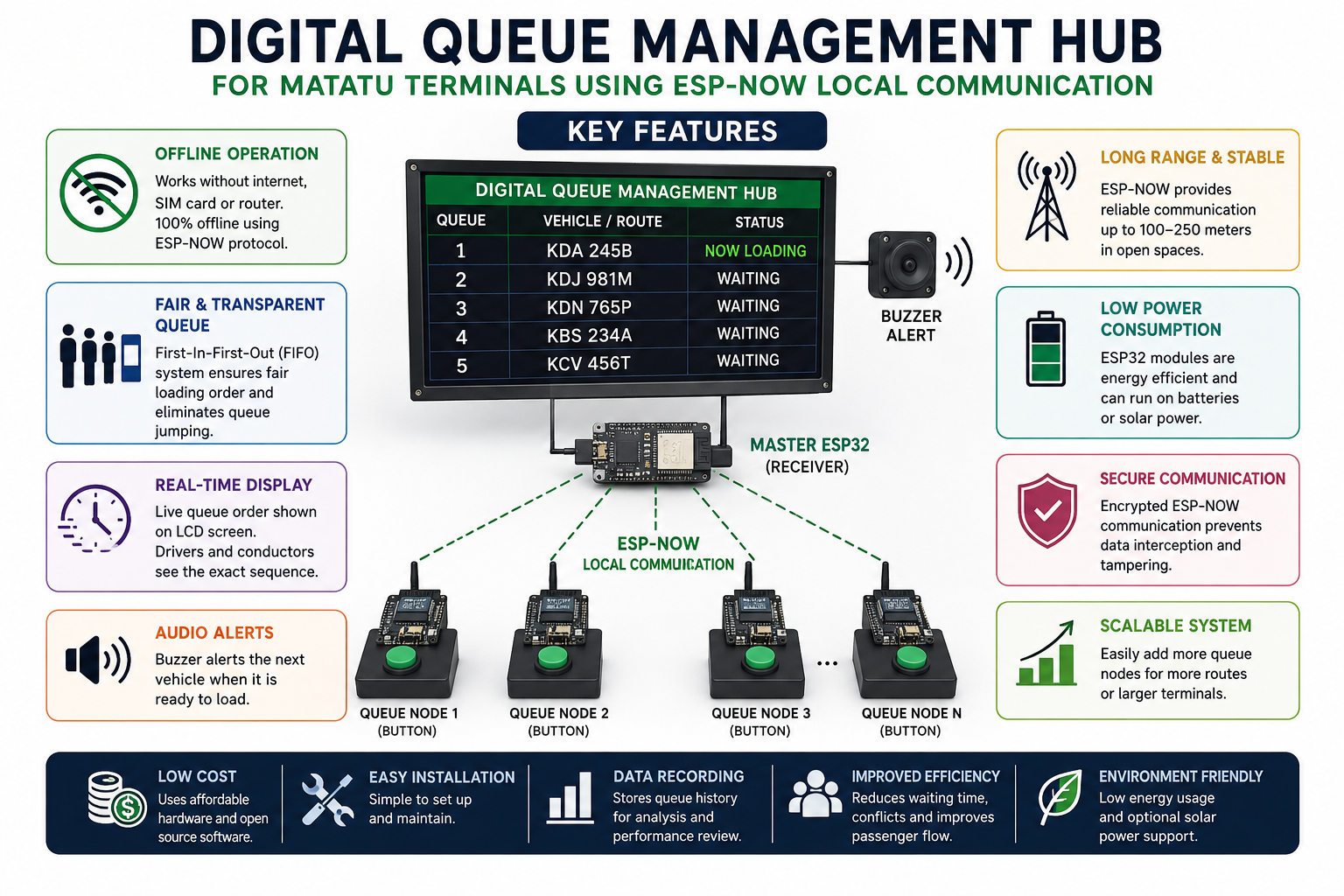
Abstract
The SmartMatatu Queue Hub is an offline digital queue management system designed to improve fairness, efficiency, and transparency at matatu terminals. The system uses multiple ESP32 microcontrollers communicating through ESP-NOW, a low-power peer-to-peer wireless protocol that does not require internet access. Drivers register their arrival by pressing a button at designated queue nodes. The queue information is transmitted to a master controller, which displays the loading order on an LCD screen. The system eliminates queue disputes, reduces passenger waiting time, and operates without recurring communication costs.
Introduction
Matatu transport is a major component of public transportation in Kenya. Most terminals still rely on manual queue management, where conductors or drivers determine loading order. This approach often leads to disagreements, queue jumping, inefficiency, and loss of time.
Digital queue management systems exist in airports, hospitals, and banks, but most require internet connectivity, cloud services, or expensive infrastructure.
This project proposes a low-cost, decentralized, and internet-independent queue management system using ESP-NOW communication between ESP32 devices.


4
Statement of the Problem
Current queue management practices at matatu terminals face several challenges:
- Lack of transparency in vehicle loading order
- Frequent disputes among drivers and conductors
- Long passenger waiting times
- Dependence on manual supervision
- Inability to maintain accurate records
- High operational costs for internet-based solutions
There is a need for a low-cost, reliable, and offline queue management system that can automate loading order without requiring internet access.
Objectives
General Objective
To design and develop an offline digital queue management hub for matatu terminals using ESP-NOW communication.
Specific Objectives
- To create a wireless queue registration system using ESP32 modules.
- To display the loading sequence on a central LCD screen.
- To eliminate queue manipulation and disputes.
- To reduce waiting time for passengers and drivers.
- To operate without internet connectivity or mobile data.
Materials and Equipment
| Component | Quantity |
|---|---|
| ESP32 Development Board | 4–10 |
| Push Buttons | 4–10 |
| 20×4 I²C LCD Display | 1 |
| Buzzer | 1 |
| Breadboards | 2 |
| Jumper Wires | Several |
| Rechargeable Battery Pack | 1 |
| Solar Panel (Optional) | 1 |
| Arduino IDE Software | 1 |
| USB Cables | As required |
System Design
The system consists of multiple queue nodes and one master node.
Each queue node contains:
- ESP32 microcontroller
- Push button
- Unique node identification number
The master node contains:
- ESP32 microcontroller
- LCD display
- Queue database
- Notification buzzer
When a driver presses a button, the node sends its identification data to the master controller through ESP-NOW.


4
System Block Diagram
Queue Node 1 ─┐
Queue Node 2 ─┼──► ESP-NOW Network ───► Master ESP32 ───► LCD Display
Queue Node 3 ─┘                                 │
                                                └──► Buzzer
Methodology
Step 1: Configure the Queue Nodes
- Program each ESP32 with a unique identification number.
- Connect a push button to each ESP32.
- Configure ESP-NOW communication.
Step 2: Configure the Master Node
- Initialize ESP-NOW receiver mode.
- Connect the LCD display.
- Create a First-In-First-Out (FIFO) queue algorithm.
Step 3: Establish Communication
- Register the MAC addresses of all queue nodes.
- Test data transmission between nodes.
Step 4: Develop the Queue Logic
When a driver presses a button:
- The queue node sends a registration request.
- The master node receives the request.
- The queue position is assigned automatically.
- The LCD display updates.
- The buzzer alerts the next vehicle when loading begins.
Procedure
- Assemble all hardware components on a breadboard.
- Connect each push button to its corresponding ESP32.
- Wire the LCD display to the master ESP32.
- Install the ESP32 board package in Arduino IDE.
- Upload the sender code to each queue node.
- Upload the receiver code to the master node.
- Power all ESP32 devices.
- Press a queue button to simulate vehicle arrival.
- Observe the queue order on the LCD display.
- Record system response time and accuracy.


4
Expected Results
The system should:
- Register vehicles within one second.
- Maintain accurate loading order.
- Reject duplicate registrations.
- Operate without internet access.
- Reduce queue disputes.
- Improve passenger flow.
Example LCD output:
NOW LOADING: KDM 482P

QUEUE:
1. KDA 105N
2. KCT 224M
3. KDJ 901K
Data Collection
The following data should be collected during testing:
| Parameter | Measurement |
|---|---|
| Response time | Seconds |
| Queue accuracy | Percentage |
| Communication range | Meters |
| Number of successful transmissions | Count |
| Duplicate registration errors | Count |
Results and Discussion
Compare the manual system with the digital system using:
- Average loading time
- Number of disputes per day
- Passenger waiting time
- Operational costs
Discuss whether the system met the project objectives.
Conclusion
The SmartMatatu Queue Hub demonstrates that offline wireless communication can improve efficiency in public transport terminals. By using ESP-NOW technology, the system eliminates the need for internet connectivity while ensuring fair and transparent queue management.
Recommendations
Future improvements may include:
- QR code vehicle registration
- LED display boards for passengers
- Voice announcements
- Route analytics dashboard
- Integration with digital payment systems
- Solar-powered operation


4