mbeva
Updated: November 7, 2026 | Business, Entrepreneurship, Artificial Intelligence
Starting a business in 2027 does not necessarily require thousands of dollars in startup capital. With the right combination of free business tools, artificial intelligence platforms, marketing applications, and productivity software, entrepreneurs can establish an online presence, attract customers, manage finances, sell products, and automate business operations without investing heavily in expensive software.
Today, small business owners, freelancers, content creators, online entrepreneurs, and startup founders have access to platforms that were previously available mainly to established companies.
For example, you can use Canva to design professional marketing materials, ChatGPT to develop business ideas and write content, Instagram to promote your products, HubSpot to manage customers, and Trello to organize daily operations.
The best part is that many of these platforms offer free plans that allow beginners to start before committing to paid subscriptions.
In this guide, we explore 15 free tools to start a business in 2027, explaining what each platform does, how entrepreneurs can use it, its free features, and the limitations to consider.

Quick Answer: What Are the 15 Free Tools to Start a Business in 2027?
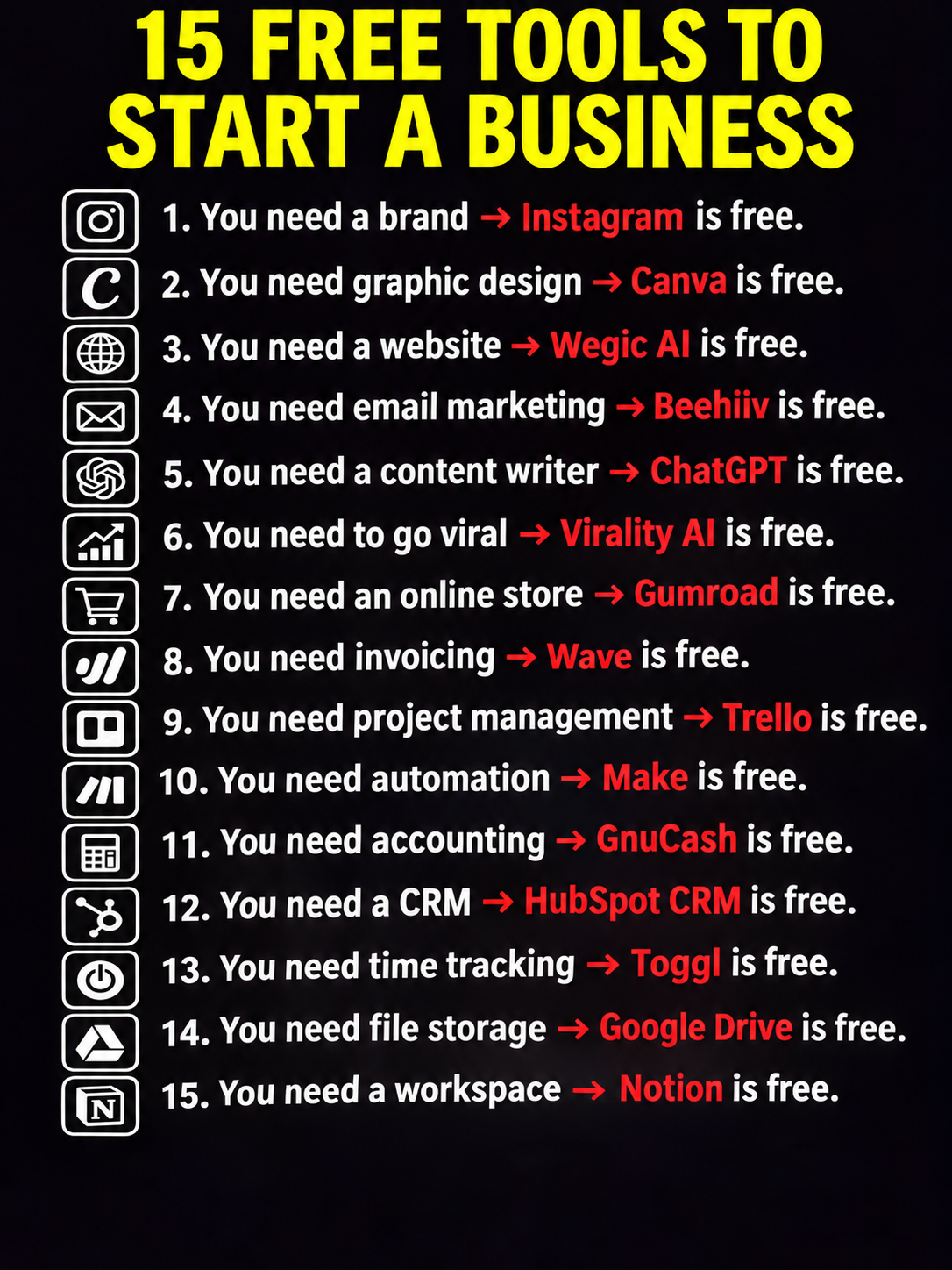
Here is a quick overview of the 15 platforms and the business activities they support.
| Business need | Recommended tool |
|---|---|
| Brand building and promotion | |
| Graphic design | Canva |
| Website creation | Wegic AI |
| Email marketing | beehiiv |
| Content writing | ChatGPT |
| Social media growth | Meta Business Suite |
| Online selling | Gumroad |
| Invoicing | Zoho Invoice / Wave |
| Project management | Trello |
| Business automation | Make |
| Accounting | GnuCash |
| Customer management | HubSpot CRM |
| Time tracking | Toggl Track |
| Cloud storage | Google Drive |
| Business workspace | Notion |
Important: Free does not always mean unlimited. Some platforms restrict storage, AI credits, subscribers, users, or monthly operations. Others charge transaction fees. Availability also varies by country.
1. Instagram – Build Your Business Brand and Find Customers

Website: Instagram
Best for: Brand awareness, product promotion, customer engagement and social selling.
Free to get started
Every business needs a way to reach potential customers. Instagram is one of the most accessible platforms for building brand awareness without paying for traditional advertising.
Entrepreneurs can create a professional business profile, publish product photographs, upload Reels, share customer testimonials, and communicate with potential buyers.
For example, someone starting a clothing business can use Instagram to showcase new designs, publish promotional videos, announce discounts, and receive customer inquiries.
How to use Instagram for business:
- Create a professional business account.
- Upload a recognizable business logo.
- Write a clear description of your products or services.
- Publish useful and engaging content consistently.
- Use relevant hashtags and location information.
- Respond to customer comments and direct messages.
- Build relationships with other businesses and creators.
Instagram does not charge users to create an account or publish ordinary content. However, paid advertising, some promotional features, and third-party services may involve costs.
Why it matters: You can begin building an audience before spending money on advertising.
2. Canva – Create Professional Business Graphics Without Hiring a Designer

Website: Canva
Best for: Graphic design, branding, posters, presentations and social media content.
Free plan available
Canva is one of the most useful design platforms for entrepreneurs who want professional-looking marketing materials without employing a graphic designer.
Its drag-and-drop editor allows beginners to create attractive designs using ready-made templates.
A new business can use Canva to produce:
- Business logos and promotional graphics.
- Product advertisements.
- Business cards and flyers.
- Social media posts and banners.
- Presentations and company profiles.
- Product catalogues.
- Marketing posters and brochures.
Canva also offers AI-powered design capabilities, although some advanced features and AI usage are restricted to paid subscriptions.
The free plan includes thousands of templates and design elements, alongside basic editing and export features. Its listed free storage allowance is 5GB. Canva +1
Business example: A small bakery can design a menu, price list, promotional poster, and Instagram advertisements without hiring a designer.
Why it matters: Canva reduces the cost of creating a consistent and professional business identity.
3. Wegic AI – Build a Website Using Artificial Intelligence

Website: Wegic AI
Best for: AI-assisted website design and website development.
A business website provides a central location where customers can discover products, understand services, and contact the company.
Wegic AI simplifies website creation by allowing users to describe the type of website they want using ordinary language.
For example, an entrepreneur could request:
“Create a modern website for a clothing business with a homepage, product catalogue, about us section, contact form, and customer testimonials.”
The AI-assisted platform can help generate the initial website structure and design.
Other website features entrepreneurs may need include:
- Mobile-friendly layouts.
- Product presentation pages.
- Business information sections.
- Contact forms.
- Image galleries.
- Landing pages.
Important free-plan limitation: Wegic is not completely free for publishing a fully functional website. Its official documentation explains that initial free credits are limited, website generation requires a paid trial, and continued publishing and editing may require a subscription. Help Center +1
If you need a website that remains free without paying for AI generation, consider alternatives such as Google Sites or the free WordPress.com plan.
Why it matters: AI website builders reduce the technical knowledge required to establish an online presence.
4. beehiiv – Start Email Marketing and Build a Subscriber Community

Website: beehiiv
Best for: Email newsletters, audience development and content distribution.
Free Launch plan
Email marketing remains an important business growth strategy because it allows entrepreneurs to communicate directly with people who have expressed interest in their products or services.
beehiiv is a newsletter publishing platform designed to help individuals and businesses build an email audience.
Its free Launch plan currently supports up to 2,500 subscribers and includes unlimited email sends, newsletter publishing, a website, and campaign analytics. The newsletter platform built for growth
Entrepreneurs can use it to:
- Collect email subscribers.
- Publish weekly newsletters.
- Announce new products.
- Share educational content.
- Promote special offers.
- Build a loyal customer community.
For example, an online fashion business can send subscribers updates about new collections, upcoming promotions, and product launches.
Why it matters: Email marketing helps businesses maintain customer relationships beyond social media platforms.
5. ChatGPT – Your AI Content Writer and Business Assistant

Website: ChatGPT
Best for: Content writing, research, business planning and brainstorming.
Free plan available
Artificial intelligence is transforming how entrepreneurs start and manage businesses. ChatGPT is among the most useful AI assistants for individuals who need support with writing, research, planning, and everyday business tasks.
Instead of hiring different professionals for every small task, entrepreneurs can use ChatGPT to generate first drafts, explore ideas, and organize their work.
Some practical applications include:
- Writing business plans.
- Generating business name ideas.
- Creating product descriptions.
- Writing website content.
- Developing marketing strategies.
- Preparing customer service responses.
- Drafting business proposals.
- Creating social media captions.
- Developing email campaigns.
- Researching business opportunities.
Example prompt:
“Develop a business plan for an online clothing store targeting young adults. Include startup costs, marketing strategies, customer acquisition, pricing, and a six-month growth plan.”
ChatGPT can help develop a structured starting point that the entrepreneur can review and improve.
The free version provides access to everyday text conversations and selected tools, although advanced capabilities such as file analysis, image generation, and other features have usage limits. OpenAI Help Center +1
Why it matters: ChatGPT can help a small business owner perform many writing and planning tasks more efficiently.
6. Meta Business Suite – Manage and Schedule Social Media Content

Website: Meta Business Suite
Best for: Managing Facebook and Instagram business accounts.
Free platform
Getting attention online is important, but managing multiple social media accounts can become time-consuming.
Meta Business Suite provides a centralized dashboard for businesses managing Facebook Pages and Instagram professional accounts.
Instead of switching between different applications, business owners can manage many social media activities from one location.
Its useful capabilities include:
- Creating and scheduling posts.
- Managing messages and comments.
- Reviewing content performance.
- Monitoring audience engagement.
- Organizing social media publishing.
- Managing connected business accounts.
For example, a restaurant can schedule its weekly menu promotions, publish photographs of meals, and monitor customer engagement.
The original infographic mentions Virality AI. However, an important distinction is necessary: no AI platform can guarantee that a post will go viral. Meta Business Suite is a more established alternative for managing and measuring social media activity.
Why it matters: Consistent content publishing can help businesses develop visibility without immediately paying for social media management services.
7. Gumroad – Sell Digital Products Online

Website: Gumroad
Best for: Selling digital products, downloads and online resources.
No monthly subscription required
Gumroad is an online selling platform that allows creators and entrepreneurs to sell digital products without developing their own ecommerce infrastructure from scratch.
It is particularly useful for people interested in selling downloadable products.
Examples include:
- E-books.
- Online guides.
- Digital planners.
- Templates.
- Educational resources.
- Design files.
- Software and digital downloads.
- Recorded courses.
Imagine creating a digital guide on starting a vegetable farming business. You can package it as a downloadable PDF and sell it through Gumroad.
The platform provides product pages and payment processing facilities.
However, Gumroad is not entirely free when making sales. Its standard direct-sale fee is 10% plus $0.50 per transaction, excluding applicable payment-processing fees. Marketplace discovery sales have a higher fee. Gumroad Help Center +1
Why it matters: You can start selling digital products without paying a monthly platform subscription.
8. Zoho Invoice or Wave – Create Professional Business Invoices

Website: Zoho Invoice
Best for: Invoices, estimates, customer billing and payment records.
Free invoicing option
Every business needs a reliable method of recording sales and requesting payment from customers.
Invoicing software makes it easier to prepare professional documents, record transactions, and maintain accurate business records.
Zoho Invoice is a useful option for small businesses looking for invoicing capabilities without an expensive monthly subscription.
You can use invoicing software to:
- Create professional invoices.
- Record customer details.
- Prepare quotations.
- Monitor outstanding payments.
- Send payment reminders.
- Organize business transactions.
What about Wave?
Wave is another popular invoicing and accounting platform. However, there is an important geographical limitation: Wave discontinued product and customer support for businesses outside the United States and Canada. Businesses in Kenya should therefore consider Zoho Invoice or another locally suitable invoicing solution instead. Help Center
For Kenyan businesses, remember that software-generated invoices do not automatically replace applicable KRA eTIMS compliance requirements.
Why it matters: Proper invoicing helps prevent lost payments and improves financial accountability.
9. Trello – Organize Projects and Business Activities

Website: Trello
Best for: Task management, planning and team coordination.
Free plan available
Running a business involves handling several activities simultaneously. These may include marketing, customer communication, product development, purchasing, and delivery.
Trello helps entrepreneurs organize these responsibilities using visual boards, lists, and cards.
A business owner can create boards for different departments or activities.
For example:
| Trello board | Activities |
|---|---|
| Marketing | Advertisements and promotions |
| Sales | Customer inquiries and orders |
| Operations | Purchasing and deliveries |
| Finance | Bills and payment follow-ups |
| Product development | New products and improvements |
The free plan includes up to 10 open boards per workspace, unlimited cards, and up to 10 collaborators. Atlassian Support +1
Why it matters: Trello helps business owners track responsibilities and avoid forgetting important tasks.
10. Make – Automate Repetitive Business Tasks

Website: Make
Best for: Connecting applications and automating workflows.
Free plan available
Automation allows businesses to complete repetitive tasks with less manual intervention.
Make is a visual automation platform that connects different applications and allows information to move between them automatically.
For example, a business owner could create an automation that:
- Receives a customer inquiry through a form.
- Records the customer’s details in a spreadsheet.
- Sends a notification to the business owner.
- Creates a follow-up task.
- Updates a customer management system.
Make supports thousands of application integrations.
Its current free plan includes 1,000 credits per month, with a minimum 15-minute interval between scheduled runs. Each module action generally consumes a credit. Make +1
Why it matters: Automation reduces repetitive work and allows entrepreneurs to concentrate on activities that generate revenue.
11. GnuCash – Manage Business Accounts and Expenses

Website: GnuCash
Best for: Bookkeeping, income records and expense management.
Free and open source
Financial management is one of the most important responsibilities of any entrepreneur.
A business can generate sales and still fail because its owner does not properly monitor expenses, cash flow, and profitability.
GnuCash is an accounting application designed to help individuals and businesses manage their financial records.
It supports accounting activities such as:
- Recording business income.
- Tracking expenses.
- Managing accounts payable and receivable.
- Monitoring bank accounts.
- Preparing financial reports.
- Recording transactions using double-entry bookkeeping.
Unlike many subscription-based accounting applications, GnuCash is free and open source.
It is particularly useful for entrepreneurs who prefer desktop accounting software and want more control over their financial records.
However, businesses should configure their accounts properly to reflect local accounting and tax requirements.
Why it matters: Good financial records help entrepreneurs understand whether their businesses are making profits or losses.
12. HubSpot CRM – Manage Customers and Sales Opportunities

Website: HubSpot CRM
Best for: Customer relationship management and sales tracking.
Free CRM tools
Customer relationships determine the long-term success of many businesses.
HubSpot CRM provides tools for organizing customer information, tracking potential sales, and managing business relationships.
A business owner can use it to record:
- Customer names and contact information.
- Sales opportunities.
- Previous customer interactions.
- Follow-up activities.
- Deal progress.
- Customer communication history.
For example, a digital marketing agency can use HubSpot to monitor potential clients from the first inquiry until a contract is signed.
HubSpot currently provides a free CRM option for up to two users, with a limit of 1,000 contacts under its free tools offering. Some additional features have separate restrictions. HubSpot +1
Why it matters: A structured customer database makes it easier to follow up on leads and maintain long-term relationships.
13. Toggl Track – Monitor Time and Improve Productivity

Website: Toggl Track
Best for: Time management, productivity and project tracking.
Free plan available
Time is one of the most valuable resources for entrepreneurs.
Many business owners spend too much time on activities that do not directly contribute to business growth.
Toggl Track helps users understand how they spend their working hours.
It allows entrepreneurs and freelancers to track time spent on different activities and projects.
For instance, a freelance graphic designer can monitor the time spent designing a client’s logo, preparing revisions, and communicating with customers.
Its free plan offers time tracking and personal-level reporting, with restrictions on team features. Toggl
Why it matters: Tracking working hours helps entrepreneurs identify inefficiencies and improve productivity.
14. Google Drive – Store and Share Business Documents

Website: Google Drive
Best for: Cloud storage, document sharing and collaboration.
15GB free storage
Business documents should be stored securely and organized in a way that makes them easy to access.
Google Drive provides cloud storage that allows entrepreneurs to save files online and access them using supported devices.
You can store:
- Business plans.
- Financial reports.
- Product photographs.
- Customer documents.
- Marketing materials.
- Contracts and quotations.
- Business presentations.
- Operational records.
Google Drive also works with Google Docs, Sheets, and Slides, making it useful for businesses that need collaborative document editing.
Each standard Google Account includes up to 15GB of storage shared across Google Drive, Gmail, and Google Photos. Google Drive Help
Why it matters: Cloud storage helps prevent the loss of important business documents when a computer or phone is damaged.
15. Notion – Create an All-in-One Business Workspace

Website: Notion
Best for: Business planning, documentation, task organization and knowledge management.
Free plan available
Notion is a productivity platform that allows entrepreneurs to organize business information in one digital workspace.
Instead of keeping business plans in one application, customer notes in another, and daily tasks in multiple notebooks, users can create interconnected pages and databases.
A new business can use Notion to establish a digital headquarters containing:
- Business plans and objectives.
- Marketing strategies.
- Product development records.
- Meeting notes.
- Daily task lists.
- Content calendars.
- Standard operating procedures.
- Business performance records.
For example, a small online business can create a Notion workspace containing its product catalogue, marketing calendar, customer service procedures, and weekly business targets.
Notion provides a free plan for individual users, while additional collaboration, administration, storage, and AI capabilities may require paid plans.
Why it matters: Notion helps entrepreneurs organize business information and maintain a clear overview of their operations.
The Best Free Business Tools by Category
With 15 tools available, choosing where to begin can be confusing. The best approach is to select applications according to the immediate needs of your business.

| Business activity | Best starting tool | Alternative |
|---|---|---|
| Social media marketing | Meta Business Suite | |
| Graphic design | Canva | Adobe Express |
| Website creation | Google Sites | WordPress.com |
| AI content writing | ChatGPT | Other AI assistants |
| Email marketing | beehiiv | MailerLite |
| Digital product sales | Gumroad | Other ecommerce platforms |
| Invoicing in Kenya | Zoho Invoice | Locally supported invoicing software |
| Accounting | GnuCash | Spreadsheet bookkeeping |
| Customer management | HubSpot | Google Sheets |
| Task management | Trello | Notion |
| Automation | Make | Other automation platforms |
| File storage | Google Drive | Dropbox |
How to Start a Business in 2027 Using These 15 Free Tools
Having access to business software is not enough. Entrepreneurs must know how to combine the tools to create an operational business.
Here is a practical approach for someone starting with little or no capital.
Step 1: Identify a Profitable Business Idea
Before registering accounts on different platforms, identify a product or service that people are willing to pay for.
Some potential business ideas include:
- Selling clothes and fashion accessories.
- Digital marketing services.
- Online tutoring and educational resources.
- Graphic design and branding.
- Selling e-books and digital templates.
- Affiliate marketing.
- Website development.
- Online consultancy.
- Content creation.
- Digital product development.
Research potential customers, competitors, pricing, and demand before investing money.
Step 2: Create Your Brand Identity
Use Canva to design your logo, business cards, promotional posters, and social media graphics.
Then establish an Instagram business account to introduce your brand to potential customers.
Ensure that your business name, logo, colours, and communication style remain consistent across platforms.
Step 3: Establish Your Online Presence
Build a website using an appropriate website builder.
Your website should ideally include:
- Homepage.
- About Us.
- Products or Services.
- Contact Information.
- Customer Testimonials.
- Frequently Asked Questions.
You can also create a newsletter using beehiiv to collect subscribers and communicate with potential customers.
Remember that a custom domain name and professional hosting may require payment.
Step 4: Use AI to Reduce Operational Costs
Use ChatGPT to assist with business planning, content development, marketing campaigns, customer communication, and product descriptions.
AI can help you complete tasks faster, but always review the information it generates. Verify important financial, legal, technical, and business claims before publishing or acting on them.
Step 5: Organize Your Business Operations
Use Trello or Notion to organize daily activities.
Create separate sections for:
- Sales and marketing.
- Customer orders.
- Product development.
- Business expenses.
- Upcoming deadlines.
- Customer follow-ups.
Use Make to automate repetitive activities when your business begins receiving regular inquiries and orders.
Step 6: Manage Your Money Properly
Set up an accounting system using GnuCash or another suitable bookkeeping application.
Use Zoho Invoice or a locally supported invoicing solution to prepare customer invoices.
Record every business transaction, including:
- Initial capital.
- Sales revenue.
- Operating expenses.
- Transport costs.
- Marketing expenditure.
- Outstanding payments.
- Business profits and losses.
For businesses operating in Kenya, ensure that applicable KRA tax and eTIMS requirements are met.
Can You Really Start a Business with Zero Money in 2027?
Yes, you can establish some types of businesses with very little startup capital by using free digital platforms.
However, it is important to distinguish between starting a business without paying for software and operating a business without any expenses.
Even when software is free, you may still need money for:
- Internet access.
- Business registration and applicable licences.
- Domain registration.
- Product purchases or raw materials.
- Delivery and transportation.
- Payment processing.
- Advertising.
- Taxes and regulatory compliance.
For example, a digital entrepreneur selling downloadable educational resources may begin with free design software, AI writing assistance, social media marketing, and a digital selling platform.
A physical clothing business, on the other hand, may require additional capital for stock, packaging, and deliveries.
The most practical strategy is to start with free tools, validate demand, generate initial revenue, and gradually invest in better business infrastructure.
A Practical Free Business Technology Stack for Beginners
The following combination is a useful starting point for an individual entrepreneur.
Your first business setup

Canva
Create your business identity and advertisements.
Free plan

ChatGPT
Plan, research and write business content.
Free plan

Promote products and attract customers.
Free

Trello
Organize tasks and business activities.
Free plan

Google Drive
Store business documents and files.
15GB shared

HubSpot CRM
Manage customer information and sales leads.
Free tools
This combination provides a foundation for branding, marketing, productivity, customer management, and document storage without purchasing several software subscriptions.
Frequently Asked Questions (FAQs)
1. What is the best free tool to start a business in 2027?
There is no single tool that handles every business activity. Canva is excellent for graphic design, ChatGPT for writing and planning, Instagram for brand promotion, and HubSpot for customer relationship management.
2. Can I start an online business using only free tools?
Yes. You can establish an online business using free software for content creation, marketing, task management, and customer communication. However, some expenses, including internet access, domain registration, payment processing, and business compliance, may still apply.
3. Which AI tool is best for small business owners?
ChatGPT is a useful starting point because it supports writing, research, brainstorming, business planning, and customer communication. Other specialized AI platforms can complement it.
4. Which free platform is best for selling digital products?
Gumroad is a useful option for selling e-books, templates, digital downloads, and other creator products. Remember that transaction fees apply when you make sales.
5. What is the best free accounting software for small businesses?
GnuCash is a strong free and open-source option for bookkeeping and financial management. Businesses should ensure that their accounting setup meets their local requirements.
6. Are these free business tools available in Kenya?
Most of the listed platforms can be accessed internationally, but specific services, payment facilities, and features may vary by country. Wave, for example, does not support invoicing for businesses based outside the United States and Canada. Kenyan entrepreneurs should consider locally supported invoicing and payment solutions.
7. Do free business tools have limitations?
Yes. Free plans may restrict storage, subscribers, users, monthly operations, AI usage, integrations, or advanced features. Always review the provider’s current pricing and terms before depending on a particular platform.
Conclusion: Start Small, Use Technology and Grow Your Business in 2027
Starting a business in 2027 is becoming more accessible because entrepreneurs can now access digital tools that reduce the cost of establishing and managing a company.
From Canva and ChatGPT to Instagram, Trello, Gumroad, Make, and HubSpot, these platforms provide practical solutions for different business activities.
However, successful entrepreneurship is not about collecting as many applications as possible. It is about identifying a real customer problem, developing a valuable product or service, reaching the right audience, managing finances, and consistently improving your offering.
You do not need all 15 tools on your first day.
Start with three or four that address your immediate business needs. Introduce additional applications as your customer base and operations grow.
The biggest advantage in 2027 will not necessarily belong to entrepreneurs with the largest startup budgets. It will belong to those who know how to use technology intelligently, solve problems, and turn ideas into sustainable businesses.
Official Resources and Pricing References
For readers who want to explore the tools and verify their current free-plan limitations:
- Canva pricing
- beehiiv pricing
- ChatGPT Free plan
- Gumroad transaction fees
- Make pricing
- HubSpot CRM pricing
- Trello pricing
- Google Drive storage information
- GnuCash official website
- Zoho Invoice