mbeva
mbeva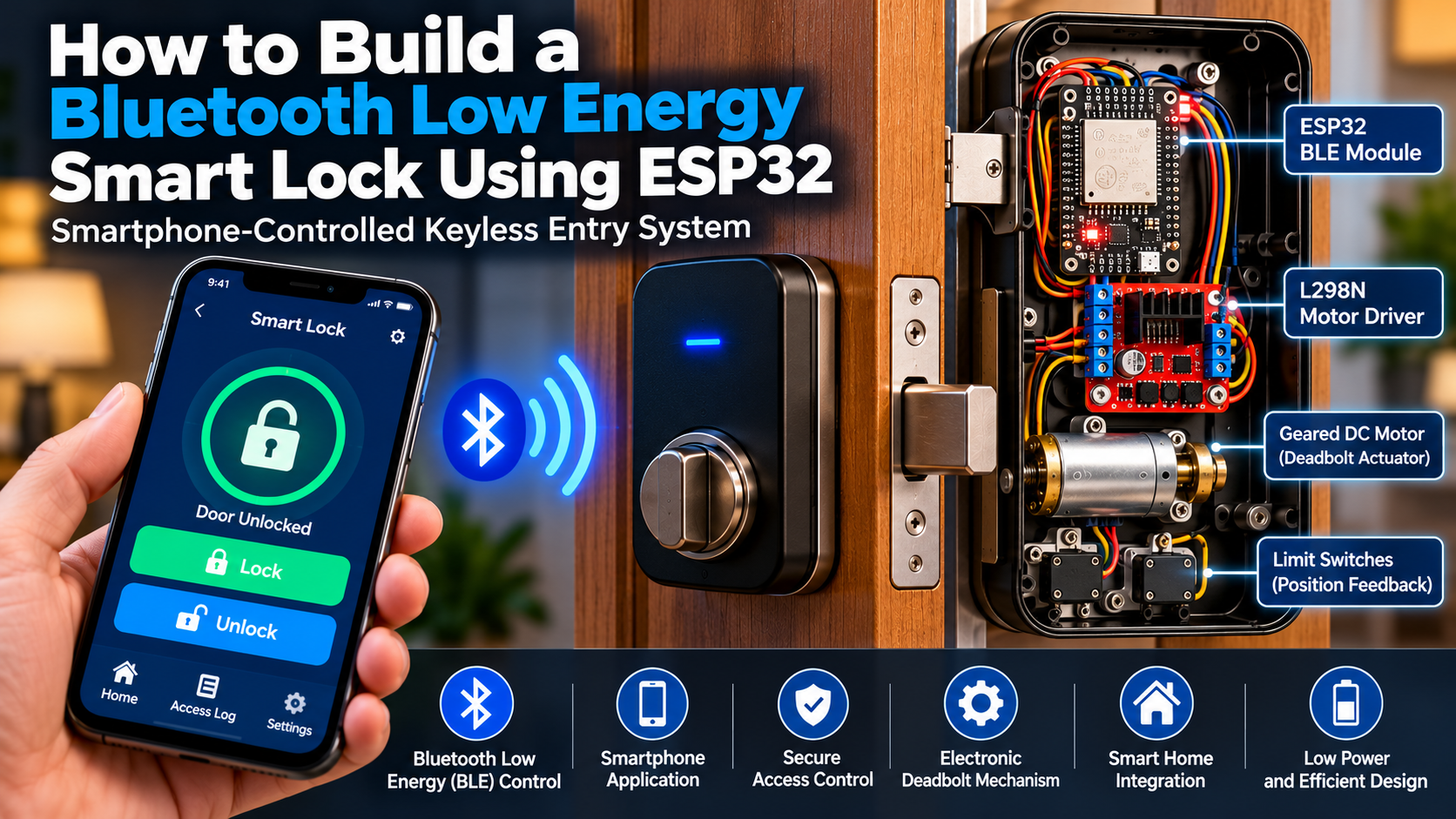
Learn how to build an ESP32 Bluetooth Low Energy smart lock with a motorized deadbolt, smartphone control, wiring diagrams, code, and safety tips.
1. Introduction
A conventional door lock depends on a physical key, which can be lost, copied, or forgotten. An electronic smart lock introduces another way to control access: an authorized user sends a command from a smartphone to a controller that operates a locking mechanism.
In this tutorial, you will learn how to build a Bluetooth Low Energy smart lock using an ESP32 development board. The prototype combines BLE communication, a motor driver, a geared DC motor, and limit switches to demonstrate smartphone-controlled locking and unlocking.
Bluetooth Low Energy (BLE) is designed for short-range wireless communication with relatively low power consumption. The ESP32 provides a convenient platform for experimenting with BLE, embedded programming, and connected-device control.
This project is suitable for STEM demonstrations, electronics clubs, engineering coursework, and early-stage smart-home prototypes. It is not a certified security product, and the prototype should not be installed on an occupied building’s primary emergency exit.
2. Quick answer: What does the project do?
A Bluetooth Low Energy smart lock uses a smartphone to send a lock or unlock command to an ESP32. The ESP32 receives the command over BLE, checks the prototype’s operating conditions, and drives a motor through an H-bridge motor driver. Limit switches indicate when the mechanism reaches its locked or unlocked position.

1. Smartphone
The user selects Lock or Unlock in a compatible BLE application.

2. ESP32 controller
Receives the BLE command and checks the switch inputs and motor timeout.

3. Motor driver
Controls the direction of current supplied to the motor.

4. Motorized deadbolt
Moves a lightweight bolt mechanism, with limit switches detecting the end positions.
3. System overview
The prototype has five functional subsystems:
- Wireless interface: A smartphone running a compatible BLE app.
- Processing unit: An ESP32 development board.
- Motor control: An L298N H-bridge driver.
- Mechanical assembly: A geared DC motor connected to a sliding bolt or demonstration deadbolt.
- Position feedback: Two normally open limit switches connected to the ESP32.
The motor is powered from a suitable external supply. The ESP32 and motor driver share a common ground, but the motor must not be powered directly from an ESP32 GPIO pin.
Block diagram
Smartphone BLE application
LOCK / UNLOCK commands
ESP32 controller
Command handling · timeout · limit-switch checks
L298N H-bridge motor driver
Direction control
Geared DC motor and bolt
Locking or unlocking movement
Limit switches return position feedback to the ESP32.
4. How the Bluetooth smart lock works
The process begins when the user opens a compatible BLE application and connects to the ESP32. The application writes a command to a BLE characteristic exposed by the controller.
The ESP32 processes the command and checks the relevant limit switch. If movement is needed, the controller activates the motor driver’s direction inputs. The geared motor moves the bolt toward the requested position.
When the destination limit switch activates, the ESP32 stops the motor. A movement timeout also stops the motor if the switch is not reached, reducing the risk of prolonged motor operation.
Operating sequence
1
Connect
The smartphone connects to the ESP32 BLE service.
2
Request
The user sends LOCK or UNLOCK.
3
Validate
The controller checks the requested state and safety conditions.
4
Move
The motor driver operates the geared motor.
5
Confirm
A limit switch signals the end position, and the motor stops.
Important security distinction: BLE connectivity is not the same as authentication. A simple command characteristic is appropriate for a classroom demonstration, but it is not sufficient for a real door-security system. Production hardware needs authenticated access, encrypted communication, secure provisioning, mechanical fail-safe design, and security testing.
5. Components and bill of materials
The following components are suitable for a small bench prototype. The mechanism should first be tested without connecting it to a real door.


Bill of materials (BOM)
| Component | Quantity | Purpose | Estimated cost (USD) |
|---|---|---|---|
| ESP32 development board | 1 | BLE communication and control | $6–15 |
| L298N motor driver | 1 | Drives the motor in either direction | $3–8 |
| Geared DC motor | 1 | Moves the demonstration bolt | $8–20 |
| Normally open limit switches | 2 | Detect locked and unlocked positions | $2–6 |
| Regulated motor power supply | 1 | Supplies the motor’s rated voltage and current | $5–12 |
| Bolt, bracket and coupler | 1 set | Connects the motor to the sliding mechanism | $5–15 |
| Breadboard or terminal blocks | 1 set | Makes low-voltage connections | $3–8 |
| Jumper wires | 1 set | Connects control signals | $2–5 |
| USB data cable | 1 | Programming and ESP32 power | $2–5 |
| Enclosure and fasteners | 1 set | Protects and mounts the prototype | $3–10 |
Indicative estimates only, not live supplier quotations. Prices vary by supplier, shipping, motor specifications, and location. The approximate total is $39–104 before delivery and any specialized mechanical parts.
Choosing the right motor
Select a geared motor with adequate torque for the test mechanism. Check the motor’s rated voltage, running current, and stall current. The driver and power supply must tolerate the expected load; a motor that draws excessive stall current can overheat the driver or cause the ESP32 to reset.
The L298N has a significant voltage drop and dissipates heat. For a higher-current motor, a more efficient driver rated for the motor’s stall current may be more appropriate.
6. Circuit diagram and pin-to-pin wiring
The following connections use the ESP32’s GPIO 25 and GPIO 26 for motor direction, GPIO 32 and GPIO 33 for limit switches, and the L298N motor driver’s first channel.
Connection schematic
Use this connection list as the authoritative wiring reference for the example firmware below.
ESP32
Control board
GPIO 25
L298N IN1
GPIO 26
L298N IN2
Limit switches
Normally open
GPIO 32
Unlock switch → GND
GPIO 33
Lock switch → GND
Motor and power
External supply
L298N OUT1/OUT2 → geared DC motor
Motor supply positive → L298N motor supply terminal
Supply negative, L298N GND, and ESP32 GND → common ground
Illustrative schematic: verify the labels on your specific module before applying power. Motor polarity determines which direction is LOCK and which is UNLOCK.
Pin-to-pin connection table
| ESP32 or supply connection | Destination | Purpose |
|---|---|---|
| GPIO 25 | L298N IN1 | Motor direction input 1 |
| GPIO 26 | L298N IN2 | Motor direction input 2 |
| GPIO 32 | Unlock limit switch; other contact to GND | Detects fully unlocked position |
| GPIO 33 | Lock limit switch; other contact to GND | Detects fully locked position |
| GND | L298N GND | Shared electrical reference |
| External motor supply positive | L298N motor supply terminal | Motor power |
| External motor supply negative | L298N GND | Motor supply return |
| L298N OUT1 and OUT2 | Motor terminals | Bidirectional motor output |
Motor-driver configuration: The example code assumes the L298N’s ENA input is enabled using its onboard jumper. If you remove the jumper and control ENA through a GPIO, you must add that pin to the wiring and firmware. Keep the ESP32 powered through USB or a suitable regulated supply. Do not connect the motor supply directly to a GPIO.
How the limit switches work
Configure both switches as INPUT_PULLUP. With a normally open switch wired between the GPIO and GND:
HIGHmeans the switch is not pressed.LOWmeans the switch is pressed.
Mount the switches so that the bolt activates the appropriate switch only when it reaches the end of travel. Check the switch orientation manually before connecting the motor.
7. Step-by-step construction

Step 1: Build the mechanical assembly
Mount the geared motor on a stable bracket. Connect it to a lightweight sliding bolt using a suitable coupler or linkage. Move the bolt manually to confirm that it slides without binding.

Step 2: Connect the controller and motor driver
Wire GPIO 25 and GPIO 26 to IN1 and IN2. Connect the motor to OUT1 and OUT2. Keep the motor supply disconnected while checking the wiring.

Step 3: Install position switches
Mount one switch at each end of travel. Connect the unlock switch to GPIO 32 and the lock switch to GPIO 33. Confirm that each switch changes state when operated by hand.

Step 4: Inspect the power system
Verify the motor’s rated voltage, supply polarity, driver rating, common ground, and wire insulation. Secure exposed connections and ensure the mechanism cannot pinch fingers.

Step 5: Test before enclosing
Upload the firmware, verify BLE connectivity, and test each direction with the bolt disconnected or unloaded first. Then connect the mechanism and confirm that both switches stop the motor correctly.
8. Install the development software
The project uses the Arduino IDE and the ESP32 Arduino core.
- Install the Arduino IDE from the official Arduino website.
- Add Espressif’s ESP32 board package through the Boards Manager.
- Install the ESP32 platform and select the exact board model or a compatible ESP32 Dev Module.
- Connect the ESP32 using a USB data cable.
- Select the correct serial port.
- Use the built-in ESP32 BLE libraries supplied with the installed board package.
The example below uses BLEDevice.h, BLEServer.h, BLEUtils.h, and BLE2902.h, which are available with supported ESP32 Arduino BLE configurations. The code is designed for the classic ESP32 BLE stack; library compatibility and board support can vary across ESP32 variants and core versions.
9. Complete example firmware
This demonstration accepts LOCK and UNLOCK text commands over a BLE characteristic. It stops when the relevant limit switch activates or when the movement timeout expires.
Important limitation: This is prototype control firmware, not production-grade security firmware. It does not implement user authentication, encrypted command authorization, secure pairing policy, or protection against a malicious BLE client. Do not use this sketch as the sole access-control mechanism for a real building.
#include <BLEDevice.h>
#include <BLEServer.h>
#include <BLEUtils.h>
#include <BLE2902.h>

// L298N direction inputs. ENA must be enabled.
const int MOTOR_IN1 = 25;
const int MOTOR_IN2 = 26;

// Normally open switches connected to GND.
const int UNLOCK_SWITCH = 32;
const int LOCK_SWITCH   = 33;

const unsigned long MOTOR_TIMEOUT_MS = 5000;

BLECharacteristic* commandCharacteristic = nullptr;

bool moving = false;
bool connected = false;
unsigned long moveStarted = 0;

enum Motion {
  STOPPED,
  MOVING_TO_LOCK,
  MOVING_TO_UNLOCK
};

Motion motion = STOPPED;

const char* SERVICE_UUID =
  "12345678-1234-1234-1234-1234567890AB";

const char* COMMAND_UUID =
  "12345678-1234-1234-1234-1234567890AC";

const char* STATUS_UUID =
  "12345678-1234-1234-1234-1234567890AD";

BLECharacteristic* statusCharacteristic = nullptr;

bool isLocked() {
  return digitalRead(LOCK_SWITCH) == LOW;
}

bool isUnlocked() {
  return digitalRead(UNLOCK_SWITCH) == LOW;
}

void stopMotor() {
  digitalWrite(MOTOR_IN1, LOW);
  digitalWrite(MOTOR_IN2, LOW);
  motion = STOPPED;
  moving = false;
}

void publishStatus(const char* status) {
  if (statusCharacteristic != nullptr) {
    statusCharacteristic->setValue(status);
    statusCharacteristic->notify();
  }
  Serial.println(status);
}

void startLocking() {
  if (isLocked()) {
    stopMotor();
    publishStatus("LOCKED");
    return;
  }

  if (isUnlocked() == false && isLocked() == false) {
    // Intermediate position is permitted in this demo.
    // Mechanical obstruction detection is not provided.
  }

  digitalWrite(MOTOR_IN1, HIGH);
  digitalWrite(MOTOR_IN2, LOW);

  motion = MOVING_TO_LOCK;
  moving = true;
  moveStarted = millis();
  publishStatus("LOCKING");
}

void startUnlocking() {
  if (isUnlocked()) {
    stopMotor();
    publishStatus("UNLOCKED");
    return;
  }

  digitalWrite(MOTOR_IN1, LOW);
  digitalWrite(MOTOR_IN2, HIGH);

  motion = MOVING_TO_UNLOCK;
  moving = true;
  moveStarted = millis();
  publishStatus("UNLOCKING");
}

class ServerCallbacks : public BLEServerCallbacks {
  void onConnect(BLEServer* server) override {
    connected = true;
    Serial.println("BLE client connected");
  }

  void onDisconnect(BLEServer* server) override {
    connected = false;

    // Stop motion if the phone disconnects.
    // The lock may remain between end positions.
    stopMotor();

    Serial.println("BLE client disconnected");
    BLEDevice::startAdvertising();
  }
};

class CommandCallbacks : public BLECharacteristicCallbacks {
  void onWrite(BLECharacteristic* characteristic) override {
    String command = characteristic->getValue().c_str();
    command.trim();
    command.toUpperCase();

    Serial.print("Received: ");
    Serial.println(command);

    if (command == "LOCK") {
      startLocking();
    } else if (command == "UNLOCK") {
      startUnlocking();
    } else {
      publishStatus("INVALID_COMMAND");
    }
  }
};

void setup() {
  Serial.begin(115200);

  pinMode(MOTOR_IN1, OUTPUT);
  pinMode(MOTOR_IN2, OUTPUT);
  pinMode(UNLOCK_SWITCH, INPUT_PULLUP);
  pinMode(LOCK_SWITCH, INPUT_PULLUP);

  stopMotor();

  BLEDevice::init("ESP32-BLE-Smart-Lock");

  BLEServer* server = BLEDevice::createServer();
  server->setCallbacks(new ServerCallbacks());

  BLEService* service = server->createService(SERVICE_UUID);

  commandCharacteristic = service->createCharacteristic(
    COMMAND_UUID,
    BLECharacteristic::PROPERTY_WRITE
  );

  commandCharacteristic->setCallbacks(new CommandCallbacks());

  statusCharacteristic = service->createCharacteristic(
    STATUS_UUID,
    BLECharacteristic::PROPERTY_READ |
    BLECharacteristic::PROPERTY_NOTIFY
  );

  statusCharacteristic->addDescriptor(new BLE2902());
  statusCharacteristic->setValue("READY");

  service->start();

  BLEAdvertising* advertising = BLEDevice::getAdvertising();
  advertising->addServiceUUID(SERVICE_UUID);
  advertising->start();

  Serial.println("ESP32 BLE Smart Lock ready");
}

void loop() {
  if (!moving) {
    delay(10);
    return;
  }

  if (motion == MOVING_TO_LOCK && isLocked()) {
    stopMotor();
    publishStatus("LOCKED");
  } else if (motion == MOVING_TO_UNLOCK && isUnlocked()) {
    stopMotor();
    publishStatus("UNLOCKED");
  } else if (millis() - moveStarted >= MOTOR_TIMEOUT_MS) {
    stopMotor();
    publishStatus("TIMEOUT");
  }

  delay(5);
}
What the code does
- Starts a BLE service named
ESP32-BLE-Smart-Lock. - Exposes a writable command characteristic and a readable/notifiable status characteristic.
- Accepts the
LOCKandUNLOCKcommands. - Runs the motor in the selected direction.
- Stops the motor when the matching limit switch activates.
- Stops the motor when the five-second timeout expires.
- Stops movement on BLE disconnection.
The timeout is a safety backstop, not a substitute for a correctly mounted limit switch or suitable mechanical design. A disconnected or damaged switch can still leave the mechanism in an uncertain position. A robust design should also detect contradictory switch states and motor-driver faults.
BLE service and characteristic UUIDs
| Item | UUID |
|---|---|
| BLE service | 12345678-1234-1234-1234-1234567890AB |
| Command characteristic | 12345678-1234-1234-1234-1234567890AC |
| Status characteristic | 12345678-1234-1234-1234-1234567890AD |
These are demonstration UUIDs. They identify the service and characteristics but do not provide authentication or prove that a client is authorized.
10. Connect a smartphone to the ESP32
For the first test, use a BLE inspection application that supports connecting to a BLE peripheral and writing to a characteristic. On Android or iOS, choose an app that lets you enter the service UUID, select the command characteristic, and write UTF-8 text.
Connection procedure
- Upload the sketch and open the Arduino Serial Monitor at 115200 baud.
- Reset the ESP32 and look for
ESP32 BLE Smart Lock ready. - Open the BLE application and scan for
ESP32-BLE-Smart-Lock. - Connect to the device and discover its services.
- Open the service ending in
90AB. - Select the writable command characteristic ending in
90AC. - Write the text
UNLOCKas a UTF-8 string, then writeLOCKto test the opposite direction. - Subscribe to notifications on the status characteristic ending in
90AD, if your app supports notifications.


These are visual references for BLE testing interfaces. Menu names and layouts depend on the application; use the UUIDs and command strings in this tutorial rather than relying on a particular screenshot.
Expected responses
| Command or event | Expected status |
|---|---|
| BLE connection | Device reports client connected in Serial Monitor |
Write UNLOCK | UNLOCKING, followed by UNLOCKED when the switch activates |
Write LOCK | LOCKING, followed by LOCKED when the switch activates |
| Movement takes too long | TIMEOUT |
| Unknown command | INVALID_COMMAND |
| BLE disconnect during movement | Motor stops |
If a command returns TIMEOUT, inspect the switch position, motor direction, mechanical travel, supply voltage, and wiring before increasing the timeout.
11. Testing and calibration
Test the project systematically before relying on the mechanism. Begin with the motor disconnected, then test with the unloaded motor, and finally test the complete lightweight bolt assembly.
The following is a test plan with expected behavior, not a claim of completed physical measurements.
| Test | Procedure | Expected result | Actual result |
|---|---|---|---|
| BLE discovery | Scan for the ESP32 | Device appears in the scan list | Record after testing |
| Command reception | Write UNLOCK | Serial Monitor shows the command | Record after testing |
| Motor direction | Send each command with the mechanism unloaded | Opposite directions are produced | Record after testing |
| Unlock switch | Activate the unlock switch during movement | Motor stops and status becomes UNLOCKED | Record after testing |
| Lock switch | Activate the lock switch during movement | Motor stops and status becomes LOCKED | Record after testing |
| Timeout | Prevent the target switch from activating during a controlled bench test | Motor stops at the timeout | Record after testing |
| Disconnect | Disconnect the BLE client during movement | Motor stops | Record after testing |
Calibrate the motor timeout
The example uses a five-second timeout. Measure how long the mechanism actually takes to move from one end to the other, using several unloaded and loaded bench tests. Choose a timeout that accommodates normal variation while stopping motion before the mechanism can be damaged.
Do not use timeout duration alone to determine whether the lock is fully engaged. The limit switches provide position feedback; a production design may need redundant sensors or a mechanical position indicator.
Troubleshooting checklist
If the lock does not work as expected, check the following:
- The correct ESP32 board and serial port are selected.
- The USB cable supports data rather than charging only.
- The motor supply meets the motor’s voltage and current requirements.
- The ESP32 and L298N share a common ground.
- The ENA jumper is installed if the firmware does not control ENA.
- The motor’s physical direction agrees with the switch positions.
- The BLE client writes to the correct characteristic.
- The limit switches are wired as normally open contacts to ground.
- The motor mechanism moves freely without binding.
12. How to Fix Common ESP32 Upload Errors
| Error | Likely cause | Fix |
|---|---|---|
Failed to connect to ESP32 | Board not entering bootloader mode | Hold BOOT while upload begins, if your board requires it |
No serial data received | Incorrect port, cable, or boot mode | Check the USB data cable, port, and boot sequence |
Port not found | USB driver or port issue | Install the correct USB-to-serial driver and reconnect |
Compilation error: BLEDevice.h: No such file or directory | ESP32 board package not installed or wrong board selected | Install the ESP32 core and select a supported ESP32 board |
BLEServer.h or other BLE header missing | Incompatible library or board package | Check the installed ESP32 core and its BLE library documentation |
| Upload stalls at connecting | Boot timing or USB communication problem | Try another USB port, a data cable, and the board-specific boot procedure |
| ESP32 resets when motor starts | Supply sag or electrical noise | Separate motor power from logic power, check current capacity, and improve wiring |
| Motor does not move | Driver disabled, insufficient supply, or wiring fault | Check ENA, IN1/IN2, motor supply, common ground, and motor continuity |
For persistent upload problems, check the documentation for the exact ESP32 board and USB-to-serial chip. Avoid changing multiple settings at once; isolate the cable, port, board selection, and bootloader issues systematically.
13. Safety precautions and technical limitations
A motorized lock is a moving mechanical device, and incorrect wiring or an unsuitable mechanism can create electrical, mechanical, or access-control hazards.
- Low-voltage power: Use a regulated supply matched to the motor and driver ratings. Never power the motor directly from an ESP32 GPIO.
- Mechanical protection: Secure the motor, bolt, and switches. Keep fingers clear of moving parts and avoid pinch points.
- Motor stall: A jammed motor can draw excessive current. Use appropriate current protection and a driver that can handle the motor’s stall current.
- Emergency access: Do not install an experimental prototype as the sole means of opening an occupied room or emergency exit.
- BLE security: The demonstration accepts commands without authenticating the user. Any client that can connect and write to the characteristic may be able to operate it.
- Power loss: Determine whether the mechanism remains locked, unlocks, or becomes movable when power is lost. Provide a suitable mechanical override.
- Enclosure: Keep wiring insulated and protected from moisture, dust, accidental contact, and mechanical damage.
For real deployment, use an established electronic-lock mechanism with documented safety behavior, secure authentication, encrypted communication, controlled provisioning, and professional installation where required.
14. Practical applications

STEM education
Demonstrates embedded programming, wireless communication, control systems, and mechanical design.

Maker projects
Provides a foundation for experimenting with BLE services and motor control.

Smart-home prototyping
Illustrates how electronic access-control components can be integrated into a larger system.

Engineering research
Supports experiments on actuator timing, sensor feedback, power consumption, and reliability.
15. Future improvements
Once the basic prototype works reliably, consider these improvements:
- Authentication: Require an authenticated, authorized client before accepting lock commands.
- Encrypted communication: Configure an appropriate BLE security and pairing policy instead of relying on discoverability or a device name.
- Position validation: Detect impossible combinations of limit-switch signals and report sensor faults.
- Motor protection: Add current monitoring or a suitably rated current-limited driver to detect jams.
- Battery operation: Measure the complete system’s current consumption before selecting a battery and charging circuit.
- Event logging: Record lock commands, position changes, timeouts, and sensor faults without storing unnecessary personal data.
- Status indicators: Add LEDs or a display to show disconnected, moving, locked, unlocked, and fault states.
- Mechanical override: Design a reliable manual method of operating the lock during power or electronics failure.
16. Frequently asked questions
1. Can I build a Bluetooth smart lock using an ESP32?
Yes. An ESP32 with BLE can receive smartphone commands and control a motorized locking mechanism. A complete implementation also requires a suitable driver, power supply, position feedback, and safe mechanical design.
2. Does the ESP32 need an internet connection?
No. BLE allows a compatible smartphone to communicate directly with the ESP32 over a short-range wireless connection. Internet access is not required for this local demonstration.
3. Can I use a servo motor instead of a geared DC motor?
Yes, if the servo’s torque, travel range, power requirements, and mechanical arrangement suit the bolt. A servo with appropriate feedback can simplify positioning, although a basic hobby servo is not automatically suitable for a security-critical lock.
4. Can I control the lock from an Android phone or iPhone?
Yes, provided the phone and application support the BLE operations and characteristics used by the ESP32. The example uses a writable characteristic for commands and a readable/notifiable characteristic for status.
5. Is the project secure enough for a real house?
Not as written. The example is a learning prototype and does not authenticate users or provide a complete security architecture. Use a professionally designed and appropriately certified locking system for real access control.
6. Why does the motor continue running after the command?
Check whether the correct limit switch activates, whether the switch is wired to the correct GPIO, and whether its contact changes the input to LOW. The timeout should stop the motor if the target switch does not activate, but a timeout does not confirm that the bolt reached its destination.
7. Why does the ESP32 restart when the motor runs?
A motor can create voltage dips and electrical noise. Use a suitable motor supply, common ground, proper wiring, and appropriate suppression components. Verify that the supply can handle startup and stall current.
8. Can this project be expanded into an IoT smart lock?
Yes. Additional networking, logging, and remote management are possible. However, remote access introduces additional security requirements, and internet connectivity should not be treated as a replacement for local safety controls.
17. Conclusion
Building a Bluetooth Low Energy smart lock using ESP32 is a useful way to explore embedded systems, BLE communication, motor control, position sensing, and mechanical automation in one project.
The prototype demonstrates how a smartphone can send commands to an ESP32, how an H-bridge controls a geared motor, and how limit switches provide position feedback. With careful assembly, systematic testing, and appropriate power protection, it can become a strong STEM demonstration or engineering research platform.
The most important next step is to validate the complete mechanism on a workbench and record actual test results before making claims about performance or reliability. For real-world access control, security, mechanical safety, emergency access, and power-loss behavior must be engineered and tested beyond this basic example.