mbeva
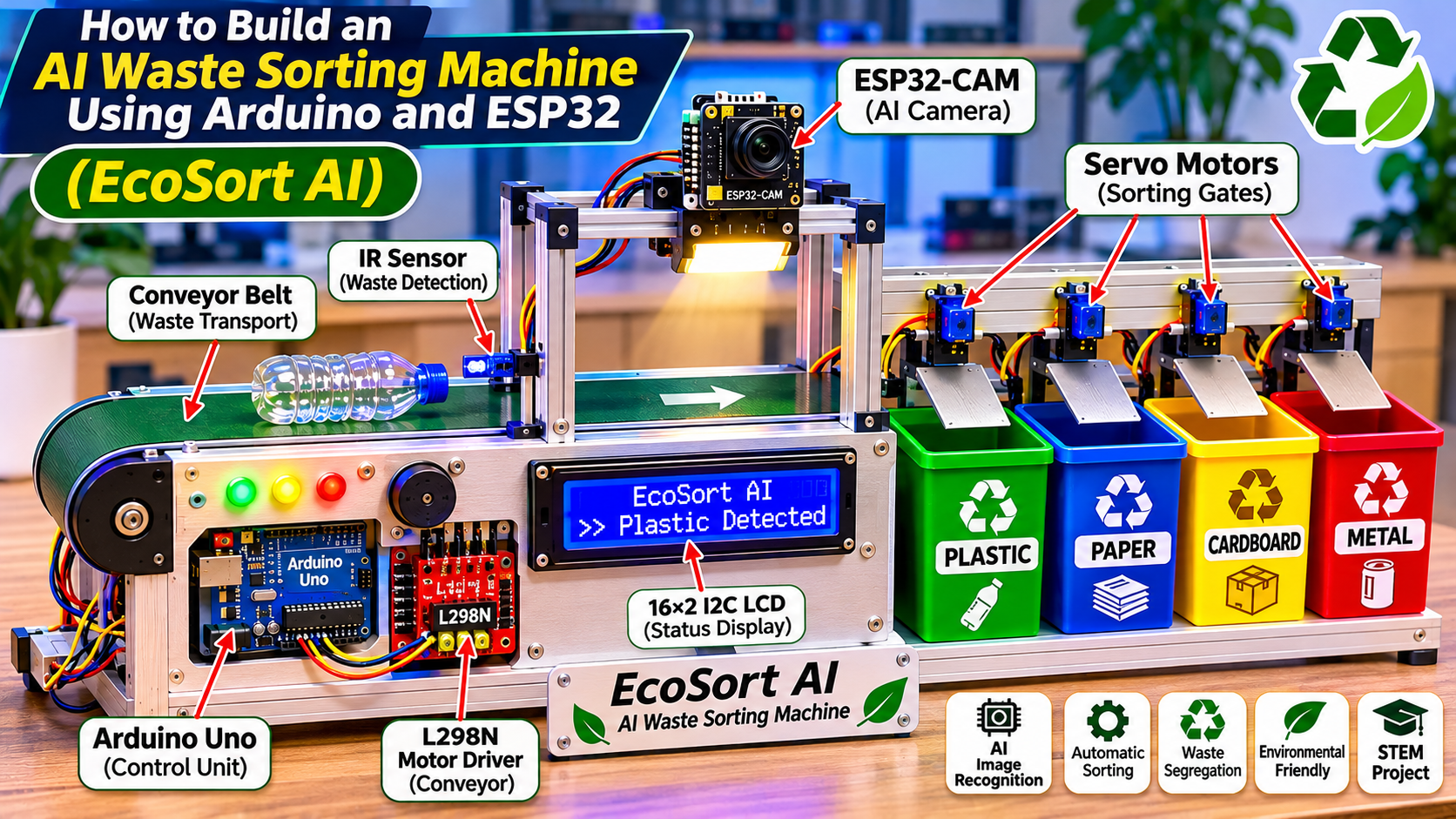
Waste management is one of the major environmental challenges facing communities around the world. Plastic bottles, paper, cardboard and metal containers are frequently disposed of together, making recycling more difficult and increasing the amount of waste requiring additional processing.
Traditional waste segregation often depends on manual sorting. This process can be time-consuming, labor-intensive and inefficient, particularly where large quantities of waste are generated.
Artificial intelligence (AI), robotics and automation offer opportunities to improve waste segregation. An AI-powered waste sorting machine can use computer vision to identify selected waste materials and automatically direct them into separate collection bins.
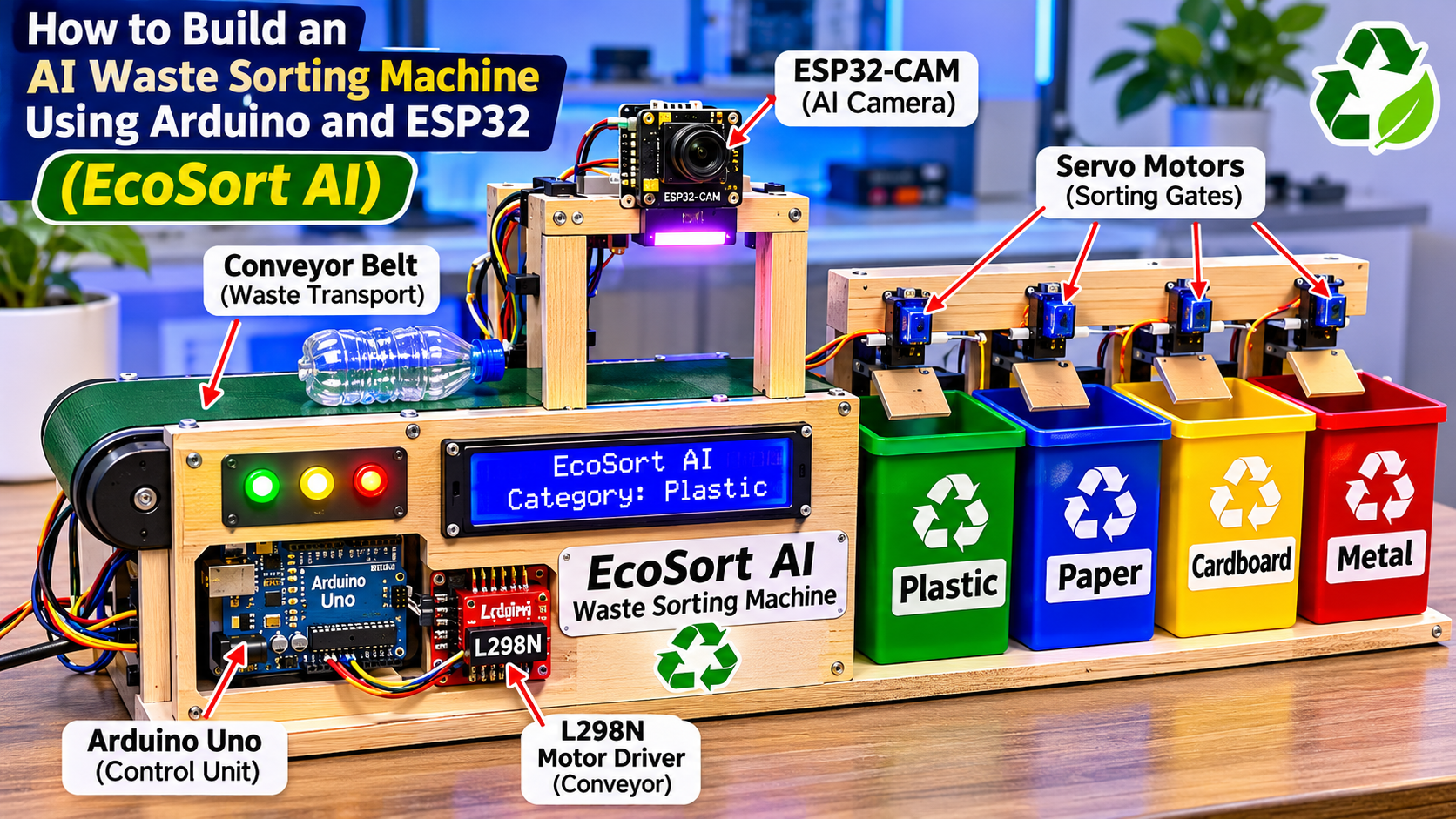
In this tutorial, we develop EcoSort AI, an intelligent waste sorting prototype that combines Arduino Uno, ESP32-CAM, artificial intelligence, infrared sensors, servo motors and a conveyor mechanism.
The prototype is designed to recognize four categories:
- Plastic
- Paper
- Cardboard
- Metal
The project is suitable for STEM exhibitions, school innovation competitions, environmental technology demonstrations and electronics enthusiasts.
1. What Is EcoSort AI?
EcoSort AI is an automated waste segregation system that uses a camera and an artificial intelligence image classification model to recognize different waste materials.
The ESP32-CAM captures an image of an object placed on the inspection platform. An AI model analyzes the image and predicts its category. The classification result is transmitted to an Arduino Uno, which activates the appropriate servo motor to operate a sorting gate.
The machine then directs the object into its corresponding collection compartment.
The system has five main units:
- Image acquisition unit.
- Artificial intelligence processing unit.
- Arduino control unit.
- Mechanical sorting unit.
- Display and feedback unit.
For the first prototype, a laptop or compatible edge computer runs the AI model. This is more practical than expecting an Arduino Uno to perform advanced image recognition because the Uno has limited memory and processing capability.
2. How Does the AI Waste Sorting Machine Work?

Figure 1: Working principle of the AI waste sorting machine.
The machine operates through five main stages.
Stage 1: Waste detection
An infrared obstacle sensor detects an object entering the inspection area. The conveyor can pause briefly to position the object beneath the camera.
Stage 2: Image capture
The ESP32-CAM captures an image of the waste material. Consistent lighting and a fixed camera position help improve image quality.
Stage 3: AI classification
The image is analyzed by a trained machine learning model. The model predicts whether the object belongs to the plastic, paper, cardboard or metal category.
Stage 4: Data communication
The AI processing computer sends the predicted category to the Arduino Uno through USB serial communication.
Stage 5: Automatic sorting
The Arduino activates the corresponding servo motor. The servo moves a gate or diverter, allowing the object to enter the correct collection bin.
For example, when the AI model identifies a plastic bottle, it sends the label PLASTIC to the Arduino. The Arduino activates the plastic sorting gate and then returns the gate to its resting position.
3. Components and Materials Required

Figure 2: Main electronic and mechanical components required to construct EcoSort AI.
Bill of Materials (BOM)
| Component | Quantity | Purpose |
|---|---|---|
| Arduino Uno R3 | 1 | Controls the sorting mechanism |
| ESP32-CAM | 1 | Captures images of waste |
| ESP32 DevKit | Optional | Additional processing or wireless functions |
| IR obstacle sensor | 1–2 | Detects objects entering the inspection area |
| Servo motors | 4 | Operate the sorting gates |
| L298N motor driver | 1 | Controls the conveyor motor |
| 12V geared DC motor | 1 | Drives the conveyor belt |
| 16×2 I2C LCD | 1 | Displays sorting information |
| LED indicators | 4 | Indicate sorting categories |
| Buzzer | 1 | Provides an audible alert |
| Conveyor materials | 1 set | Transports waste objects |
| Collection bins | 4 | Store separated materials |
| Jumper wires | Several | Connect electronic components |
| Power supplies | As required | Power the motors and controllers |
Additional tools
- Soldering iron and solder wire
- Wire stripper
- Screwdrivers
- Hot glue gun
- Measuring ruler
- Drill
- Laptop or desktop computer
- Arduino IDE
- AI model development software
Estimated project cost in Kenya
The following is an illustrative budget for planning purposes. Actual prices will depend on the supplier, component quality and availability.
| Component | Estimated cost (KES) |
|---|---|
| Arduino Uno | 900 |
| ESP32 DevKit | 900 |
| ESP32-CAM | 1,200 |
| Sensors | 1,400 |
| Servo motors | 1,200 |
| Motor driver | 450 |
| LCD, LEDs and buzzer | 800 |
| Conveyor and frame | 3,500 |
| Wires and connectors | 1,100 |
| Total | 11,450 |
The estimated component budget is KSh 11,450. The estimate may exclude tools, delivery, fabrication services, additional power supplies and replacement parts.
4. System Architecture

Figure 3: System block diagram showing communication between the camera, AI computer, Arduino controller, sensors and sorting mechanism.
The system is divided into five main units.
4.1 Image acquisition unit
The ESP32-CAM captures images of objects placed on the inspection platform. The camera should be mounted securely above the inspection area and have a clear view of the entire object.
4.2 Artificial intelligence unit
The AI model analyzes the captured image and predicts the waste category.
For the initial prototype, a laptop or compatible edge computer can run the classification model using a suitable machine learning framework.
4.3 Control unit
The Arduino Uno receives the classification label from the AI computer and determines which servo motor should be activated.
4.4 Mechanical sorting unit
The servo motors operate mechanical gates that guide objects into the appropriate collection compartments.
4.5 Display unit
A 16×2 LCD can display messages such as:
- SYSTEM READY
- SCANNING OBJECT
- PLASTIC DETECTED
- PAPER DETECTED
- METAL DETECTED
- UNKNOWN OBJECT
5. Circuit Connections and Pin Configuration

Figure 4: Reference circuit arrangement for the Arduino-controlled sorting mechanism. Verify all connections against your actual modules before powering the circuit.
The following pin arrangement can be used for the Arduino Uno.
| Component | Arduino pin |
|---|---|
| IR sensor OUT | D2 |
| Plastic servo signal | D3 |
| Paper servo signal | D4 |
| Cardboard servo signal | D5 |
| Metal servo signal | D9 |
| L298N IN1 | D7 |
| L298N IN2 | D8 |
| L298N ENA | D6 |
| LCD SDA | A4 |
| LCD SCL | A5 |
| AI computer | USB serial |
The ESP32-CAM communicates with the AI processing computer using the selected camera connection. The computer sends the classification label to the Arduino through USB serial communication.
Power supply precautions
Power management is important because servo motors and DC motors can draw significantly more current than the microcontroller can provide.
- Do not power four servo motors directly from the Arduino Uno 5V pin.
- Use an external regulated 5–6V supply with sufficient current capacity for the servos.
- Connect the external servo supply ground to Arduino ground.
- Use a suitable separate supply for the conveyor motor.
- Check the L298N driver’s current and thermal limits.
- ESP32 devices use 3.3V logic. Use appropriate level shifting when connecting a 5V Arduino output to an ESP32 input.
- Switch off power before changing circuit connections.
- Keep wires away from moving belts and sorting gates.
6. Mechanical Construction of the Machine

Figure 5: Suggested mechanical arrangement showing the conveyor, camera, sorting gates and collection bins.
Step 1: Construct the frame
Use plywood, acrylic sheets or aluminum profiles to construct a stable frame.
The frame should accommodate the conveyor belt, camera mounting structure, sorting platform, servo-operated gates and collection compartments.
Step 2: Install the conveyor belt
Attach the conveyor belt to two rollers and connect one roller to the geared DC motor.
Ensure that the belt moves smoothly without slipping. Test the conveyor at low speed before installing the sorting gates.
Step 3: Mount the ESP32-CAM
Position the camera above the inspection point.
The camera should capture clear images of objects passing through the inspection area. Secure it to prevent movement and maintain a consistent viewing angle.
Step 4: Install the servo gates
Attach the servo motors to the mechanical sorting gates.
Each servo should control a gate that directs waste toward a specific collection bin.
The gates should move freely without colliding with the frame or blocking the conveyor.
Step 5: Install the collection bins
Arrange four removable containers and label them:
- PLASTIC
- PAPER
- CARDBOARD
- METAL
7. Developing the Artificial Intelligence Model
The AI model is responsible for identifying different waste materials.
A beginner-friendly approach is to use supervised image classification. The model learns from labeled images and uses the patterns it has learned to predict the category of new images.
Step 1: Collect image datasets
| Category | Example training images |
|---|---|
| Plastic | Water bottles, containers and plastic packaging |
| Paper | Newspapers, office paper and magazines |
| Cardboard | Boxes and carton packaging |
| Metal | Aluminum cans and metal containers |
Collect images with different colors, shapes, backgrounds, orientations and lighting conditions.
Step 2: Label the images
Organize the images into four classes:
- Plastic
- Paper
- Cardboard
- Metal
Each image should be assigned the correct category before training.
Step 3: Train the model
Suitable tools include:
- TensorFlow
- TensorFlow Lite
- Edge Impulse
- Teachable Machine
Divide the dataset into training, validation and test groups.
Step 4: Test the model
Test the model using images that were not included in the training dataset.
Observe which materials are frequently confused. For example, a shiny plastic wrapper may be mistaken for metal, while a printed carton may be confused with paper.
Step 5: Connect the model to Arduino
The computer running the AI model sends the predicted category to the Arduino through USB serial communication.
Example classification messages:
PLASTIC
PAPER
CARDBOARD
METAL
Important: The Arduino code in this guide controls the motors. It does not perform image recognition. The AI classification model must be developed and run separately.
8. Arduino Programming Code
The following example controls four servo motors using category labels received through USB serial communication.
Install the Servo library in the Arduino IDE before uploading the code.
#include <Servo.h>

Servo plasticServo;
Servo paperServo;
Servo cardboardServo;
Servo metalServo;

const int plasticPin = 3;
const int paperPin = 4;
const int cardboardPin = 5;
const int metalPin = 9;

String receivedData = "";

void resetGates() {
  plasticServo.write(90);
  paperServo.write(90);
  cardboardServo.write(90);
  metalServo.write(90);
}

void setup() {
  Serial.begin(9600);

  plasticServo.attach(plasticPin);
  paperServo.attach(paperPin);
  cardboardServo.attach(cardboardPin);
  metalServo.attach(metalPin);

  resetGates();

  Serial.println("EcoSort AI Ready");
}

void sortWaste(String category) {

  category.trim();
  category.toUpperCase();

  resetGates();
  delay(300);

  if (category == "PLASTIC") {
    plasticServo.write(30);
  }

  else if (category == "PAPER") {
    paperServo.write(30);
  }

  else if (category == "CARDBOARD") {
    cardboardServo.write(30);
  }

  else if (category == "METAL") {
    metalServo.write(30);
  }

  else {
    Serial.println("Unknown category");
    return;
  }

  Serial.print("Sorting: ");
  Serial.println(category);

  delay(1000);

  resetGates();
}

void loop() {

  if (Serial.available()) {

    receivedData = Serial.readStringUntil('\n');

    sortWaste(receivedData);
  }
}
How the code works
- The Arduino initializes the four servo motors.
- It waits for a classification label from the AI computer.
- When it receives
PLASTIC, it activates the plastic servo. - When it receives
PAPER, it activates the paper servo. - When it receives
CARDBOARD, it activates the cardboard servo. - When it receives
METAL, it activates the metal servo. - The servo returns to its resting position after sorting.
The servo angles are starting examples. Adjust them according to the actual mechanical arrangement of the gates.
9. Operating Flowchart

Figure 6: EcoSort AI operating flowchart.
The operating sequence is as follows:
- Start the system.
- Initialize the camera, sensors, Arduino and display.
- Detect an object entering the inspection area.
- Capture an image using the ESP32-CAM.
- Send the image to the AI classification model.
- Identify the waste category.
- Send the category label to Arduino.
- Activate the corresponding sorting gate.
- Direct the object into the correct collection bin.
- Reset the gate and wait for the next object.
Where the AI model is uncertain, the system should return an UNKNOWN result or direct the object to a manual inspection area rather than forcing an unreliable classification.
10. Testing and Evaluation

Figure 7: Suggested testing arrangement for evaluating waste identification and automatic sorting performance.
After completing the construction, test the machine using different waste samples.
Suggested testing procedure
- Place a plastic bottle on the conveyor.
- Allow the camera to capture its image.
- Record the AI classification result.
- Observe whether the correct servo gate activates.
- Repeat the process using paper, cardboard and metal samples.
- Record correct and incorrect classifications.
- Measure the time taken to complete each sorting operation.
- Repeat the tests using different object orientations and lighting conditions.
Classification accuracy
\text{Accuracy} =
\frac{\text{Correct Predictions}}{\text{Total Predictions}}\times100
Sorting success rate
\text{Sorting Success Rate} =
\frac{\text{Correctly Sorted Objects}}{\text{Total Objects Tested}}\times100
Suggested testing table
| Test | Waste category | AI prediction | Correct bin? | Response time |
|---|---|---|---|---|
| 1 | Plastic | Record result | Yes/No | Record time |
| 2 | Paper | Record result | Yes/No | Record time |
| 3 | Cardboard | Record result | Yes/No | Record time |
| 4 | Metal | Record result | Yes/No | Record time |
Use actual experimental measurements in the final project report. Do not present assumed accuracy percentages as results from a completed experiment.
11. How to Fix Common Arduino and ESP32 Upload Errors
ESP32-CAM upload failure
Possible causes include incorrect board selection, incorrect COM port, insufficient power and incorrect programming connections.
Solutions:
- Select the correct ESP32 board.
- Check the serial port.
- Verify the programming adapter connections.
- Use a stable power supply.
- Follow the programming procedure for the specific ESP32-CAM board.
Servo motors fail to move
Possible causes include insufficient current, incorrect wiring and poor ground connections.
Solutions:
- Use an external regulated servo power supply.
- Connect the external supply ground to Arduino ground.
- Check the servo signal wires.
- Ensure that the mechanical gates are not blocked.
LCD does not display information
Possible causes include an incorrect I2C address, loose wiring or incorrect power connections.
Solutions:
- Run an I2C scanner.
- Check the LCD address.
- Confirm that SDA connects to A4 and SCL connects to A5 on the Arduino Uno.
Incorrect waste classification
Possible causes include poor training images, inadequate lighting and incorrect dataset labels.
Solutions:
- Collect more representative images.
- Improve camera lighting.
- Retrain the model.
- Test the model using separate images.
- Introduce an unknown category for uncertain predictions.
Conveyor motor does not run
Possible causes include incorrect motor wiring, insufficient power and an unsuitable motor driver.
Solutions:
- Check the motor supply.
- Verify L298N connections.
- Check the enable pin.
- Confirm that the driver’s current rating is appropriate.
- Inspect the motor for mechanical obstruction.
12. Applications of EcoSort AI
EcoSort AI can be developed for several practical applications.
Schools and learning institutions: The project demonstrates artificial intelligence, electronics, environmental conservation and engineering.
Recycling centers: A larger version could assist with preliminary separation of selected recyclable materials.
Shopping centers: Smart collection systems could encourage the separation of recyclable materials.
Research institutions: The prototype provides a platform for studying computer vision, robotics and automation.
Environmental programs: The project demonstrates how technology can support responsible waste management.
13. Future Improvements
EcoSort AI can be upgraded with additional technologies to improve its performance and usefulness.
- Wi-Fi monitoring using ESP32.
- Cloud-based waste collection reports.
- A mobile application for monitoring sorting statistics.
- Weight sensors for measuring collected waste.
- Additional AI categories such as glass and organic waste.
- Solar power for suitable low-power subsystems.
- Edge AI processing to reduce dependence on a laptop.
- A reject compartment for objects that cannot be classified confidently.
A future version could also use a dashboard to display the number and estimated weight of materials collected in each category.
14. Environmental and Educational Benefits
The project demonstrates how artificial intelligence can be applied to environmental challenges.
It encourages proper waste segregation, recycling awareness and practical innovation.
For schools implementing Competency-Based Education (CBE), EcoSort AI integrates several learning areas.
| STEM area | Application |
|---|---|
| Science | Material properties and environmental conservation |
| Technology | AI image recognition and embedded systems |
| Engineering | Mechanical design, conveyor construction and automation |
| Mathematics | Measurements, angles, timing and performance calculations |
Learners can investigate a waste management problem in their community, collect image datasets, design the machine, construct the prototype and evaluate its performance.
This makes EcoSort AI a practical multidisciplinary learning project.
15. Safety Considerations and Project Limitations
Although this is an educational low-voltage prototype, it contains moving parts and electrical loads.
- Keep fingers, hair and loose clothing away from the conveyor and gates.
- Provide an accessible power switch.
- Secure wires away from moving components.
- Use clean, dry and non-hazardous sample materials.
- Do not sort broken glass, sharp metal, batteries, chemicals, medical waste or hot materials.
- Switch off power before carrying out repairs.
The four visual categories are broad approximations. A camera cannot reliably determine every material’s composition from appearance alone. For example, multilayer packaging and plastic-coated paper may be difficult to classify correctly.
Industrial sorting facilities may use additional technologies such as near-infrared sensors, magnetic separation, eddy-current separation and human inspection.
16. Frequently Asked Questions
Can I build an AI waste sorting machine using Arduino?
Yes. Arduino can control the sorting mechanism, while an ESP32-CAM captures images and a compatible computer or edge device runs the AI model.
Can Arduino Uno recognize waste materials by itself?
The Arduino Uno has limited processing capability. It is better suited to controlling sensors and motors than running camera-based AI classification.
What is the role of ESP32-CAM?
The ESP32-CAM captures images of waste objects and makes them available to the AI processing system.
How many waste categories can EcoSort AI identify?
The initial design identifies plastic, paper, cardboard and metal. Additional categories can be added by expanding the dataset, retraining the model and modifying the sorting mechanism.
How much does the project cost in Kenya?
The illustrative component budget is approximately KSh 11,450. Actual costs depend on component quality, suppliers and additional construction requirements.
Can the project be presented at a science fair?
Yes. Include the working prototype, research methodology, circuit diagram, AI training process, testing data, limitations and recommendations.
Conclusion
EcoSort AI demonstrates how artificial intelligence, Arduino, ESP32-CAM, sensors and mechanical automation can be combined to develop a smart waste segregation system.
The prototype provides a practical introduction to computer vision, machine learning, embedded systems and environmental engineering.
Although the first version uses a separate computer for AI classification, future versions can incorporate edge AI processing, IoT monitoring and more advanced sorting mechanisms.
By developing and evaluating this project, learners, teachers and innovators can explore how technology can contribute to more effective waste management and environmental sustainability
| SEO element | Recommended content |
|---|---|
| WordPress category | STEM Projects |
| Focus keyphrase | AI waste sorting machine using Arduino |
| Featured image filename | ai-waste-sorting-machine-arduino-esp32-ecosort-ai.png |
| Featured image ALT | AI waste sorting machine using Arduino and ESP32-CAM with conveyor and four recycling bins |
| Tags | Arduino Projects, ESP32 Projects, Artificial Intelligence, Robotics, Waste Management, Environmental Technology, STEM Education, Machine Learning, Recycling Technology, DIY E |