mbeva
CREATORSINSIGHT.COM | BUSINESS TECHNOLOGY | NOVEMBER 2026
Meta Description: Discover 15 free tools to start a business in 2026. Build a brand, create websites, market products, manage customers and automate business.
Starting a Business Is Easier With the Right Digital Tools
Starting a business in 2026 does not necessarily require thousands of dollars in startup capital. Technology has made it possible for entrepreneurs, freelancers, content creators, and small business owners to establish professional businesses using affordable or free digital platforms.
In the past, starting a business could require hiring a graphic designer, web developer, accountant, marketing specialist, and administrative assistant. Today, many of these responsibilities can be handled using online software and artificial intelligence tools.
Whether you want to launch a clothing brand, establish an online shop, start a digital marketing agency, sell e-books, create an educational platform, or build a technology startup, the right digital tools can help you reduce operational expenses.
For example, Canva can help you design promotional materials, ChatGPT can assist with business content, Instagram can help you reach customers, and Trello can organize your daily business activities.
The challenge is choosing tools that offer genuine value without forcing you to purchase expensive subscriptions before your business starts generating income.
This article explores 15 useful free business tools in 2026, their features, applications, limitations, and how entrepreneurs can combine them to establish a functional business.
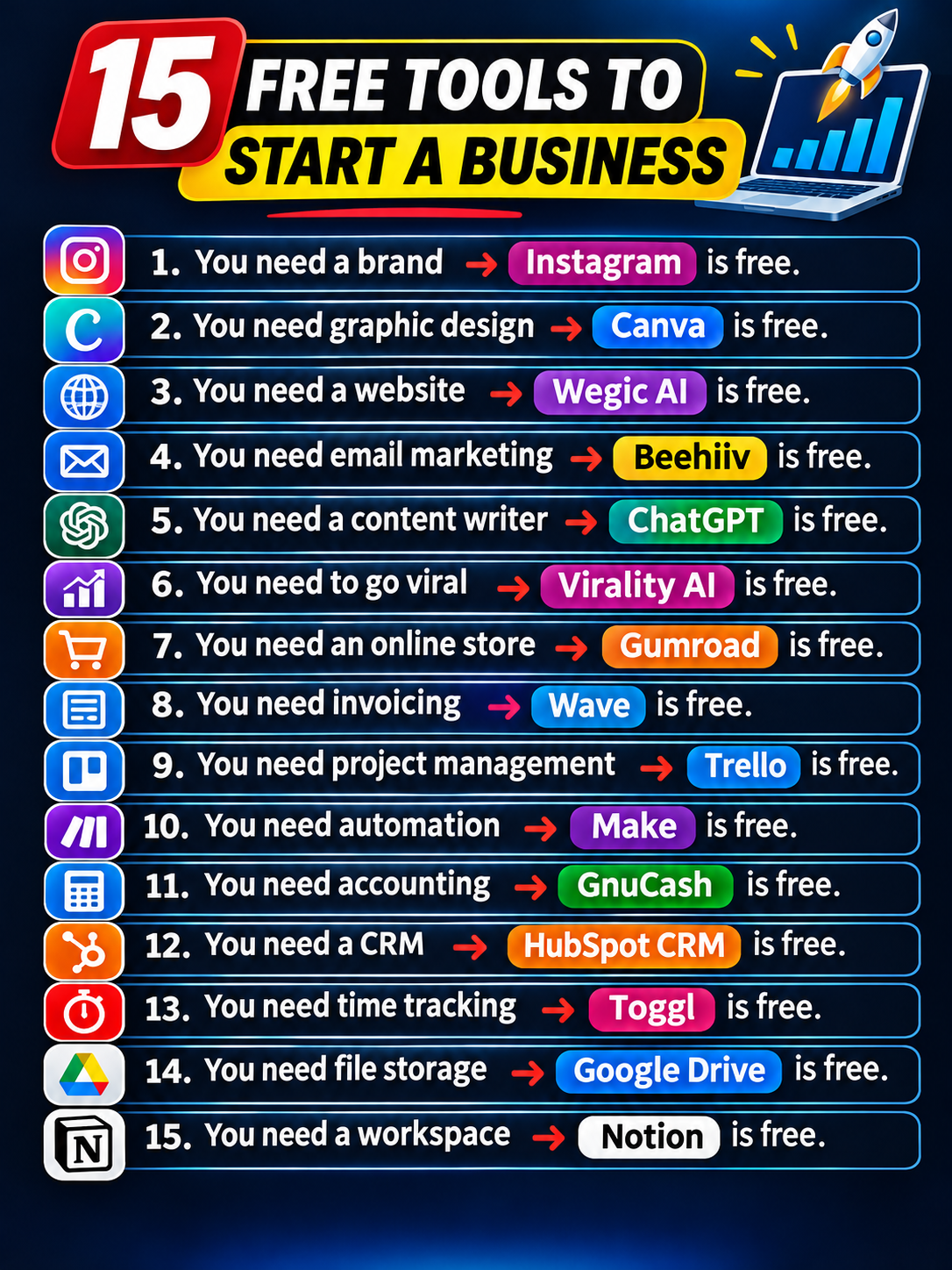
15 business tools explained
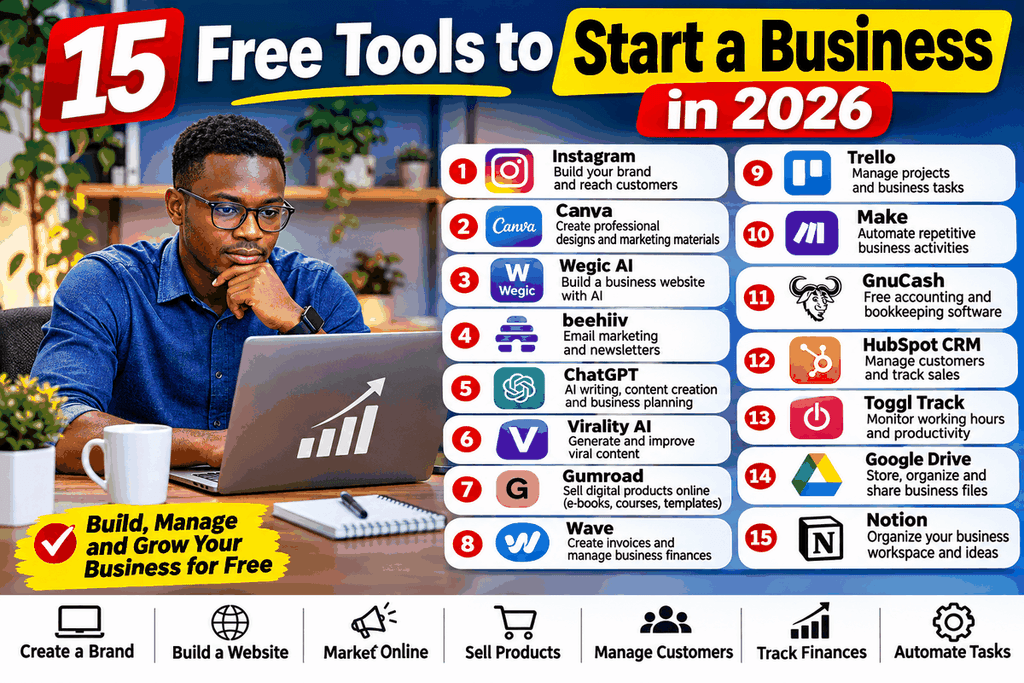
Featured image: 15 free digital tools for branding, website creation, marketing, sales, accounting, and business management.
1. Instagram – Build and Promote Your Business Brand
File:Instagram icon.png – Wikimedia Commons
Official website: Instagram
Category: Branding and social media marketing
Free account available
Every business needs a recognizable identity and a reliable way of reaching potential customers. Instagram provides an opportunity to establish a business presence without paying for a social media account.
Entrepreneurs can create professional business profiles, upload product photographs, publish promotional videos, communicate with customers, and develop an audience interested in their products or services.
For example, someone starting a clothing business can use Instagram to showcase new designs, announce product launches, publish customer reviews, and receive inquiries through direct messages.
Main features:
- Professional business profiles.
- Instagram Reels and Stories.
- Product and service promotion.
- Direct messaging.
- Audience engagement.
- Insights and performance analytics.
- Integration with other Meta business tools.
Practical business application
A small fashion business can publish three product demonstrations each week, share customer testimonials, and use Stories to announce discounts.
A food business can publish preparation videos, menus, prices, and customer feedback.
Best for: Clothing brands, restaurants, beauty businesses, photographers, online shops, and personal brands.
Cost consideration: Instagram accounts are free. Paid advertisements, some shopping features, and third-party services may involve additional costs.
2. Canva – Design Professional Marketing Materials Without Hiring a Designer
Official website: Canva
Category: Graphic design and branding
Free plan available
Canva is one of the most useful graphic design platforms for entrepreneurs who want to create professional marketing materials without advanced design knowledge.
The platform offers templates that can be customized using a drag-and-drop editor.
Instead of paying a designer to create every promotional poster, business owners can design their own graphics using available templates.
What can you create with Canva?
- Business logos.
- Product advertisements.
- Posters and flyers.
- Business cards.
- Social media graphics.
- Product catalogues.
- Presentations.
- Marketing brochures.
- Promotional videos.
Example: An entrepreneur launching a cosmetics business can create a logo, product catalogue, promotional posters, and Instagram advertisements using Canva.
Canva also includes AI-assisted design features, although access to premium assets and some advanced tools requires a subscription.
Best for: Startups, small businesses, online sellers, content creators, and digital marketers.
3. Wegic AI – Create a Business Website Using Artificial Intelligence
Wegic – Crunchbase Company Profile & Funding
Official website: Wegic AI
Category: AI website development
Limited free credits
A business website is an important part of establishing a professional online presence. It provides a central location where customers can learn about your business, explore products, view prices, and contact you.
However, traditional website development may require technical knowledge, web hosting, domain registration, and professional development services.
Wegic AI simplifies the process by allowing users to create websites through conversational instructions.
You can describe the website you want, and the AI platform helps generate its structure and design.
For example, you could request:
“Create a modern website for a clothing brand selling men’s and women’s fashion. Include a homepage, product gallery, contact page, and business information.”
The platform can assist with generating a website based on your description.
Key features:
- AI-assisted website creation.
- Conversational website editing.
- Website layout generation.
- Business website design.
- Website publishing options.
- Reduced need for manual coding.
Best for: Freelancers, startups, consultants, small businesses, and entrepreneurs without web development experience.
Important: Free credits are limited. A custom domain, additional AI usage, or advanced publishing features may require payment.
4. beehiiv – Build an Email Marketing Business
Beehiiv Review – Is it any good? (2026)
Official website: beehiiv
Category: Email marketing and newsletters
Free Launch plan
Email marketing allows businesses to communicate directly with customers without depending entirely on social media platforms.
beehiiv is a newsletter publishing and audience management platform designed for creators, publishers, and businesses.
You can use it to create newsletters, distribute business updates, grow an email audience, and publish content.
For example, an online technology business can send weekly newsletters featuring new products, technology tutorials, special offers, and industry updates.
Main features:
- Newsletter publishing.
- Email subscriber management.
- Audience growth tools.
- Email performance analytics.
- Website and publication features.
- Newsletter monetization options.
Business application: A blogger can build an email list by offering free educational content and later promote premium guides, courses, or digital products.
Best for: Bloggers, publishers, digital entrepreneurs, educators, and online businesses.
beehiiv offers a free Launch plan with limitations. Advanced automations and some monetization features are available through paid subscriptions.
5. ChatGPT – Your AI Business Assistant and Content Writer
File:ChatGPT-Logo.svg – Wikimedia Commons
Official website: ChatGPT
Category: Artificial intelligence and business productivity
Free plan available
Artificial intelligence is changing how entrepreneurs establish and manage businesses. ChatGPT can help business owners complete writing, research, planning, brainstorming, and customer communication tasks.
Instead of spending hours developing marketing content or preparing business documents from scratch, entrepreneurs can use AI to generate initial drafts and improve their productivity.
How entrepreneurs can use ChatGPT:
- Generate business names and slogans.
- Develop business plans.
- Write product descriptions.
- Prepare marketing strategies.
- Create social media captions.
- Draft professional customer emails.
- Develop website content.
- Generate blog article ideas.
- Prepare business proposals.
- Brainstorm new products and services.
Example: Suppose you want to establish a business selling customized T-shirts.
You can ask ChatGPT to:
- Suggest brand names.
- Develop a business launch strategy.
- Create product descriptions.
- Generate promotional messages.
- Prepare a monthly content calendar.
- Suggest ways to attract customers.
The free version provides access with usage limitations, while advanced capabilities and higher usage allowances may require a subscription.
Best for: Entrepreneurs, freelancers, bloggers, startups, educators, and small business owners.
6. Virality AI – Improve Your Social Media Content Strategy
ViralityAI | AI Tools Directory [Discover Top AI Tools in 2026]
Website: Virality AI
Category: AI content marketing
Verify free usage
Social media visibility can influence the growth of a new business. Entrepreneurs need content that attracts attention, communicates value, and encourages potential customers to engage.
AI content platforms can assist with generating ideas, developing promotional messages, and improving content strategies.
Virality AI is included as a tool to explore for AI-assisted social content creation.
Potential applications:
- Brainstorming social media ideas.
- Developing video hooks.
- Creating promotional content.
- Improving marketing messages.
- Planning content campaigns.
Example: A small electronics shop can develop short product demonstration videos, promotional captions, and educational posts to attract customers.
Best for: Influencers, social media marketers, creators, and businesses that depend on digital marketing.
Always verify the official platform’s current services, free allowance, and pricing before subscribing. Do not assume every advertised feature is permanently free.
7. Gumroad – Sell Digital Products Online
202Как оплатить Gumroad из России в 2025 году? – 17.12.24 18:33 | Пикабу
Official website: Gumroad
Category: Digital commerce and online selling
No monthly subscription required for standard selling
Gumroad is a platform that enables creators and entrepreneurs to sell digital products online.
You do not necessarily need to build a complete e-commerce website before selling your first digital product.
You can create product pages, upload downloadable files, set prices, and share your product links with potential customers.
Products you can sell:
- E-books.
- Online courses.
- Digital templates.
- Educational resources.
- Photography.
- Artwork.
- Software.
- Downloadable guides.
- Memberships.
Example: A teacher can create downloadable revision materials and sell them online. A graphic designer can sell editable design templates, while a blogger can sell an e-book containing specialist information.
Best for: Digital creators, educators, writers, designers, and online entrepreneurs.
Gumroad charges transaction fees on sales. Payment processing and payout availability vary by country, so international entrepreneurs should confirm eligibility before relying on the platform.
8. Wave – Manage Invoices and Business Transactions
Wave Invoicing Price, Features and Reviews in 2026 | Techjockey US
Official website: Wave
Category: Accounting and invoicing
Regional restrictions
Every business needs to maintain proper financial records. Invoices help businesses document transactions, request payments, and maintain professional relationships with customers.
Wave offers accounting and invoicing solutions for small businesses.
Main features:
- Invoice creation.
- Customer billing.
- Income and expense tracking.
- Financial reports.
- Accounting tools.
- Payment management.
Example: A freelance consultant can create an invoice for a client, record the transaction, and monitor outstanding payments.
Best for: Freelancers, consultants, and eligible small businesses.
Important for Kenyan entrepreneurs: Wave’s accounting and invoicing availability is restricted by country. Its free accounting services are primarily directed at businesses in the United States and Canada. Consider locally supported accounting solutions if you operate in Kenya.
9. Trello – Organize Business Projects and Daily Tasks
Trello Logo PNG Vector (SVG) Free Download
Official website: Trello
Category: Project management
Free plan available
Managing a business requires coordinating several activities simultaneously. You may need to monitor customer orders, marketing campaigns, product development, supplier communication, and deliveries.
Trello helps organize these activities through visual project boards.
It uses boards, lists, and cards to represent projects and individual tasks.
For example, an online clothing business can create a board with the following lists:
- New orders.
- Orders being processed.
- Products ready for delivery.
- Completed deliveries.
- Customer follow-ups.
Each card can contain descriptions, deadlines, attachments, and assigned team members.
Main features:
- Visual project boards.
- Task management.
- Deadlines and reminders.
- Team collaboration.
- File attachments.
- Project organization.
Best for: Freelancers, small businesses, startups, marketing teams, and online shops.
Trello offers a free plan, although advanced project management features and larger team requirements may require paid subscriptions.
10. Make – Automate Repetitive Business Tasks
Make – Automation Workflows Visual Platform – ToolPilot
Official website: Make
Category: Workflow automation
Free plan available
Automation is becoming an important part of modern business management. Instead of manually performing repetitive tasks, business owners can connect different applications and allow them to exchange information automatically.
Make is a visual automation platform that helps users build workflows between compatible applications.
For example, when a customer submits an online inquiry form, an automation can transfer the information into a spreadsheet and send a notification to the business owner.
Practical automation examples:
- Transfer customer information between applications.
- Send automatic notifications.
- Organize online form submissions.
- Connect business applications.
- Automate selected email workflows.
- Create automated task updates.
Example: A digital marketing agency can automate its customer inquiry process by connecting an online form, spreadsheet, and notification service.
Best for: Digital marketers, online businesses, freelancers, and startups.
Make has a free plan with monthly operation limits. Businesses with more complex workflows may need paid subscriptions.
11. GnuCash – Free Accounting and Bookkeeping Software
ملف:GnuCash logo.svg – المعرفة
Official website: GnuCash
Category: Accounting and bookkeeping
Free and open source
Financial management is one of the most important responsibilities when starting a business. Entrepreneurs need to understand their revenue, expenses, assets, liabilities, and profitability.
GnuCash is a free, open-source accounting application designed to help individuals and businesses maintain financial records.
Unlike many subscription-based accounting platforms, GnuCash can be downloaded and used without paying a monthly software fee.
Key features:
- Double-entry bookkeeping.
- Income and expense recording.
- Bank account management.
- Financial statements.
- Profit and loss reports.
- Customer and vendor tracking.
- Multiple-currency support.
Example: A small retail business can use GnuCash to record daily sales, supplier payments, operating expenses, and other financial transactions.
Best for: Freelancers, small businesses, independent entrepreneurs, and users who prefer desktop accounting software.
GnuCash is especially useful for business owners who want greater control over their financial records without committing to expensive accounting subscriptions.
12. HubSpot CRM – Manage Customers and Sales Opportunities
21 Best CRM Enterprise Software Reviewed For 2026
Official website: HubSpot CRM
Category: Customer relationship management
Free CRM available
Customer management becomes increasingly important as a business grows.
Imagine receiving inquiries from 50 potential customers every week. Without an organized system, you may forget to respond to some inquiries, lose track of conversations, or miss important sales opportunities.
HubSpot CRM helps businesses organize customer information and manage relationships.
CRM stands for Customer Relationship Management.
The platform provides a centralized location for recording contacts, managing deals, and tracking interactions with potential and existing customers.
Key features:
- Customer contact management.
- Sales pipeline organization.
- Deal tracking.
- Customer interaction records.
- Sales activity management.
- Basic reporting.
- Team collaboration features.
Example: A consultancy business can record potential clients, monitor their inquiries, schedule follow-ups, and track opportunities from initial contact to completed sales.
Best for: Marketing agencies, consultants, sales teams, startups, and service providers.
HubSpot offers free CRM tools, but advanced automation, reporting, and other premium features require paid subscriptions.
13. Toggl Track – Monitor Working Hours and Productivity
Toggl Track 2026 Pricing, Features, Reviews & Alternatives | GetApp
Official website: Toggl Track
Category: Time tracking
Free plan available
Time management directly affects business productivity and profitability.
Freelancers, consultants, and agencies often charge customers based on the number of hours required to complete a project.
Toggl Track helps users monitor the time spent on different activities and projects.
Main features:
- Digital time tracking.
- Project-based time records.
- Working-hour reports.
- Billable hours monitoring.
- Productivity analysis.
- Desktop and mobile applications.
Example: A freelance website developer can track the time spent designing a website, communicating with a client, and correcting technical problems.
This information helps the developer estimate future project costs and understand which activities consume the most time.
Best for: Freelancers, consultants, remote workers, agencies, and service businesses.
Toggl Track has a free plan, with advanced reporting and other features available through paid subscriptions.
14. Google Drive – Store and Share Business Documents
The Latest Google Drive API is All About Collaboration
Official website: Google Drive
Category: Cloud storage and collaboration
15 GB free shared storage
A business generates many digital documents, including invoices, contracts, product photographs, customer records, presentations, and marketing materials.
Google Drive provides cloud storage that allows users to save and access their files through different devices.
You can also collaborate with employees and business partners using Google Docs, Sheets, and Slides.
Key features:
- Cloud-based file storage.
- Document sharing.
- Online spreadsheets.
- Presentation creation.
- Real-time collaboration.
- File synchronization.
- Access from multiple devices.
Example: A small business can create a Google Drive folder containing its business plan, financial records, marketing designs, product photographs, and supplier documents.
The free Google account includes 15 GB of storage shared across Google Drive, Gmail, and Google Photos.
Best for: Startups, freelancers, online businesses, educators, and small teams.
15. Notion – Create an All-in-One Business Workspace
Notion Overview 2025: Used By 10 Brands
Official website: Notion
Category: Business productivity and workspace management
Free plan available
Notion is a flexible digital workspace that helps entrepreneurs organize information, projects, business documents, and daily operations.
Instead of keeping important business information in several disconnected applications, you can use Notion to create a centralized workspace.
For example, a startup can develop a business dashboard containing its objectives, marketing calendar, product development plans, financial targets, and meeting notes.
Main features:
- Business planning templates.
- Project management.
- Notes and documentation.
- Content calendars.
- Business dashboards.
- Databases.
- Knowledge management.
- Team collaboration.
Example: A digital marketing entrepreneur can create a Notion workspace to organize client information, content schedules, marketing strategies, and weekly business targets.
Best for: Entrepreneurs, startups, freelancers, bloggers, content creators, and small teams.
Notion offers a free individual plan, with certain collaboration, storage, and advanced features limited or available through paid subscriptions.
Comparison Table: 15 Free Business Tools and Their Uses
Choosing the right software becomes easier when you compare the main purpose of each platform.
| No. | Business tool | Main application | Free access |
|---|---|---|---|
| 1 | Branding and marketing | Yes | |
| 2 | Canva | Graphic design | Free plan |
| 3 | Wegic AI | Website creation | Limited credits |
| 4 | beehiiv | Email marketing | Free plan |
| 5 | ChatGPT | AI content and planning | Free plan |
| 6 | Virality AI | Content marketing | Verify current offer |
| 7 | Gumroad | Digital product sales | No monthly fee; transaction fees |
| 8 | Wave | Invoicing and accounting | Regional restrictions |
| 9 | Trello | Project management | Free plan |
| 10 | Make | Business automation | Free plan |
| 11 | GnuCash | Accounting | Free and open source |
| 12 | HubSpot CRM | Customer management | Free CRM |
| 13 | Toggl Track | Time tracking | Free plan |
| 14 | Google Drive | Cloud storage | 15 GB shared storage |
| 15 | Notion | Business organization | Free plan |
Free plans, usage limits, and regional availability may change. Confirm the latest terms on each provider’s official website.
How to Combine These 15 Tools to Start a Profitable Business
Having 15 free tools does not mean you must use all of them immediately. The best approach is to combine a few applications to create a simple business operating system.
Here is a practical five-stage approach.
Transformasi Digital UMKM: Manfaatkan Teknologi untuk Pertumbuhan Bisnis | NNC Netralnews
Step 1: Create Your Business Brand
Start with Instagram and Canva.
- Use Canva to create your logo and brand identity.
- Design business cards and promotional materials.
- Create an Instagram business profile.
- Publish product photographs and videos.
- Develop a consistent visual identity.
Step 2: Build Your Online Presence
Use Wegic AI to explore website creation.
Your website should include:
- Homepage.
- About Us page.
- Products or Services page.
- Contact page.
- Customer inquiry section.
Use Google Drive to organize your website content, photographs, documents, and business records.
Step 3: Attract Potential Customers
Combine ChatGPT, Instagram, beehiiv, and Virality AI.
Use these platforms to:
- Develop marketing campaigns.
- Create social media content.
- Write product descriptions.
- Publish newsletters.
- Generate promotional ideas.
- Build an audience.
The objective is to attract potential customers and develop long-term relationships with them.
Step 4: Sell Products and Services
Use Gumroad for eligible digital products such as e-books, templates, courses, and downloadable resources.
For physical products, establish an online store or use a suitable e-commerce platform that supports your preferred payment methods.
Step 5: Manage and Grow Your Business
Combine Trello, Notion, Make, HubSpot CRM, GnuCash, and Toggl Track.
These tools can help you manage:
- Daily business activities.
- Customer relationships.
- Project deadlines.
- Financial transactions.
- Employee responsibilities.
- Business productivity.
- Repetitive administrative tasks.
Best Free Business Tool Combinations for Different Industries
Different businesses require different software. The following combinations provide a practical starting point.
| Business type | Recommended tools |
|---|---|
| Clothing and fashion brand | Instagram, Canva, ChatGPT, Trello |
| Digital marketing agency | Canva, ChatGPT, HubSpot, Make |
| Blogging and publishing | ChatGPT, beehiiv, Canva, Google Drive |
| Online digital products | Gumroad, Canva, Instagram |
| Freelancing and consultancy | ChatGPT, Trello, Toggl, Google Drive |
| Online education | Canva, ChatGPT, Google Drive, beehiiv |
| Technology startup | Wegic AI, Make, Trello, Notion |
| E-commerce business | Instagram, Canva, HubSpot, Trello |
Benefits of Using Free Business Tools
1. Reduced Startup Costs
Free software allows entrepreneurs to establish essential business operations without immediately purchasing expensive subscriptions.
2. Improved Productivity
AI writing assistants, project management applications, and automation tools reduce repetitive activities.
3. Better Customer Management
CRM platforms help businesses organize customer information, follow up on inquiries, and monitor sales opportunities.
4. Professional Business Presentation
Graphic design and website development platforms make it easier to establish a professional online presence.
5. Easier Business Expansion
Cloud-based applications allow businesses to collaborate with remote workers, customers, and business partners.
6. More Efficient Business Operations
Combining automation, accounting, time tracking, and project management can help entrepreneurs understand how their businesses operate.
Starting a Business With These Tools in Kenya
Entrepreneurs in Kenya can also benefit from these digital platforms when establishing businesses with limited startup capital.
For example, someone starting a clothing brand in Nairobi, Mombasa, Nakuru, Machakos, or Embu can use Instagram to showcase products, Canva to design advertisements, and ChatGPT to develop marketing strategies.
A digital entrepreneur can create educational resources, downloadable templates, and e-books for an international audience.
However, there are several important considerations.
Payment methods: Confirm that your selected platform supports your preferred payment options, including M-Pesa or suitable payment gateways.
International payouts: Check whether the platform supports withdrawals to Kenyan bank accounts.
Business registration: Understand the applicable business registration and tax requirements.
Website costs: Although AI website builders may provide free credits, a custom domain and professional hosting may require payment.
Financial management: Maintain accurate financial records in Kenya shillings and monitor business income and expenses.
Platform restrictions: Some international services, including Wave, have geographical limitations. Check eligibility before depending on them.
The best strategy is to begin with platforms that are accessible in your country and upgrade as your business develops.
Frequently Asked Questions (FAQs)
1. What are the best free tools to start a business in 2027?
Some useful options include Instagram for marketing, Canva for graphic design, ChatGPT for AI assistance, Trello for project management, Google Drive for storage, and HubSpot CRM for customer management.
2. Can I start a business with zero money?
You can start certain online businesses with very little capital by using free software and existing resources. However, internet access, registration, product development, payment processing, and other operational expenses may still require money.
3. Which free AI tools are useful for small businesses?
ChatGPT, Canva’s AI features, and AI website builders such as Wegic can help with content creation, graphic design, website development, and business planning.
4. What is the best free website builder for a startup?
Wegic AI is an option for beginners who want to create websites through conversational instructions. Other website builders may offer different free features and restrictions.
5. Which platform is best for selling digital products?
Gumroad is a popular option for selling e-books, templates, digital artwork, and other downloadable products. Check transaction fees and country-specific payout availability.
6. What is the best free accounting software?
GnuCash is a completely free, open-source accounting application. Wave is another option for eligible businesses in supported countries.
7. Do I need all 15 business tools?
No. Start with three to five tools that solve your immediate business needs. Introduce additional applications when your operations become more complex.
8. Can I use these tools to run a business from my phone?
Many of these platforms offer mobile applications or mobile-friendly websites. You can manage social media, communicate with customers, monitor projects, and access business documents from a smartphone.
Conclusion: Build Your Business With the Right Free Digital Tools
Starting a business in 2026 is more accessible than ever. Entrepreneurs no longer need to purchase expensive software or employ large teams to establish basic business operations.
With the 15 tools discussed in this guide, you can create a brand, design marketing materials, build a website, attract customers, sell digital products, manage finances, and organize daily business activities.
The secret is not using every available application. It is identifying the tools that solve your immediate business problems and using them consistently.
Start with Canva, Instagram, and ChatGPT. Establish your online presence, attract your first customers, and introduce additional tools as your business grows.
You do not need expensive software to start building a successful business. You need a valuable idea, a clear strategy, consistency, and the right digital tools.
Official Websites – Access the 15 Business Tools
| Tool | Official website |
|---|---|
| instagram.com | |
| Canva | canva.com |
| Wegic AI | wegic.ai |
| beehiiv | beehiiv.com |
| ChatGPT | chatgpt.com |
| Virality AI | virality.ai |
| Gumroad | gumroad.com |
| Wave | waveapps.com |
| Trello | trello.com |
| Make | make.com |
| GnuCash | gnucash.org |
| HubSpot CRM | hubspot.com |
| Toggl Track | toggl.com |
| Google Drive | drive.google.com |
| Notion | notion.com |